---
title: "Browser-based integration"
description: "Support 3D Secure 2 authentication on your website using your existing classic API integration."
url: "https://docs.adyen.com/online-payments/classic-integrations/classic-api-integration/3d-secure-authentication/native-3ds2/browser-based-integration"
source_url: "https://docs.adyen.com/online-payments/classic-integrations/classic-api-integration/3d-secure-authentication/native-3ds2/browser-based-integration.md"
canonical: "https://docs.adyen.com/online-payments/classic-integrations/classic-api-integration/3d-secure-authentication/native-3ds2/browser-based-integration"
last_modified: "2021-01-14T16:40:00+01:00"
language: "en"
---
# Browser-based integration
Support 3D Secure 2 authentication on your website using your existing classic API integration.
[View source](/online-payments/classic-integrations/classic-api-integration/3d-secure-authentication/native-3ds2/browser-based-integration.md)
**Adyen is no longer developing the Classic API integration**
This page is for the Classic API (`/authorise`) integration, which we no longer accept new integrations with.
We strongly recommend migrating to the newer [Native 3D Secure 2 on Checkout API](/online-payments/3d-secure/native-3ds2) integration. To use this newer integration, you must also [migrate to the Checkout API](/online-payments/upgrade-your-integration/migrate-to-checkout-api).
## How it works
In a full implementation, a payment eligible for 3D Secure 2 can go through either a frictionless or a challenge authentication flow before the payment is authorised. To support both flows, you need to build your own client-side and server-side implementation, with the option of using our [helper functions](/online-payments/classic-integrations/classic-api-integration/3d-secure-authentication/native-3ds2/browser-based-integration/3d-secure-2-helper-functions).
If you only want to perform a 3D Secure 2 authentication and then authorise the payment later, see the [Authentication-only](/online-payments/classic-integrations/classic-api-integration/3d-secure-authentication/native-3ds2/authentication-only-integration) integration page.
The use of helper functions replaces the Web 3D Secure 2 SDK implementation. If you are currently using Web 3D Secure 2 SDK and require assistance, contact [Support Team](https://ca-test.adyen.com/ca/ca/contactUs/support.shtml?form=other).
Here's a diagram for a 3D Secure 2 browser-based full implementation:
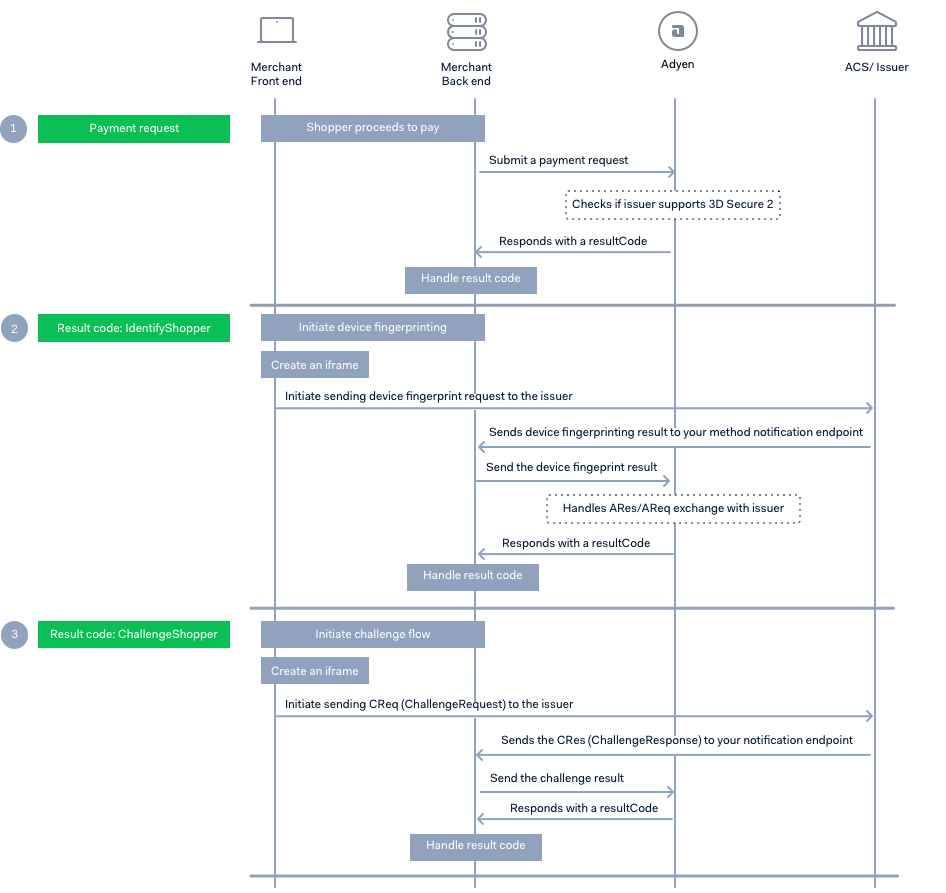
1. [Submit a payment request](#submit-a-payment-request) with the required 3D Secure 2 objects to start the authentication process. Build your implementation depending on the `resultCode` returned in the response.
2. [Get the 3D Secure device fingerprint](#get-the-3d-secure-2-device-fingerprint). If you receive an **IdentifyShopper** `resultCode`, you need to get the shopper's 3D Secure 2 device fingerprint. Create an iframe on the browser, send a device fingerprint request to the issuer, and then send the result to Adyen. If you get a response with an **Authorised** `resultCode`, this indicates that the 3D Secure 2 authentication was frictionless, and the payment authorisation was successfully completed.
3. [Present a challenge to the shopper](#present-a-challenge). If you receive **ChallengeShopper** `resultCode`, this means that the issuer requires further shopper interaction. Depending on the logic on issuer's side, this result code can be returned after you submit a payment request or after you submit the device fingerprint result to Adyen. To handle a challenge flow, create an iframe, send a challenge request to the issuer, and then submit the challenge result to Adyen.
To optimize authorization rates, Adyen's [Authentication Engine](https://www.adyen.com/knowledge-hub/psd2-simplified-with-our-new-authentication-engine) routes each payment to either the 3D Secure 2 or the 3D Secure 1 flow, based on issuer performance. If you do not want to automatically fall back to 3D Secure 1, contact [Support Team](https://ca-test.adyen.com/ca/ca/contactUs/support.shtml?form=other).
For a complete list of `resultCode` values and the actions that you need to take, see [Result codes](/online-payments/payment-result-codes).
## Before you begin
Before you begin to integrate, make sure you have followed the [Get started with Adyen guide](/get-started-with-adyen) to:
* Get an overview of the steps needed to accept live payments.
* Create your test account.
After you have created your test account:
1. [Get your API Key](/development-resources/api-credentials#generate-api-key). Save a copy as you'll need it for API calls you make to the Adyen payments platform.
2. Install one of our [Libraries](/development-resources/libraries) to connect with the Adyen APIs. For more information on these steps, refer to [Get started with Adyen](/get-started-with-adyen).
3. Set up the following webhooks. The issuer will send an HTTP POST containing the 3D Secure 2 device fingerprinting process and the challenge result to these URLs.
* `YOUR_3DS_METHOD_NOTIFICATION_URL`: Absolute URL to where the issuer can post the result of the 3D Secure device fingerprinting process.
* `YOUR_3DS_NOTIFICATION_URL`: Absolute URL to where the issuer can post a base64url encoded Challenge Response (`CRes`) message, containing the challenge result.
## Integration steps
1. Collect the shopper's card details and proceed to [submit a payment request](#submit-a-payment-request).
2. Use the `resultCode` from the response to determine your next action. For example, to complete a 3D Secure 2 authentication flow, you might need to get the [3D Secure 2 device fingerprint](#get-the-3d-secure-2-device-fingerprint), or [present a challenge](#present-a-challenge) to the shopper, or both.
To test your integration, see [Testing 3D Secure 2](#testing-3d-secure-2).
## Step 1: Submit a payment request
Submit a payment request with a POST [/authorise](https://docs.adyen.com/api-explorer/#/Payment/authorise) call. Include the `threeDS2RequestData` and `browserInfo` objects to indicate that you are ready to accept 3D Secure 2 authenticated payments.
* `threeDS2RequestData.deviceChannel`: **browser**.
* `browserInfo`: Collect information about your shopper's browser.
* `threeDS2RequestData.notificationURL`: `YOUR_3DS_NOTIFICATION_URL`
For the [data-only flow](/online-payments/classic-integrations/classic-api-integration/3d-secure-authentication/other-3ds-flows/data-only), use a dummy value for your `notificationURL`. For example, `https://www.example.com`.
You can send [additional parameters](/online-payments/classic-integrations/classic-api-integration/3d-secure-authentication/native-3ds2/api-reference-3d-secure-2#3d-secure-2-additional-parameters) for better authorization rates, and to increase the chance of a frictionless flow. You do not have to send all the additional parameters. Send parameters that you know you can provide accurately, or that are mandatory in specific scenarios.
Here is an example of how to make a request for a **EUR 150** purchase:
**Request**
#### curl
```bash
curl https://pal-test.adyen.com/pal/servlet/Payment/v68/authorise \
-H 'x-api-key: ADYEN_API_KEY' \
-H 'content-type: application/json' \
-d '{
"amount":{
"currency":"EUR",
"value":1500
},
"merchantAccount":"YOUR_MERCHANT_ACCOUNT",
"reference":"TEST",
"threeDS2RequestData":{
"deviceChannel":"browser",
"notificationURL":"https:\/\/www.example.com\/YOUR_3DS_NOTIFICATION_URL"
},
"browserInfo":{
"userAgent":"Mozilla\/5.0 (Windows NT 10.0; Win64; x64) AppleWebKit\/537.36 (KHTML, like Gecko) Chrome\/70.0.3538.110 Safari\/537.36",
"acceptHeader":"text\/html,application\/xhtml+xml,application\/xml;q=0.9,image\/webp,image\/apng,*\/*;q=0.8",
"language":"en-GB",
"colorDepth":24,
"screenHeight":723,
"screenWidth":1536,
"timeZoneOffset":0,
"javaEnabled":false
},
"shopperIP": "192.0.2.1",
"card":{
"cvc":"737",
"expiryMonth":"03",
"expiryYear":"2030",
"holderName":"Simon Hopper",
"number":"4917610000000000"
}
}'
```
#### Java
```java
// Adyen Java API Library v26.3.0
import com.adyen.Client;
import com.adyen.enums.Environment;
import com.adyen.model.payment.*;
import java.time.OffsetDateTime;
import java.util.*;
import com.adyen.service.*;
Client client = new Client("ADYEN_API_KEY", Environment.TEST);
// Create the request object(s)
Amount amount = new Amount()
.currency("EUR")
.value(1500L);
ThreeDS2RequestData threeDS2RequestData = new ThreeDS2RequestData()
.notificationURL("https://www.example.com/YOUR_3DS_NOTIFICATION_URL")
.deviceChannel("browser");
BrowserInfo browserInfo = new BrowserInfo()
.acceptHeader("text/html,application/xhtml+xml,application/xml;q=0.9,image/webp,image/apng,*/*;q=0.8")
.screenWidth(1536)
.javaEnabled(false)
.screenHeight(723)
.timeZoneOffset(0)
.userAgent("Mozilla/5.0 (Windows NT 10.0; Win64; x64) AppleWebKit/537.36 (KHTML, like Gecko) Chrome/70.0.3538.110 Safari/537.36")
.language("en-GB")
.colorDepth(24);
Card card = new Card()
.cvc("737")
.number("4917610000000000")
.holderName("Simon Hopper")
.expiryMonth("03")
.expiryYear("2030");
PaymentRequest paymentRequest = new PaymentRequest()
.reference("TEST")
.amount(amount)
.merchantAccount("YOUR_MERCHANT_ACCOUNT")
.threeDS2RequestData(threeDS2RequestData)
.shopperIP("192.0.2.1")
.browserInfo(browserInfo)
.card(card);
// Send the request
paymentApi service = new paymentApi(client);
PaymentResult response = service.authorise(paymentRequest, null);
```
#### PHP
```php
// Adyen PHP API Library v18.2.1
use Adyen\Client;
use Adyen\Environment;
use Adyen\Model\Payments\Amount;
use Adyen\Model\Payments\ThreeDS2RequestData;
use Adyen\Model\Payments\BrowserInfo;
use Adyen\Model\Payments\Card;
use Adyen\Model\Payments\PaymentRequest;
use Adyen\Service\Payments\PaymentsApi;
$client = new Client();
$client->setXApiKey("ADYEN_API_KEY");
$client->setEnvironment(Environment::TEST);
// Create the request object(s)
$amount = new Amount();
$amount
->setCurrency("EUR")
->setValue(1500);
$threeDS2RequestData = new ThreeDS2RequestData();
$threeDS2RequestData
->setNotificationURL("https://www.example.com/YOUR_3DS_NOTIFICATION_URL")
->setDeviceChannel("browser");
$browserInfo = new BrowserInfo();
$browserInfo
->setAcceptHeader("text/html,application/xhtml+xml,application/xml;q=0.9,image/webp,image/apng,*/*;q=0.8")
->setScreenWidth(1536)
->setJavaEnabled(false)
->setScreenHeight(723)
->setTimeZoneOffset(0)
->setUserAgent("Mozilla/5.0 (Windows NT 10.0; Win64; x64) AppleWebKit/537.36 (KHTML, like Gecko) Chrome/70.0.3538.110 Safari/537.36")
->setLanguage("en-GB")
->setColorDepth(24);
$card = new Card();
$card
->setCvc("737")
->setNumber("4917610000000000")
->setHolderName("Simon Hopper")
->setExpiryMonth("03")
->setExpiryYear("2030");
$paymentRequest = new PaymentRequest();
$paymentRequest
->setReference("TEST")
->setAmount($amount)
->setMerchantAccount("YOUR_MERCHANT_ACCOUNT")
->setThreeDS2RequestData($threeDS2RequestData)
->setShopperIP("192.0.2.1")
->setBrowserInfo($browserInfo)
->setCard($card);
// Send the request
$service = new PaymentsApi($client);
$response = $service->authorise($paymentRequest);
```
#### C\#
```cs
// Adyen .net API Library v17.0.0
using Adyen;
using Environment = Adyen.Model.Environment;
using Adyen.Model;
using Adyen.Model.Payment;
using Adyen.Service;
var config = new Config()
{
XApiKey = "ADYEN_API_KEY",
Environment = Environment.Test
};
var client = new Client(config);
// Create the request object(s)
Amount amount = new Amount
{
Currency = "EUR",
Value = 1500
};
ThreeDS2RequestData threeDS2RequestData = new ThreeDS2RequestData
{
NotificationURL = "https://www.example.com/YOUR_3DS_NOTIFICATION_URL",
DeviceChannel = "browser"
};
BrowserInfo browserInfo = new BrowserInfo
{
AcceptHeader = "text/html,application/xhtml+xml,application/xml;q=0.9,image/webp,image/apng,*/*;q=0.8",
ScreenWidth = 1536,
JavaEnabled = false,
ScreenHeight = 723,
TimeZoneOffset = 0,
UserAgent = "Mozilla/5.0 (Windows NT 10.0; Win64; x64) AppleWebKit/537.36 (KHTML, like Gecko) Chrome/70.0.3538.110 Safari/537.36",
Language = "en-GB",
ColorDepth = 24
};
Card card = new Card
{
Cvc = "737",
Number = "4917610000000000",
HolderName = "Simon Hopper",
ExpiryMonth = "03",
ExpiryYear = "2030"
};
PaymentRequest paymentRequest = new PaymentRequest
{
Reference = "TEST",
Amount = amount,
MerchantAccount = "YOUR_MERCHANT_ACCOUNT",
ThreeDS2RequestData = threeDS2RequestData,
ShopperIP = "192.0.2.1",
BrowserInfo = browserInfo,
Card = card
};
// Send the request
var service = new PaymentService(client);
var response = service.Authorise(paymentRequest);
```
#### NodeJS (JavaScript)
```js
// Adyen Node API Library v17.3.0
// Require the parts of the module you want to use
const { Client, PaymentAPI } = require('@adyen/api-library');
// Initialize the client object
const client = new Client({apiKey: "ADYEN_API_KEY", environment: "TEST"});
// Create the request object(s)
const paymentRequest = {
amount: {
currency: "EUR",
value: 1500
},
merchantAccount: "YOUR_MERCHANT_ACCOUNT",
reference: "TEST",
threeDS2RequestData: {
deviceChannel: "browser",
notificationURL: "https://www.example.com/YOUR_3DS_NOTIFICATION_URL"
},
browserInfo: {
userAgent: "Mozilla/5.0 (Windows NT 10.0; Win64; x64) AppleWebKit/537.36 (KHTML, like Gecko) Chrome/70.0.3538.110 Safari/537.36",
acceptHeader: "text/html,application/xhtml+xml,application/xml;q=0.9,image/webp,image/apng,*/*;q=0.8",
language: "en-GB",
colorDepth: 24,
screenHeight: 723,
screenWidth: 1536,
timeZoneOffset: 0,
javaEnabled: false
},
shopperIP: "192.0.2.1",
card: {
cvc: "737",
expiryMonth: "03",
expiryYear: "2030",
holderName: "Simon Hopper",
number: "4917610000000000"
}
}
// Send the request
const paymentAPI = new PaymentAPI(client);
const response = paymentAPI.authorise(paymentRequest);
```
#### Go
```go
// Adyen Go API Library v10.4.0
import (
"context"
"github.com/adyen/adyen-go-api-library/v9/src/common"
"github.com/adyen/adyen-go-api-library/v9/src/adyen"
"github.com/adyen/adyen-go-api-library/v9/src/payments"
)
client := adyen.NewClient(&common.Config{
ApiKey: "ADYEN_API_KEY",
Environment: common.TestEnv,
})
// Create the request object(s)
amount := payments.Amount{
Currency: "EUR",
Value: 1500,
}
threeDS2RequestData := payments.ThreeDS2RequestData{
NotificationURL: common.PtrString("https://www.example.com/YOUR_3DS_NOTIFICATION_URL"),
DeviceChannel: "browser",
}
browserInfo := payments.BrowserInfo{
AcceptHeader: "text/html,application/xhtml+xml,application/xml;q=0.9,image/webp,image/apng,*/*;q=0.8",
ScreenWidth: 1536,
JavaEnabled: false,
ScreenHeight: 723,
TimeZoneOffset: 0,
UserAgent: "Mozilla/5.0 (Windows NT 10.0; Win64; x64) AppleWebKit/537.36 (KHTML, like Gecko) Chrome/70.0.3538.110 Safari/537.36",
Language: "en-GB",
ColorDepth: 24,
}
card := payments.Card{
Cvc: common.PtrString("737"),
Number: common.PtrString("4917610000000000"),
HolderName: common.PtrString("Simon Hopper"),
ExpiryMonth: common.PtrString("03"),
ExpiryYear: common.PtrString("2030"),
}
paymentRequest := payments.PaymentRequest{
Reference: "TEST",
Amount: amount,
MerchantAccount: "YOUR_MERCHANT_ACCOUNT",
ThreeDS2RequestData: &threeDS2RequestData,
ShopperIP: common.PtrString("192.0.2.1"),
BrowserInfo: &browserInfo,
Card: &card,
}
// Send the request
service := client.Payments()
req := service.PaymentsApi.AuthoriseInput().PaymentRequest(paymentRequest)
res, httpRes, err := service.PaymentsApi.Authorise(context.Background(), req)
```
#### Python
```py
# Adyen Python API Library v12.5.1
import Adyen
adyen = Adyen.Adyen()
adyen.client.xapikey = "ADYEN_API_KEY"
adyen.client.platform = "test" # The environment to use library in.
# Create the request object(s)
json_request = {
"amount": {
"currency": "EUR",
"value": 1500
},
"merchantAccount": "YOUR_MERCHANT_ACCOUNT",
"reference": "TEST",
"threeDS2RequestData": {
"deviceChannel": "browser",
"notificationURL": "https://www.example.com/YOUR_3DS_NOTIFICATION_URL"
},
"browserInfo": {
"userAgent": "Mozilla/5.0 (Windows NT 10.0; Win64; x64) AppleWebKit/537.36 (KHTML, like Gecko) Chrome/70.0.3538.110 Safari/537.36",
"acceptHeader": "text/html,application/xhtml+xml,application/xml;q=0.9,image/webp,image/apng,*/*;q=0.8",
"language": "en-GB",
"colorDepth": 24,
"screenHeight": 723,
"screenWidth": 1536,
"timeZoneOffset": 0,
"javaEnabled": False
},
"shopperIP": "192.0.2.1",
"card": {
"cvc": "737",
"expiryMonth": "03",
"expiryYear": "2030",
"holderName": "Simon Hopper",
"number": "4917610000000000"
}
}
# Send the request
result = adyen.payment.payments_api.authorise(request=json_request)
```
#### Ruby
```rb
# Adyen Ruby API Library v9.5.1
require "adyen-ruby-api-library"
adyen = Adyen::Client.new
adyen.api_key = 'ADYEN_API_KEY'
adyen.env = :test # Set to "live" for live environment
# Create the request object(s)
request_body = {
:amount => {
:currency => 'EUR',
:value => 1500
},
:merchantAccount => 'YOUR_MERCHANT_ACCOUNT',
:reference => 'TEST',
:threeDS2RequestData => {
:deviceChannel => 'browser',
:notificationURL => 'https://www.example.com/YOUR_3DS_NOTIFICATION_URL'
},
:browserInfo => {
:userAgent => 'Mozilla/5.0 (Windows NT 10.0; Win64; x64) AppleWebKit/537.36 (KHTML, like Gecko) Chrome/70.0.3538.110 Safari/537.36',
:acceptHeader => 'text/html,application/xhtml+xml,application/xml;q=0.9,image/webp,image/apng,*/*;q=0.8',
:language => 'en-GB',
:colorDepth => 24,
:screenHeight => 723,
:screenWidth => 1536,
:timeZoneOffset => 0,
:javaEnabled => false
},
:shopperIP => '192.0.2.1',
:card => {
:cvc => '737',
:expiryMonth => '03',
:expiryYear => '2030',
:holderName => 'Simon Hopper',
:number => '4917610000000000'
}
}
# Send the request
result = adyen.payment.payments_api.authorise(request_body)
```
#### NodeJS (TypeScript)
```ts
// Adyen Node API Library v17.3.0
// Require the parts of the module you want to use
import { Client, PaymentAPI, Types } from "@adyen/api-library";
// Initialize the client object
const client = new Client({apiKey: "ADYEN_API_KEY", environment: "TEST"});
// Create the request object(s)
const amount: Types.payment.Amount = {
currency: "EUR",
value: 1500
};
const threeDS2RequestData: Types.payment.ThreeDS2RequestData = {
notificationURL: "https://www.example.com/YOUR_3DS_NOTIFICATION_URL",
deviceChannel: "browser"
};
const browserInfo: Types.payment.BrowserInfo = {
acceptHeader: "text/html,application/xhtml+xml,application/xml;q=0.9,image/webp,image/apng,*/*;q=0.8",
screenWidth: 1536,
javaEnabled: false,
screenHeight: 723,
timeZoneOffset: 0,
userAgent: "Mozilla/5.0 (Windows NT 10.0; Win64; x64) AppleWebKit/537.36 (KHTML, like Gecko) Chrome/70.0.3538.110 Safari/537.36",
language: "en-GB",
colorDepth: 24
};
const card: Types.payment.Card = {
cvc: "737",
number: "4917610000000000",
holderName: "Simon Hopper",
expiryMonth: "03",
expiryYear: "2030"
};
const paymentRequest: Types.payment.PaymentRequest = {
reference: "TEST",
amount: amount,
merchantAccount: "YOUR_MERCHANT_ACCOUNT",
threeDS2RequestData: threeDS2RequestData,
shopperIP: "192.0.2.1",
browserInfo: browserInfo,
card: card
};
// Send the request
const paymentAPI = new PaymentAPI(client);
const response = paymentAPI.authorise(paymentRequest);
```
You receive a response containing:
* `resultCode`: **IdentifyShopper** or **ChallengeShopper**. Perform the corresponding [3D Secure 2 device fingerprinting](#get-the-3d-secure-2-device-fingerprint) or [Present a challenge to the shopper](#present-a-challenge) flows. If the transaction is exempted from 3D Secure 2, you might get an **Authorised** result code.
To optimize authorization rates, Adyen's [Authentication Engine](https://www.adyen.com/knowledge-hub/psd2-simplified-with-our-new-authentication-engine) routes each payment to either the 3D Secure 2 or the 3D Secure 1 flow, based on issuer performance. See [3D Secure fallback](/online-payments/classic-integrations/classic-api-integration/3d-secure-authentication/native-3ds2#3d-secure-1-fallback) for more information.
For a complete list of `resultCode` values and the actions that you need to take, see [Result codes](/online-payments/payment-result-codes).
**Response - IdentifyShopper**
```json
{
"additionalData": {
"threeds2.threeDSServerTransID": "f8062b92-66e9-4c5a-979a-f465e66a6e48",
"threeds2.threeDS2Token": "BQABAQBPCQZ98WKh3v7qGnBlUMGClVzDolIjs8w/8L64WIAqaOGZipbZod7n+E=...",
"threeds2.threeDSMethodURL": "https://pal-test.adyen.com/threeds2simulator/acs/threedsmethodURL.shtml"
},
"pspReference": "8835494629682519",
"resultCode": "IdentifyShopper"
}
```
## Step 2: Get the 3D Secure 2 device fingerprint
If your server receives an **IdentifyShopper** `resultCode`, start the 3D Secure 2 device fingerprinting process. Otherwise, skip this step.
1. []()Get the following values from the [/authorise](https://docs.adyen.com/api-explorer/#/Payment/authorise) response:
* `threeds2.threeDSServerTransID`
* `threeds2.threeDSMethodURL`
* `threeds2.threeDS2Token`
2. Create the `threeDSMethod` object with the `threeds2.threeDSServerTransID` and `YOUR_3DS_METHOD_NOTIFICATION_URL`.
```
const dataObj =
{ threeDSServerTransID : serverTransactionID, threeDSMethodNotificationURL : YOUR_3DS_METHOD_NOTIFICATION_URL };
```
3. Stringify the object.
```
const stringifiedDataObject = JSON.stringify(dataObj);
```
4. Base64url encode the object.
```
const encodedJSON = base64Url.encode(stringifiedDataObject);
```
5. Render a hidden HTML iframe in the browser, and send an HTTP POST to the `threeDSMethodURL` with a `threeDSMethodData` field containing the base64url encoded JSON object.
```bash
```
6. Wait for the issuer's response which will be posted in your `YOUR_3DS_METHOD_NOTIFICATION_URL` within 10 seconds after you sent the HTTP POST. If do not get any response within 10 seconds, proceed to the next step.
The issuer will post the `threeDSMethodData`. This contains the base64encoded `threeDSServerTransID` which you can use to identify which request the webhook event is for.
```bash
threeDSMethodData=eyJ0aHJlZURTU2VydmVyVHJhbnNJRCI6ImY4MDYyYjkyLTY2ZTktNGM1YS05NzlhLWY0NjVlNjZhNmU0OCJ9
```
```json
{"threeDSServerTransID":"f8062b92-66e9-4c5a-979a-f465e66a6e48"}
```
7. Make a POST [/authorise3ds2](https://docs.adyen.com/api-explorer/#/Payment/authorise3ds2) request from your server, specifying:
* `threeDS2Token` from the [API response](#api-response-identify)
* `threeDSCompInd`: If you received a response in `YOUR_3DS_METHOD_NOTIFICATION_URL` within 10 seconds, set this to **Y**. Otherwise, set this to **N**.
**Request - Submit device fingerprint**
#### curl
```bash
curl https://pal-test.adyen.com/pal/servlet/Payment/v68/authorise3ds2 \
-H 'x-api-key: ADYEN_API_KEY' \
-H 'content-type: application/json' \
-d '{
"merchantAccount":"YOUR_MERCHANT_ACCOUNT",
"threeDS2RequestData":{
"threeDSCompInd":"Y"
},
"threeDS2Token":"BQABAQBPCQZ98WKh3v7qGnBlUMGClVzDolIjs8w/8L64WIAqaOGZipbZod7n+E=..."
}'
```
#### Java
```java
// Adyen Java API Library v26.3.0
import com.adyen.Client;
import com.adyen.enums.Environment;
import com.adyen.model.payment.*;
import java.time.OffsetDateTime;
import java.util.*;
import com.adyen.service.*;
Client client = new Client("ADYEN_API_KEY", Environment.TEST);
// Create the request object(s)
ThreeDS2RequestData threeDS2RequestData2 = new ThreeDS2RequestData()
.threeDSCompInd("Y");
PaymentRequest3ds2 paymentRequest3ds2 = new PaymentRequest3ds2()
.threeDS2Token("BQABAQBPCQZ98WKh3v7qGnBlUMGClVzDolIjs8w/8L64WIAqaOGZipbZod7n+E=...")
.merchantAccount("YOUR_MERCHANT_ACCOUNT")
.threeDS2RequestData(threeDS2RequestData2);
// Send the request
paymentApi service = new paymentApi(client);
PaymentResult response = service.authorise3ds2(paymentRequest3ds2, null);
```
#### PHP
```php
// Adyen PHP API Library v18.2.1
use Adyen\Client;
use Adyen\Environment;
use Adyen\Model\Payments\ThreeDS2RequestData;
use Adyen\Model\Payments\PaymentRequest3ds2;
use Adyen\Service\Payments\PaymentsApi;
$client = new Client();
$client->setXApiKey("ADYEN_API_KEY");
$client->setEnvironment(Environment::TEST);
// Create the request object(s)
$threeDS2RequestData2 = new ThreeDS2RequestData();
$threeDS2RequestData2
->setThreeDSCompInd("Y");
$paymentRequest3ds2 = new PaymentRequest3ds2();
$paymentRequest3ds2
->setThreeDS2Token("BQABAQBPCQZ98WKh3v7qGnBlUMGClVzDolIjs8w/8L64WIAqaOGZipbZod7n+E=...")
->setMerchantAccount("YOUR_MERCHANT_ACCOUNT")
->setThreeDS2RequestData($threeDS2RequestData2);
// Send the request
$service = new PaymentsApi($client);
$response = $service->authorise3ds2($paymentRequest3ds2);
```
#### C\#
```cs
// Adyen .net API Library v17.0.0
using Adyen;
using Environment = Adyen.Model.Environment;
using Adyen.Model;
using Adyen.Model.Payment;
using Adyen.Service;
var config = new Config()
{
XApiKey = "ADYEN_API_KEY",
Environment = Environment.Test
};
var client = new Client(config);
// Create the request object(s)
ThreeDS2RequestData threeDS2RequestData2 = new ThreeDS2RequestData
{
ThreeDSCompInd = "Y"
};
PaymentRequest3ds2 paymentRequest3ds2 = new PaymentRequest3ds2
{
ThreeDS2Token = "BQABAQBPCQZ98WKh3v7qGnBlUMGClVzDolIjs8w/8L64WIAqaOGZipbZod7n+E=...",
MerchantAccount = "YOUR_MERCHANT_ACCOUNT",
ThreeDS2RequestData = threeDS2RequestData2
};
// Send the request
var service = new PaymentService(client);
var response = service.Authorise3ds2(paymentRequest3ds2);
```
#### NodeJS (JavaScript)
```js
// Adyen Node API Library v17.3.0
// Require the parts of the module you want to use
const { Client, PaymentAPI } = require('@adyen/api-library');
// Initialize the client object
const client = new Client({apiKey: "ADYEN_API_KEY", environment: "TEST"});
// Create the request object(s)
const paymentRequest3ds2 = {
merchantAccount: "YOUR_MERCHANT_ACCOUNT",
threeDS2RequestData: {
threeDSCompInd: "Y"
},
threeDS2Token: "BQABAQBPCQZ98WKh3v7qGnBlUMGClVzDolIjs8w/8L64WIAqaOGZipbZod7n+E=..."
}
// Send the request
const paymentAPI = new PaymentAPI(client);
const response = paymentAPI.authorise3ds2(paymentRequest3ds2);
```
#### Go
```go
// Adyen Go API Library v10.4.0
import (
"context"
"github.com/adyen/adyen-go-api-library/v9/src/common"
"github.com/adyen/adyen-go-api-library/v9/src/adyen"
"github.com/adyen/adyen-go-api-library/v9/src/payments"
)
client := adyen.NewClient(&common.Config{
ApiKey: "ADYEN_API_KEY",
Environment: common.TestEnv,
})
// Create the request object(s)
threeDS2RequestData2 := payments.ThreeDS2RequestData{
ThreeDSCompInd: common.PtrString("Y"),
}
paymentRequest3ds2 := payments.PaymentRequest3ds2{
ThreeDS2Token: common.PtrString("BQABAQBPCQZ98WKh3v7qGnBlUMGClVzDolIjs8w/8L64WIAqaOGZipbZod7n+E=..."),
MerchantAccount: "YOUR_MERCHANT_ACCOUNT",
ThreeDS2RequestData: &threeDS2RequestData2,
}
// Send the request
service := client.Payments()
req := service.PaymentsApi.Authorise3ds2Input().PaymentRequest3ds2(paymentRequest3ds2)
res, httpRes, err := service.PaymentsApi.Authorise3ds2(context.Background(), req)
```
#### Python
```py
# Adyen Python API Library v12.5.1
import Adyen
adyen = Adyen.Adyen()
adyen.client.xapikey = "ADYEN_API_KEY"
adyen.client.platform = "test" # The environment to use library in.
# Create the request object(s)
json_request = {
"merchantAccount": "YOUR_MERCHANT_ACCOUNT",
"threeDS2RequestData": {
"threeDSCompInd": "Y"
},
"threeDS2Token": "BQABAQBPCQZ98WKh3v7qGnBlUMGClVzDolIjs8w/8L64WIAqaOGZipbZod7n+E=..."
}
# Send the request
result = adyen.payment.payments_api.authorise3ds2(request=json_request)
```
#### Ruby
```rb
# Adyen Ruby API Library v9.5.1
require "adyen-ruby-api-library"
adyen = Adyen::Client.new
adyen.api_key = 'ADYEN_API_KEY'
adyen.env = :test # Set to "live" for live environment
# Create the request object(s)
request_body = {
:merchantAccount => 'YOUR_MERCHANT_ACCOUNT',
:threeDS2RequestData => {
:threeDSCompInd => 'Y'
},
:threeDS2Token => 'BQABAQBPCQZ98WKh3v7qGnBlUMGClVzDolIjs8w/8L64WIAqaOGZipbZod7n+E=...'
}
# Send the request
result = adyen.payment.payments_api.authorise3ds2(request_body)
```
#### NodeJS (TypeScript)
```ts
// Adyen Node API Library v17.3.0
// Require the parts of the module you want to use
import { Client, PaymentAPI, Types } from "@adyen/api-library";
// Initialize the client object
const client = new Client({apiKey: "ADYEN_API_KEY", environment: "TEST"});
// Create the request object(s)
const threeDS2RequestData2: Types.payment.ThreeDS2RequestData = {
threeDSCompInd: "Y"
};
const paymentRequest3ds2: Types.payment.PaymentRequest3ds2 = {
threeDS2Token: "BQABAQBPCQZ98WKh3v7qGnBlUMGClVzDolIjs8w/8L64WIAqaOGZipbZod7n+E=...",
merchantAccount: "YOUR_MERCHANT_ACCOUNT",
threeDS2RequestData: threeDS2RequestData2
};
// Send the request
const paymentAPI = new PaymentAPI(client);
const response = paymentAPI.authorise3ds2(paymentRequest3ds2);
```
You receive a response containing a `resultCode`:
* **Authorised**: Indicates that the 3D Secure 2 authentication was frictionless, and the payment authorisation was successfully completed. This state serves as an indicator to proceed with the delivery of goods and services.
* **ChallengeShopper**: The issuer has requested further shopper interaction. Perform the [Challenge flow](#present-a-challenge).
For a complete list of `resultCode` values and the actions you need to take, see [Result codes](/online-payments/payment-result-codes).
**Response - ChallengeShopper**
```json
{
"additionalData":{
"threeds2.threeDS2ResponseData.dsReferenceNumber":"ADYEN-DS-SIMULATOR",
"threeds2.threeDS2ResponseData.transStatus":"C",
"threeds2.threeDS2ResponseData.acsChallengeMandated":"Y",
"threeds2.threeDS2ResponseData.acsURL":"https:\/\/docs.adyen.com\/threeds2simulator\/services\/ThreeDS2Simulator\/v1\/handle\/eb9c6eb3-57b3-400d-bf2f-4e72bd69dcec",
"threeds2.threeDS2ResponseData.threeDSServerTransID":"c9200190-5ffe-11e8-954f-2677777ae710",
"threeds2.threeDS2ResponseData.authenticationType":"01",
"threeds2.threeDS2ResponseData.dsTransID":"73aab3ce-eb39-49e8-8e9b-46fb77a472f1",
"threeds2.threeDS2ResponseData.messageVersion":"2.1.0",
"threeds2.threeDS2Token":"BQABAQBPCQZ98WKh3v7qGnBlUMGClVzDolIjs8w/8L64WIAqaOGZipbZod7n+E=...",
"threeds2.threeDS2ResponseData.acsTransID":"eb9c6eb3-57b3-400d-bf2f-4e72b779dcec",
"threeds2.threeDS2ResponseData.acsReferenceNumber":"ADYEN-ACS-SIMULATOR"
},
"pspReference":"9935272408577755",
"resultCode":"ChallengeShopper"
}
```
## Step 3: Present a challenge
If your server receives **ChallengeShopper** `resultCode`, this means that the issuer would like to perform additional checks in order to verify that the shopper is indeed the cardholder.
1. []()Get the following parameters from the [/authorise](https://docs.adyen.com/api-explorer/#/Payment/authorise) response or from [/authorise3ds2](https://docs.adyen.com/api-explorer/#/Payment/authorise3ds2) if you are proceeding from the **IdentifyShopper** flow.
* `threeds2.threeDS2Token`
* `threeds2.threeDS2ResponseData.threeDSServerTransID`
* `threeds2.threeDS2ResponseData.acsTransID`
* `threeds2.threeDS2ResponseData.messageVersion`
2. Create a `cReqData` object.
```java
const cReqData = {
threeDSServerTransID : pResp.additionalData['threeds2.threeDS2ResponseData.threeDSServerTransID'],
acsTransID : pResp.additionalData['threeds2.threeDS2ResponseData.acsTransID'],
messageVersion : pResp.additionalData['threeds2.threeDS2ResponseData.messageVersion'],
challengeWindowSize : '05',
messageType : 'CReq'
}
```
Set the `challengeWindowSize` to any of the following specifications:
| identifier | size |
| ---------- | ------------- |
| 01 | 250px x 400px |
| 02 | 390px x 400px |
| 03 | 500px x 600px |
| 04 | 600px x 400px |
| 05 | 100% x 100% |
3. Stringify the object.
```js
const stringifiedDataObject = JSON.stringify(cReqData);
```
4. Base64url encode the `CReqData` object.
```js
const encodedcReq = base64Url.encode(stringifiedDataObject);
```
5. Render an iframe in the browser, and send an HTTP POST with a `creq` field containing the encoded `CReq` to the `threeds2.threeDS2ResponseData.acsURL`. This will initiate the challenge window in the iframe.
```bash
```
6. After the shopper has passed the challenge in the iframe, wait for the issuer's response which will be posted to `YOUR_3DS_NOTIFICATION_URL` within 10 minutes after you sent the HTTP POST. The response will contain the Challenge Response (`CRes`) in a base64url encoded format.
If you do not receive a response within 10 minutes, assume that something went wrong or the shopper aborted the transaction. Skip the next step and proceed to step 8.
```bash
cres=eyJtZXNzYWdlVHlwZSI6IkNSZXMiLCJtZXNzYWdlVmVyc2lvbiI6IjIuMS4wIiwidGhyZWVEU1NlcnZlclRyYW5zSUQiOiI1ZWY2MzBiMC03NmQwLTRmY2It...
```
7. Base64url decode the response and get the `transStatus` value.
```json
{
"messageType":"CRes",
"messageVersion":"2.1.0",
"threeDSServerTransID":"5ef630b0-76d0-4fcb-8a17-c81ecc86cff7",
"acsTransID":"1f1bb4cc-05c9-49d0-a82c-e587c914a37b",
"acsUiType":"01",
"challengeCompletionInd":"Y",
"transStatus":"Y"
}
```
8. Make a POST [/authorise3ds2](https://docs.adyen.com/api-explorer/#/Payment/authorise3ds2) request from your server and submit the `transStatus` from the decoded message in the previous step and the `threeDS2Token` from the [API response](#api-response-challenge) as parameters.
If you do not receive a response in `YOUR_3DS_NOTIFICATION_URL` within 10 minutes, send `transStatus: U` to Adyen to indicate that authentication or account verification could not be performed.
**Request - Submit challenge result**
#### curl
```bash
curl https://pal-test.adyen.com/pal/servlet/Payment/v68/authorise3ds2 \
-H 'x-api-key: ADYEN_API_KEY' \
-H 'content-type: application/json' \
-d '{
"merchantAccount": "YOUR_MERCHANT_ACCOUNT",
"threeDS2Result": {
"transStatus": "Y"
},
"threeDS2Token": "BQABAQBPCQZ98WKh3v7qGnBlUMGClVzDolIjs8w/8L64WIAqaOGZipbZod7n+E=..."
}'
```
#### Java
```java
// Adyen Java API Library v32.0.0
import com.adyen.Client;
import com.adyen.enums.Environment;
import com.adyen.model.payment.*;
import java.time.OffsetDateTime;
import java.util.*;
import com.adyen.service.*;
Client client = new Client("ADYEN_API_KEY", Environment.TEST);
// Create the request object(s)
ThreeDS2Result threeDS2Result2 = new ThreeDS2Result()
.transStatus("Y");
PaymentRequest3ds2 paymentRequest3ds2 = new PaymentRequest3ds2()
.threeDS2Result(threeDS2Result2)
.threeDS2Token("BQABAQBPCQZ98WKh3v7qGnBlUMGClVzDolIjs8w/8L64WIAqaOGZipbZod7n+E=...")
.merchantAccount("YOUR_MERCHANT_ACCOUNT");
// Send the request
paymentApi service = new paymentApi(client);
PaymentResult response = service.authorise3ds2(paymentRequest3ds2, null);
```
#### PHP
```php
setXApiKey("ADYEN_API_KEY");
$client->setEnvironment(Environment::TEST);
// Create the request object(s)
$threeDS2Result2 = new ThreeDS2Result();
$threeDS2Result2
->setTransStatus("Y");
$paymentRequest3ds2 = new PaymentRequest3ds2();
$paymentRequest3ds2
->setThreeDS2Result($threeDS2Result2)
->setThreeDS2Token("BQABAQBPCQZ98WKh3v7qGnBlUMGClVzDolIjs8w/8L64WIAqaOGZipbZod7n+E=...")
->setMerchantAccount("YOUR_MERCHANT_ACCOUNT");
// Send the request
$service = new PaymentsApi($client);
$response = $service->authorise3ds2($paymentRequest3ds2);
```
#### C\#
```cs
// Adyen .net API Library v26.0.0
using Adyen;
using Environment = Adyen.Model.Environment;
using Adyen.Model;
using Adyen.Model.Payment;
using Adyen.Service;
var config = new Config()
{
XApiKey = "ADYEN_API_KEY",
Environment = Environment.Test
};
var client = new Client(config);
// Create the request object(s)
ThreeDS2Result threeDS2Result2 = new ThreeDS2Result
{
TransStatus = "Y"
};
PaymentRequest3ds2 paymentRequest3ds2 = new PaymentRequest3ds2
{
ThreeDS2Result = threeDS2Result2,
ThreeDS2Token = "BQABAQBPCQZ98WKh3v7qGnBlUMGClVzDolIjs8w/8L64WIAqaOGZipbZod7n+E=...",
MerchantAccount = "YOUR_MERCHANT_ACCOUNT"
};
// Send the request
var service = new PaymentService(client);
var response = service.Authorise3ds2(paymentRequest3ds2);
```
#### NodeJS (JavaScript)
```js
// Adyen Node API Library v22.1.0
// Require the parts of the module you want to use
const { Client, PaymentAPI } = require('@adyen/api-library');
const client = new Client({ apiKey: "ADYEN_API_KEY", environment: "TEST" });
// Create the request object(s)
const paymentRequest3ds2 = {
merchantAccount: "YOUR_MERCHANT_ACCOUNT",
threeDS2Result: {
transStatus: "Y"
},
threeDS2Token: "BQABAQBPCQZ98WKh3v7qGnBlUMGClVzDolIjs8w/8L64WIAqaOGZipbZod7n+E=..."
}
// Send the request
const paymentAPI = new PaymentAPI(client);
const response = paymentAPI.authorise3ds2(paymentRequest3ds2);
```
#### Go
```go
// Adyen Go API Library v16.1.0
import (
"context"
"github.com/adyen/adyen-go-api-library/v9/src/common"
"github.com/adyen/adyen-go-api-library/v9/src/adyen"
"github.com/adyen/adyen-go-api-library/v9/src/payments"
)
client := adyen.NewClient(&common.Config{
ApiKey: "ADYEN_API_KEY",
Environment: common.TestEnv,
})
// Create the request object(s)
threeDS2Result2 := payments.ThreeDS2Result{
TransStatus: common.PtrString("Y"),
}
paymentRequest3ds2 := payments.PaymentRequest3ds2{
ThreeDS2Result: &threeDS2Result2,
ThreeDS2Token: common.PtrString("BQABAQBPCQZ98WKh3v7qGnBlUMGClVzDolIjs8w/8L64WIAqaOGZipbZod7n+E=..."),
MerchantAccount: "YOUR_MERCHANT_ACCOUNT",
}
// Send the request
service := client.Payments()
req := service.PaymentsApi.Authorise3ds2Input().PaymentRequest3ds2(paymentRequest3ds2)
res, httpRes, err := service.PaymentsApi.Authorise3ds2(context.Background(), req)
```
#### Python
```py
# Adyen Python API Library v13.2.0
import Adyen
adyen = Adyen.Adyen()
adyen.client.xapikey = "ADYEN_API_KEY"
adyen.client.platform = "test" # The environment to use library in.
# Create the request object(s)
json_request = {
"merchantAccount": "YOUR_MERCHANT_ACCOUNT",
"threeDS2Result": {
"transStatus": "Y"
},
"threeDS2Token": "BQABAQBPCQZ98WKh3v7qGnBlUMGClVzDolIjs8w/8L64WIAqaOGZipbZod7n+E=..."
}
# Send the request
result = adyen.payment.payments_api.authorise3ds2(request=json_request)
```
#### Ruby
```rb
# Adyen Ruby API Library v10.1.0
require "adyen-ruby-api-library"
adyen = Adyen::Client.new
adyen.api_key = 'ADYEN_API_KEY'
adyen.env = :test # Set to "live" for live environment
# Create the request object(s)
request_body = {
:merchantAccount => 'YOUR_MERCHANT_ACCOUNT',
:threeDS2Result => {
:transStatus => 'Y'
},
:threeDS2Token => 'BQABAQBPCQZ98WKh3v7qGnBlUMGClVzDolIjs8w/8L64WIAqaOGZipbZod7n+E=...'
}
# Send the request
result = adyen.payment.payments_api.authorise3ds2(request_body)
```
#### NodeJS (TypeScript)
```ts
// Adyen Node API Library v22.1.0
// Require the parts of the module you want to use
import { Client, PaymentAPI, Types } from "@adyen/api-library";
const client = new Client({ apiKey: "ADYEN_API_KEY", environment: "TEST" });
// Create the request object(s)
const threeDS2Result2: Types.payment.ThreeDS2Result = {
transStatus: "Y"
};
const paymentRequest3ds2: Types.payment.PaymentRequest3ds2 = {
threeDS2Result: threeDS2Result2,
threeDS2Token: "BQABAQBPCQZ98WKh3v7qGnBlUMGClVzDolIjs8w/8L64WIAqaOGZipbZod7n+E=...",
merchantAccount: "YOUR_MERCHANT_ACCOUNT"
};
// Send the request
const paymentAPI = new PaymentAPI(client);
const response = paymentAPI.authorise3ds2(paymentRequest3ds2);
```
You receive **Authorised** as the `resultCode` if the payment was successful.
**Response - Authorised**
```json
{
"additionalData": {
"liabilityShift": "true",
"authCode": "44402",
"avsResult": "4 AVS not supported for this card type",
"threeDOffered": "true",
"refusalReasonRaw": "AUTHORISED",
"authorisationMid": "1000",
"acquirerAccountCode": "TestPmmAcquirerAccount",
"cvcResult": "1 Matches",
"avsResultRaw": "4",
"threeDAuthenticated": "true",
"cvcResultRaw": "M",
"acquirerCode": "TestPmmAcquirer",
"acquirerReference": "7CASOGMCCB4"
},
"pspReference": "8825495331860022",
"resultCode": "Authorised",
"authCode": "44402"
}
```
## Optional: Prefetch device fingerprinting keys
To enable this functionality, contact our [Support Team](https://ca-test.adyen.com/ca/ca/contactUs/support.shtml?form=other).
You can opt to retrieve and cache 3D Secure device fingerprint keys for specific BIN ranges. When you cache the keys, you reduce the number of calls for each transaction as you can already start with performing 3D Secure 2 device fingerprinting.
To use cached keys for your authentication flow, you will need to:
1. [Retrieve and cache threeDSMethodURL](#get-the-3d-secure-2-method-url) once for each BIN.
2. [Generate a threeDSServerTransID](#generate-a-3d-secure-2-server-transaction-id) for each transaction.
3. [Perform 3D Secure 2 device fingerprinting](#perform-3d-secure-2-device-fingerprinting) and submit the result in a payment request.
4. [Present a challenge](#present-a-challenge) if required by the issuer.
Make sure to update your cache regularly to get the latest keys and to avoid getting your transactions refused.
### Get the 3D Secure 2 Method URL
To retrieve device fingerprinting keys, submit a POST [get3dsAvailability](https://docs.adyen.com/api-explorer/BinLookup/latest/post/get3dsAvailability) request with a `cardNumber` from a BIN range you want to prefetch the keys for, along with your `merchantAccount`.
#### Sample request with card number
* `cardNumber`
**Request with card number**
```bash
curl https://pal-test.adyen.com/pal/servlet/Payment/v54/get3dsAvailability \
-H 'x-api-key: ADYEN_API_KEY' \
-H 'content-type: application/json' \
-d '{
"merchantAccount":"YOUR_MERCHANT_ACCOUNT",
"cardNumber":"4917610000000000"
}'
```
**Response for card number**
```json
{
"binDetails": {
"issuerCountry": "PL"
},
"dsPublicKeys": [
{
"brand": "visa",
"directoryServerId": "F013371337",
"publicKey": "eyJrdHkiOiJSU0==.."
}
],
"threeDS1Supported": true,
"threeDS2CardRangeDetails": [
{
"brandCode": "visa",
"endRange": "491761000000",
"startRange": "491761000000",
"threeDS2Version": "2.1.0",
"threeDSMethodURL": "https://pal-test.adyen.com/threeds2simulator/acs/startMethod.shtml"
}
],
"threeDS2supported": true
}
```
Cache the values of the following parameter for the specific BIN range:
* `threeDS2CardRangeDetails.threeDSMethodURL`
If a card is registered with multiple 3D Secure 2 schemes, the `threeDS2CardRangeDetails` array might contain a `threeDSMethodURL` for each scheme.
### Generate a 3D Secure 2 server transaction ID
The `threeDSServerTransID` is a universally unique transaction identifier required when exchanging data between your shopper's browser and the issuer during the device fingerprinting process.
Generate a `threeDSServerTransID` for each authentication transaction according to the following specifications:
* Length: 36 characters
* JSON Data Type: String
* Value accepted: Canonical format as defined in [IETF RFC 4122](https://tools.ietf.org/html/rfc4122). May use any of the specified versions if the output meets specified requirements.
For more information on the requirements, see [EMVCo specifications](https://www.emvco.com/emv-technologies/3-d-secure/).
Next, use the cached `threeDS2CardRangeDetails.threeDSMethodURL` and the `threeDSServerTransID` you generated to get the shopper's 3D Secure 2 device fingerprint.
### Perform 3D Secure 2 device fingerprinting
1. Create the `threeDSMethod` object with the `threeds2.threeDSServerTransID` and `YOUR_3DS_METHOD_NOTIFICATION_URL`.
```
const dataObj =
{ threeDSServerTransID : serverTransactionID, threeDSMethodNotificationURL : YOUR_3DS_METHOD_NOTIFICATION_URL };
```
2. Stringify the object.
```
const stringifiedDataObject = JSON.stringify(dataObj);
```
3. Base64url encode the object.
```
const encodedJSON = base64Url.encode(stringifiedDataObject);
```
4. Render a hidden HTML iframe in the browser, and send an HTTP POST to the `threeDSMethodURL` with a `threeDSMethodData` field containing the base64url encoded JSON object.
```bash
```
5. Wait for the issuer's response which will be posted in your `YOUR_3DS_METHOD_NOTIFICATION_URL` within 10 seconds from sending the HTTP POST. If do not get any response within 10 seconds, proceed to the next step.
The issuer will post the `threeDSMethodData`. This contains the base64encoded `threeDSServerTransID` which you can use to identify which request the webhook event is for.
```bash
threeDSMethodData=eyJ0aHJlZURTU2VydmVyVHJhbnNJRCI6ImY4MDYyYjkyLTY2ZTktNGM1YS05NzlhLWY0NjVlNjZhNmU0OCJ9
```
```json
{"threeDSServerTransID":"f8062b92-66e9-4c5a-979a-f465e66a6e48"}
```
6. []()Make a POST [/authorise](https://docs.adyen.com/api-explorer/#/Payment/authorise)request from your server and include the `threeDSCompInd`.
If you receive a response to `YOUR_3DS_METHOD_NOTIFICATION_URL` within 10 seconds, send `threeDSCompInd : Y`. Otherwise, send `threeDSCompInd : N`.
You can send [additional parameters](/online-payments/classic-integrations/classic-api-integration/3d-secure-authentication/native-3ds2/api-reference-3d-secure-2#3d-secure-2-additional-parameters) for better authorization rates, and to increase the chance of a frictionless flow. You do not have to send all the additional parameters. Send parameters that you know you can provide accurately, or that are mandatory in specific scenarios.
**Request**
#### curl
```bash
curl https://pal-test.adyen.com/pal/servlet/Payment/v68/authorise \
-H 'x-api-key: ADYEN_API_KEY' \
-H 'content-type: application/json' \
-d '{
"merchantAccount":"YOUR_MERCHANT_ACCOUNT",
"reference":"YOUR_ORDER_NUMBER",
"amount":{
"currency":"EUR",
"value":1500
},
"threeDS2RequestData":{
"deviceChannel":"browser",
"notificationURL":"https:\/\/www.example.com\/YOUR_3DS_NOTIFICATION_URL",
"threeDSCompInd":"Y"
},
"browserInfo":{
"userAgent":"Mozilla\/5.0 (Windows NT 10.0; Win64; x64) AppleWebKit\/537.36 (KHTML, like Gecko) Chrome\/70.0.3538.110 Safari\/537.36",
"acceptHeader":"text\/html,application\/xhtml+xml,application\/xml;q=0.9,image\/webp,image\/apng,*\/*;q=0.8",
"language":"en",
"colorDepth":24,
"screenHeight":723,
"screenWidth":1536,
"timeZoneOffset":0,
"javaEnabled":false
},
"card":{
"cvc":"737",
"expiryMonth":"03",
"expiryYear":"2030",
"holderName":"Simon Hopper",
"number":"4917610000000000"
}
}'
```
#### Java
```java
// Adyen Java API Library v26.3.0
import com.adyen.Client;
import com.adyen.enums.Environment;
import com.adyen.model.payment.*;
import java.time.OffsetDateTime;
import java.util.*;
import com.adyen.service.*;
Client client = new Client("ADYEN_API_KEY", Environment.TEST);
// Create the request object(s)
Amount amount = new Amount()
.currency("EUR")
.value(1500L);
ThreeDS2RequestData threeDS2RequestData = new ThreeDS2RequestData()
.notificationURL("https://www.example.com/YOUR_3DS_NOTIFICATION_URL")
.threeDSCompInd("Y")
.deviceChannel("browser");
BrowserInfo browserInfo = new BrowserInfo()
.acceptHeader("text/html,application/xhtml+xml,application/xml;q=0.9,image/webp,image/apng,*/*;q=0.8")
.screenWidth(1536)
.javaEnabled(false)
.screenHeight(723)
.timeZoneOffset(0)
.userAgent("Mozilla/5.0 (Windows NT 10.0; Win64; x64) AppleWebKit/537.36 (KHTML, like Gecko) Chrome/70.0.3538.110 Safari/537.36")
.language("en")
.colorDepth(24);
Card card = new Card()
.cvc("737")
.number("4917610000000000")
.holderName("Simon Hopper")
.expiryMonth("03")
.expiryYear("2030");
PaymentRequest paymentRequest = new PaymentRequest()
.reference("YOUR_ORDER_NUMBER")
.amount(amount)
.merchantAccount("YOUR_MERCHANT_ACCOUNT")
.threeDS2RequestData(threeDS2RequestData)
.browserInfo(browserInfo)
.card(card);
// Send the request
paymentApi service = new paymentApi(client);
PaymentResult response = service.authorise(paymentRequest, null);
```
#### PHP
```php
// Adyen PHP API Library v18.2.1
use Adyen\Client;
use Adyen\Environment;
use Adyen\Model\Payments\Amount;
use Adyen\Model\Payments\ThreeDS2RequestData;
use Adyen\Model\Payments\BrowserInfo;
use Adyen\Model\Payments\Card;
use Adyen\Model\Payments\PaymentRequest;
use Adyen\Service\Payments\PaymentsApi;
$client = new Client();
$client->setXApiKey("ADYEN_API_KEY");
$client->setEnvironment(Environment::TEST);
// Create the request object(s)
$amount = new Amount();
$amount
->setCurrency("EUR")
->setValue(1500);
$threeDS2RequestData = new ThreeDS2RequestData();
$threeDS2RequestData
->setNotificationURL("https://www.example.com/YOUR_3DS_NOTIFICATION_URL")
->setThreeDSCompInd("Y")
->setDeviceChannel("browser");
$browserInfo = new BrowserInfo();
$browserInfo
->setAcceptHeader("text/html,application/xhtml+xml,application/xml;q=0.9,image/webp,image/apng,*/*;q=0.8")
->setScreenWidth(1536)
->setJavaEnabled(false)
->setScreenHeight(723)
->setTimeZoneOffset(0)
->setUserAgent("Mozilla/5.0 (Windows NT 10.0; Win64; x64) AppleWebKit/537.36 (KHTML, like Gecko) Chrome/70.0.3538.110 Safari/537.36")
->setLanguage("en")
->setColorDepth(24);
$card = new Card();
$card
->setCvc("737")
->setNumber("4917610000000000")
->setHolderName("Simon Hopper")
->setExpiryMonth("03")
->setExpiryYear("2030");
$paymentRequest = new PaymentRequest();
$paymentRequest
->setReference("YOUR_ORDER_NUMBER")
->setAmount($amount)
->setMerchantAccount("YOUR_MERCHANT_ACCOUNT")
->setThreeDS2RequestData($threeDS2RequestData)
->setBrowserInfo($browserInfo)
->setCard($card);
// Send the request
$service = new PaymentsApi($client);
$response = $service->authorise($paymentRequest);
```
#### C\#
```cs
// Adyen .net API Library v17.0.0
using Adyen;
using Environment = Adyen.Model.Environment;
using Adyen.Model;
using Adyen.Model.Payment;
using Adyen.Service;
var config = new Config()
{
XApiKey = "ADYEN_API_KEY",
Environment = Environment.Test
};
var client = new Client(config);
// Create the request object(s)
Amount amount = new Amount
{
Currency = "EUR",
Value = 1500
};
ThreeDS2RequestData threeDS2RequestData = new ThreeDS2RequestData
{
NotificationURL = "https://www.example.com/YOUR_3DS_NOTIFICATION_URL",
ThreeDSCompInd = "Y",
DeviceChannel = "browser"
};
BrowserInfo browserInfo = new BrowserInfo
{
AcceptHeader = "text/html,application/xhtml+xml,application/xml;q=0.9,image/webp,image/apng,*/*;q=0.8",
ScreenWidth = 1536,
JavaEnabled = false,
ScreenHeight = 723,
TimeZoneOffset = 0,
UserAgent = "Mozilla/5.0 (Windows NT 10.0; Win64; x64) AppleWebKit/537.36 (KHTML, like Gecko) Chrome/70.0.3538.110 Safari/537.36",
Language = "en",
ColorDepth = 24
};
Card card = new Card
{
Cvc = "737",
Number = "4917610000000000",
HolderName = "Simon Hopper",
ExpiryMonth = "03",
ExpiryYear = "2030"
};
PaymentRequest paymentRequest = new PaymentRequest
{
Reference = "YOUR_ORDER_NUMBER",
Amount = amount,
MerchantAccount = "YOUR_MERCHANT_ACCOUNT",
ThreeDS2RequestData = threeDS2RequestData,
BrowserInfo = browserInfo,
Card = card
};
// Send the request
var service = new PaymentService(client);
var response = service.Authorise(paymentRequest);
```
#### NodeJS (JavaScript)
```js
// Adyen Node API Library v17.3.0
// Require the parts of the module you want to use
const { Client, PaymentAPI } = require('@adyen/api-library');
// Initialize the client object
const client = new Client({apiKey: "ADYEN_API_KEY", environment: "TEST"});
// Create the request object(s)
const paymentRequest = {
merchantAccount: "YOUR_MERCHANT_ACCOUNT",
reference: "YOUR_ORDER_NUMBER",
amount: {
currency: "EUR",
value: 1500
},
threeDS2RequestData: {
deviceChannel: "browser",
notificationURL: "https://www.example.com/YOUR_3DS_NOTIFICATION_URL",
threeDSCompInd: "Y"
},
browserInfo: {
userAgent: "Mozilla/5.0 (Windows NT 10.0; Win64; x64) AppleWebKit/537.36 (KHTML, like Gecko) Chrome/70.0.3538.110 Safari/537.36",
acceptHeader: "text/html,application/xhtml+xml,application/xml;q=0.9,image/webp,image/apng,*/*;q=0.8",
language: "en",
colorDepth: 24,
screenHeight: 723,
screenWidth: 1536,
timeZoneOffset: 0,
javaEnabled: false
},
card: {
cvc: "737",
expiryMonth: "03",
expiryYear: "2030",
holderName: "Simon Hopper",
number: "4917610000000000"
}
}
// Send the request
const paymentAPI = new PaymentAPI(client);
const response = paymentAPI.authorise(paymentRequest);
```
#### Go
```go
// Adyen Go API Library v10.4.0
import (
"context"
"github.com/adyen/adyen-go-api-library/v9/src/common"
"github.com/adyen/adyen-go-api-library/v9/src/adyen"
"github.com/adyen/adyen-go-api-library/v9/src/payments"
)
client := adyen.NewClient(&common.Config{
ApiKey: "ADYEN_API_KEY",
Environment: common.TestEnv,
})
// Create the request object(s)
amount := payments.Amount{
Currency: "EUR",
Value: 1500,
}
threeDS2RequestData := payments.ThreeDS2RequestData{
NotificationURL: common.PtrString("https://www.example.com/YOUR_3DS_NOTIFICATION_URL"),
ThreeDSCompInd: common.PtrString("Y"),
DeviceChannel: "browser",
}
browserInfo := payments.BrowserInfo{
AcceptHeader: "text/html,application/xhtml+xml,application/xml;q=0.9,image/webp,image/apng,*/*;q=0.8",
ScreenWidth: 1536,
JavaEnabled: false,
ScreenHeight: 723,
TimeZoneOffset: 0,
UserAgent: "Mozilla/5.0 (Windows NT 10.0; Win64; x64) AppleWebKit/537.36 (KHTML, like Gecko) Chrome/70.0.3538.110 Safari/537.36",
Language: "en",
ColorDepth: 24,
}
card := payments.Card{
Cvc: common.PtrString("737"),
Number: common.PtrString("4917610000000000"),
HolderName: common.PtrString("Simon Hopper"),
ExpiryMonth: common.PtrString("03"),
ExpiryYear: common.PtrString("2030"),
}
paymentRequest := payments.PaymentRequest{
Reference: "YOUR_ORDER_NUMBER",
Amount: amount,
MerchantAccount: "YOUR_MERCHANT_ACCOUNT",
ThreeDS2RequestData: &threeDS2RequestData,
BrowserInfo: &browserInfo,
Card: &card,
}
// Send the request
service := client.Payments()
req := service.PaymentsApi.AuthoriseInput().PaymentRequest(paymentRequest)
res, httpRes, err := service.PaymentsApi.Authorise(context.Background(), req)
```
#### Python
```py
# Adyen Python API Library v12.5.1
import Adyen
adyen = Adyen.Adyen()
adyen.client.xapikey = "ADYEN_API_KEY"
adyen.client.platform = "test" # The environment to use library in.
# Create the request object(s)
json_request = {
"merchantAccount": "YOUR_MERCHANT_ACCOUNT",
"reference": "YOUR_ORDER_NUMBER",
"amount": {
"currency": "EUR",
"value": 1500
},
"threeDS2RequestData": {
"deviceChannel": "browser",
"notificationURL": "https://www.example.com/YOUR_3DS_NOTIFICATION_URL",
"threeDSCompInd": "Y"
},
"browserInfo": {
"userAgent": "Mozilla/5.0 (Windows NT 10.0; Win64; x64) AppleWebKit/537.36 (KHTML, like Gecko) Chrome/70.0.3538.110 Safari/537.36",
"acceptHeader": "text/html,application/xhtml+xml,application/xml;q=0.9,image/webp,image/apng,*/*;q=0.8",
"language": "en",
"colorDepth": 24,
"screenHeight": 723,
"screenWidth": 1536,
"timeZoneOffset": 0,
"javaEnabled": False
},
"card": {
"cvc": "737",
"expiryMonth": "03",
"expiryYear": "2030",
"holderName": "Simon Hopper",
"number": "4917610000000000"
}
}
# Send the request
result = adyen.payment.payments_api.authorise(request=json_request)
```
#### Ruby
```rb
# Adyen Ruby API Library v9.5.1
require "adyen-ruby-api-library"
adyen = Adyen::Client.new
adyen.api_key = 'ADYEN_API_KEY'
adyen.env = :test # Set to "live" for live environment
# Create the request object(s)
request_body = {
:merchantAccount => 'YOUR_MERCHANT_ACCOUNT',
:reference => 'YOUR_ORDER_NUMBER',
:amount => {
:currency => 'EUR',
:value => 1500
},
:threeDS2RequestData => {
:deviceChannel => 'browser',
:notificationURL => 'https://www.example.com/YOUR_3DS_NOTIFICATION_URL',
:threeDSCompInd => 'Y'
},
:browserInfo => {
:userAgent => 'Mozilla/5.0 (Windows NT 10.0; Win64; x64) AppleWebKit/537.36 (KHTML, like Gecko) Chrome/70.0.3538.110 Safari/537.36',
:acceptHeader => 'text/html,application/xhtml+xml,application/xml;q=0.9,image/webp,image/apng,*/*;q=0.8',
:language => 'en',
:colorDepth => 24,
:screenHeight => 723,
:screenWidth => 1536,
:timeZoneOffset => 0,
:javaEnabled => false
},
:card => {
:cvc => '737',
:expiryMonth => '03',
:expiryYear => '2030',
:holderName => 'Simon Hopper',
:number => '4917610000000000'
}
}
# Send the request
result = adyen.payment.payments_api.authorise(request_body)
```
#### NodeJS (TypeScript)
```ts
// Adyen Node API Library v17.3.0
// Require the parts of the module you want to use
import { Client, PaymentAPI, Types } from "@adyen/api-library";
// Initialize the client object
const client = new Client({apiKey: "ADYEN_API_KEY", environment: "TEST"});
// Create the request object(s)
const amount: Types.payment.Amount = {
currency: "EUR",
value: 1500
};
const threeDS2RequestData: Types.payment.ThreeDS2RequestData = {
notificationURL: "https://www.example.com/YOUR_3DS_NOTIFICATION_URL",
threeDSCompInd: "Y",
deviceChannel: "browser"
};
const browserInfo: Types.payment.BrowserInfo = {
acceptHeader: "text/html,application/xhtml+xml,application/xml;q=0.9,image/webp,image/apng,*/*;q=0.8",
screenWidth: 1536,
javaEnabled: false,
screenHeight: 723,
timeZoneOffset: 0,
userAgent: "Mozilla/5.0 (Windows NT 10.0; Win64; x64) AppleWebKit/537.36 (KHTML, like Gecko) Chrome/70.0.3538.110 Safari/537.36",
language: "en",
colorDepth: 24
};
const card: Types.payment.Card = {
cvc: "737",
number: "4917610000000000",
holderName: "Simon Hopper",
expiryMonth: "03",
expiryYear: "2030"
};
const paymentRequest: Types.payment.PaymentRequest = {
reference: "YOUR_ORDER_NUMBER",
amount: amount,
merchantAccount: "YOUR_MERCHANT_ACCOUNT",
threeDS2RequestData: threeDS2RequestData,
browserInfo: browserInfo,
card: card
};
// Send the request
const paymentAPI = new PaymentAPI(client);
const response = paymentAPI.authorise(paymentRequest);
```
###### Response
You'll receive a response containing a `resultCode` that can either be:
* **Authorised**: Indicates that the 3D Secure 2 authentication was frictionless, and the payment authorisation was successfully completed. This state serves as an indicator to proceed with the delivery of goods and services.
* **ChallengeShopper**: The issuer has requested further shopper interaction. Perform the [Challenge flow](#present-a-challenge).
For a complete list of `resultCode` values and the actions that you need to take, see [Result codes](/online-payments/payment-result-codes).
```json
{
"additionalData":{
"threeds2.threeDS2ResponseData.dsReferenceNumber":"ADYEN-DS-SIMULATOR",
"threeds2.threeDS2ResponseData.transStatus":"C",
"threeds2.threeDS2ResponseData.acsChallengeMandated":"Y",
"threeds2.threeDS2ResponseData.acsURL":"https:\/\/docs.adyen.com\/threeds2simulator\/services\/ThreeDS2Simulator\/v1\/handle\/eb9c6eb3-57b3-400d-bf2f-4e72bd69dcec",
"threeds2.threeDS2ResponseData.threeDSServerTransID":"c9200190-5ffe-11e8-954f-2677777ae710",
"threeds2.threeDS2ResponseData.authenticationType":"01",
"threeds2.threeDS2ResponseData.dsTransID":"73aab3ce-eb39-49e8-8e9b-46fb77a472f1",
"threeds2.threeDS2ResponseData.messageVersion":"2.1.0",
"threeds2.threeDS2Token":"BQABAQBPCQZ98WKh3v7qGnBlUMGClVzDolIjs8w/8L64WIAqaOGZipbZod7n+E=...",
"threeds2.threeDS2ResponseData.acsTransID":"eb9c6eb3-57b3-400d-bf2f-4e72b779dcec",
"threeds2.threeDS2ResponseData.acsReferenceNumber":"ADYEN-ACS-SIMULATOR"
},
"pspReference":"9935272408577755",
"resultCode":"ChallengeShopper"
}
```
## Testing 3D Secure 2
Before going live, use the following card numbers and credentials to test your integration.
We recommend testing each **Card Type**.
To test how your integration handles different 3D Secure 2 authentication scenarios, use our test card numbers.
All our test cards use the following expiry dates and security codes:
| Expiry Date | CVC/CVV | CID |
| ----------- | ------- | ---- |
| 03/2030 | 737 | 7373 |
When prompted for 3D Secure 2 text challenges, use the following credentials:
* For mobile, use password: **1234**
* For web, use password: **password**
| Card Type | Card Number |
| ------------------- | ------------------- |
| Cartes Bancaires | 4035 5014 2814 6300 |
| Maestro [1](#nocvc) | 5000 5500 0000 0029 |
| Mastercard | 5454 5454 5454 5454 |
| Visa | 4917 6100 0000 0000 |
[]()1 This card doesn't require a CVC.
When you make a payment request with these cards, you'll receive the following result codes depending on your integration:
* **RedirectShopper**: You'll receive this result code if you are using the [Redirect authentication](/online-payments/classic-integrations/classic-api-integration/3d-secure-authentication/3d-secure-1).
* **IdentifyShopper**: You'll receive this result code if you are using the [Native authentication](/online-payments/classic-integrations/classic-api-integration/3d-secure-authentication/native-3ds2).
* **ChallengeShopper**: You might get this result code after you submit the 3D Secure 2 device fingerprinting result in a Native authentication, indicating a challenge flow.
To test the web-based flow where the device fingerprinting step is skipped (because the issuer's ACS has not configured a `threeDSMethodURL`), and you get a **ChallengeShopper** `resultCode` *immediately* after submitting the payment request, use the following card:
| Card Type | Card Number |
| --------- | ------------------- |
| Visa | 4212 3456 7891 0006 |
To test the frictionless flow, specify in your payment request:
* `amount.value`: **12002**
#### App-based integration
To test different authentication scenarios for app-based integration, use the following test cards:
| Card number | Authentication scenario |
| ------------------- | ------------------------------------------ |
| 5201 2855 6567 2311 | Basic text authentication |
| 5201 2874 9905 2008 | Basic single select |
| 5201 2815 9233 1633 | Basic multi select |
| 5201 2888 2269 6974 | Basic out-of-band (OOB) authentication |
| 5201 2895 0084 3268 | HTML OOB authentication |
| 5201 2861 5377 1465 | App single select then text authentication |
#### Other scenarios
| Card number | Scenario |
| ------------------- | ---------------------------------------------------- |
| 4199 3500 0000 0002 | The card is not enrolled for 3D Secure transactions, |
| 5201 2829 9900 5515 | There was a technical error. |