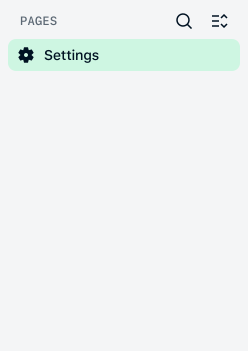
Starting in July 2026, we are updating the Customer Area menu to make it easier to find what you need. Menu items will be moved and renamed to better align with your workflows. This page explains what is changing and when these changes will take place.
What has changed
Renamed and moved pages
Some pages have been renamed or moved to different sections in the menu, for example:
- Transactions is now Payments.
- Finance pages are now in Balances, Reconciliation, or Reports.
- Insights is now Analytics.
For a full list of changes, see Where did a page move to.
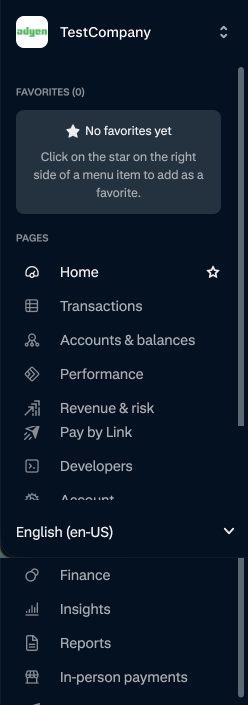
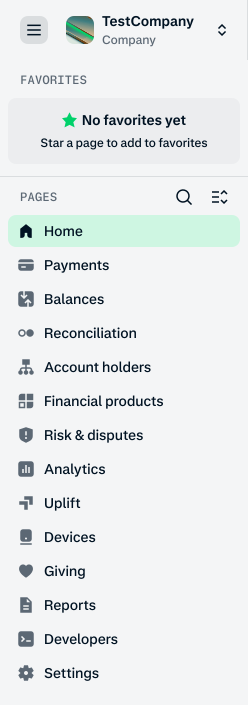
The diagrams below compare the old menu with the new menu.
Old menu
New menu
Search for a page
You can search for pages using both their new and old names. To search for a page:
- Select the search icon at the top of the menu.
- Start typing to see matching pages.
- Select a page from the results to open it.
Expand or collapse menu sections
You can view or hide multiple sections at the same time:
- Select a section to expand it.
- Repeat this for any other sections you want to view. Sections stay open as you navigate.
- Select the Hide all pages icon to collapse all sections.
Timeline
We are rolling out the new Customer Area menu in phases:
| Phase | Availability | What to expect |
|---|---|---|
| Early access (starts mid-May) | Selected accounts | The new menu is the default for selected accounts to gather initial feedback. If you have access during this phase, you can:
|
| Public preview (starts 6 July) | All users | The new menu is available for all users to try. The old menu remains the default. During this phase, all users can:
|
| Official launch (starts 15 July) | All users | The new menu becomes the default menu for all users of the Customer Area. During this phase, you can:
|
| Full transition (starts 15 August) | All users | The new menu is fully rolled out.
|
Where did a page move to
These tables show where pages from the old menu have moved in the new Customer Area menu. You can also search for a page and jump to it instantly.
Customer Area page URLs will change, but old URLs are automatically redirected to the new ones.
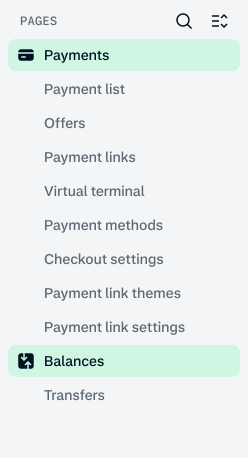
Transactions, Pay by Link, Virtual terminal and Payment methods
Pages moved to Payments and Balances:
| Old section | Old page name | New section | New page name |
|---|---|---|---|
| Transactions | Payments | Payments | Payment list |
| Transactions | Offers | Payments | No change |
| Transactions | Transfers | Balances | No change |
| Pay by Link | Payment links | Payments | No change |
| Pay by Link | Themes | Payments | Payment link themes |
| Pay by Link | Settings | Payments | Payment link settings |
| Virtual terminal | Create transaction | Payments | Virtual terminal |
| Settings | Payment methods | Payments | No change |
| Settings | Checkout settings | Payments | No change |
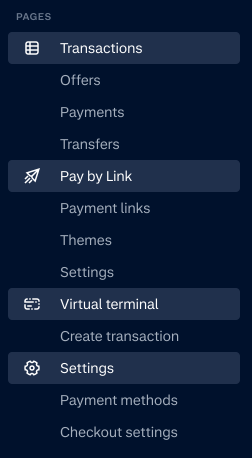
The diagrams below compare the old menu with the new menu for Transactions.
Old menu
New menu
Finance and Reports
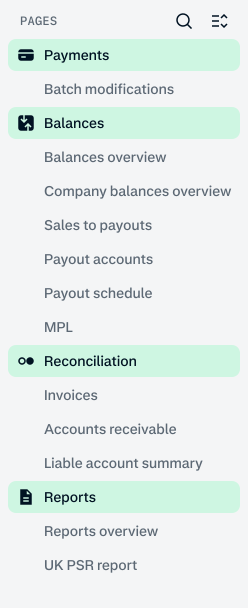
Pages moved to Balances, Reconciliation, and Reports:
| Old section | Old page name | New section | New page name |
|---|---|---|---|
| Finance | MPL | Balances | No change |
| Finance | Sales to payouts | Balances | No change |
| Finance | Payout accounts | Balances | No change |
| Finance | Payout model | Balances | Payout schedule |
| Finance | Balances overview | Balances | No change |
| Finance | Company balances overview | Balances | No change |
| Finance | Batch modifications | Payments | No change |
| Finance | Accounts receivable | Reconciliation | No change |
| Finance | Liable account summary | Reconciliation | No change |
| Finance | Invoices | Reconciliation | No change |
| Finance | UK PSR report | Reports | No change |
The diagrams below compare the old menu with the new menu for Finance.
Old menu
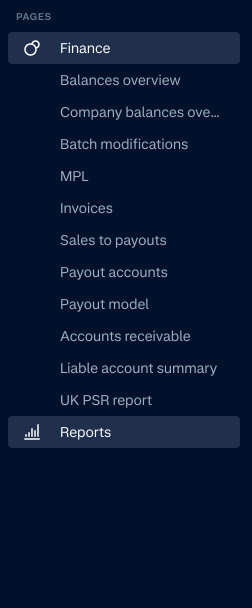
New menu
Accounts & balances
Pages moved to Account holders and Balances:
| Old section | Old page name | New section | New page name |
|---|---|---|---|
| Accounts & balances | Balance accounts | Balances | No change |
| Accounts & balances | Account holders | Account holders | Account holder list |
| Accounts & balances | Score | Account holders | Account holder risk |
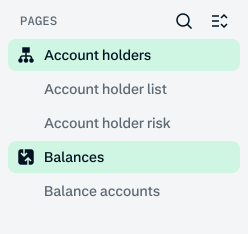
The diagrams below compare the old menu with the new menu for Accounts & balances.
Old menu
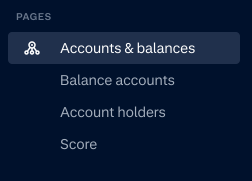
New menu
Revenue & risk
Pages moved to Risk & disputes and Uplift:
| Old section | Old page name | New section | New page name |
|---|---|---|---|
| Revenue & risk | Uplift overview | Uplift | No change |
| Revenue & risk | Recommendations | Uplift | No change |
| Revenue & risk | Experiments | Uplift | No change |
| Revenue & risk | Settings | Uplift | Uplift settings |
| N/A | Performance | Uplift | Uplift overview |
| Revenue & risk | Disputes | Risk & disputes | No change |
| Revenue & risk | Case management | Risk & disputes | No change |
| Revenue & risk | Dynamic 3D Secure | Risk & disputes | No change |
| Revenue & risk | Risk profiles | Risk & disputes | No change |
| Revenue & risk | Risk fields | Risk & disputes | No change |
| Revenue & risk | Risk lists | Risk & disputes | No change |
| N/A | Risk settings | Risk & disputes | New page |
The diagrams below compare the old menu with the new menu for Revenue & risk.
Old menu
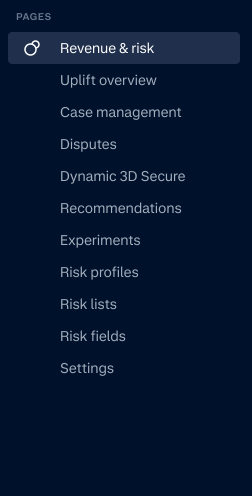
New menu
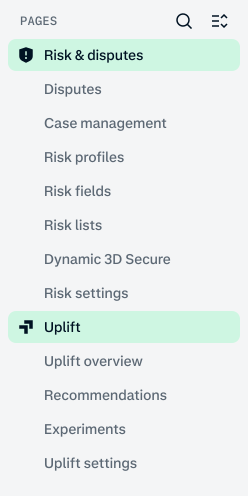
Insights
Pages moved to Analytics:
| Old section | Old page name | New section | New page name |
|---|---|---|---|
| Insights | Payment lifecycle | Analytics | Payment analytics |
| Insights | Risk & dispute management | Analytics | Risk & dispute analytics |
| Insights | Checkout | Analytics | Checkout analytics |
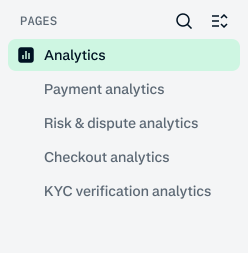
| Insights | KYC verification insights | Analytics | KYC verification analytics |
The diagrams below compare the old menu with the new menu for Insights.
Old menu
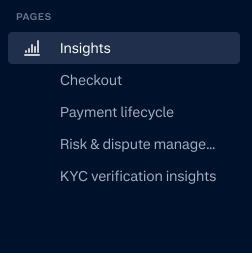
New menu
In-person payments
Pages moved to Devices:
| Old section | Old page name | New section | New page name |
|---|---|---|---|
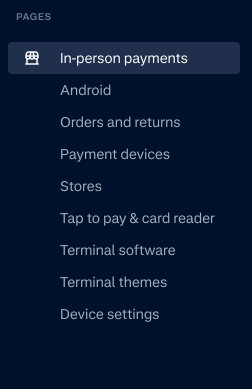
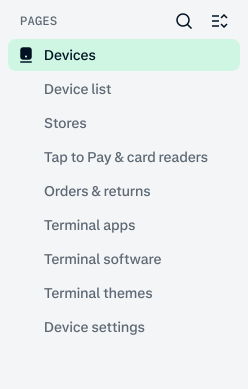
| In-person payments | Payment devices | Devices | Device list |
| In-person payments | Stores | Devices | No change |
| In-person payments | Tap to Pay & card readers | Devices | No change |
| In-person payments | Orders and returns | Devices | No change |
| In-person payments | Terminal software | Devices | No change |
| In-person payments | Android | Devices | Terminal apps |
| In-person payments | Themes | Devices | Terminal themes |
| In-person payments | Device settings | Devices | No change |
The diagrams below compare the old menu with the new menu for In-person payments.
Old menu
New menu
Partners
In Partners, the Overview page has been renamed to Partner overview.
Developers
Pages updated within Developers or moved to Settings:
| Old section | Old page name | New section | New page name |
|---|---|---|---|
| Developers | Dashboard | No change | Developer overview |
| Developers | Event logs | No change | Webhook event logs |
| Developers | Hosted onboarding | No change | Onboarding themes |
Account and OAuth
Pages moved to Settings:
| Old section | Old page name | New section | New page name |
|---|---|---|---|
| Account | Merchant accounts | Settings | No change |
| Account | Users | Settings | No change |
| Account | Partner users | Settings | No change |
| Account | Role groups | Settings | User role groups |
| Account | Close account | Settings | Close merchant accounts |
| Developers | OAuth apps | Settings | No change |
| Developers | OAuth authorizations | Settings | No change |
| Settings | Account groups | No change | Merchant account groups |
The diagrams below compare the old menu with the new menu for Account and OAuth.
Old menu
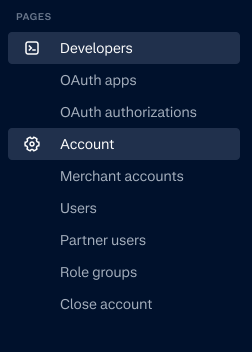
New menu