


Limited availability
Direct debits in the UK are in pilot phase. Some of the processes and documentation may change as the feature evolves.
Adyen business accounts support direct debits in the United Kingdom. Your users can authorize direct debits to automatically pay for business expenses, such as paying for utilities or to providers.
Requirements
Before you begin, make sure that you fulfill the following requirements:
| Requirement | Description |
|---|---|
| Integration type | You must have an Adyen for Platforms integration that includes business accounts. |
| Capabilities | Make sure that you enabled the following capability for your user:
|
| Limitations | The information in this page only applies to accounts in the UK. |
| Setup steps | Reach out to your Adyen contact to enable direct debits in the UK. |
Direct debits in the UK
A direct debit is an instruction from your user authorizing a counterparty to collect funds from their business account. Your users can authorize direct debits to make single or recurring payments.
In the UK, Adyen supports direct debits using the Bankers' Automated Clearing System (BACS). The following diagram shows how Adyen accepts direct debits through BACS.
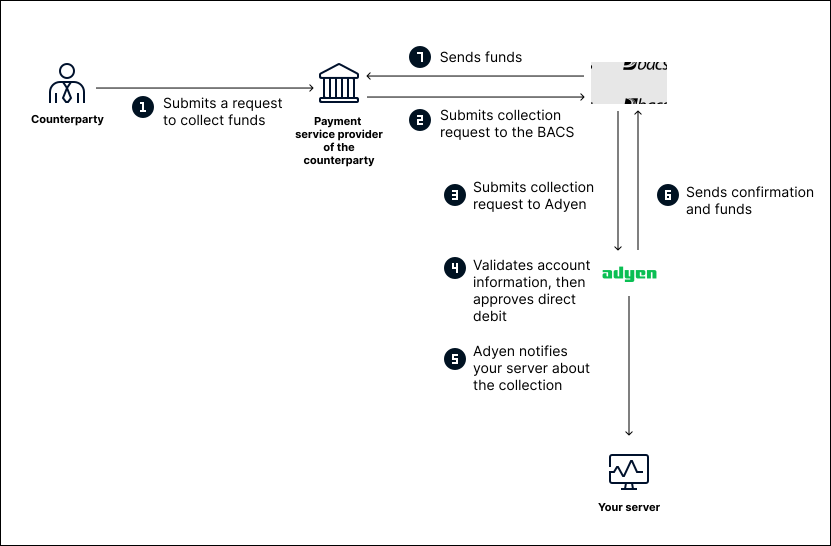
As shown in the diagram, direct debits through BACS work as follows:
- The counterparty makes a request to collect funds from your user's business account. If this is a recurring payment, the request is made on the frequency authorized by your user.
- The payment service provider of the counterparty submits the collection request to BACS.
- BACS sends the collection request to Adyen.
-
Adyen validates that the business account:
- Is active and has the required capability for accepting direct debits.
- Has an approved mandate linked to it.
- Has enough available balance for the direct debit.
If these requirements are fulfilled, Adyen approves the collection request. Otherwise, Adyen rejects the direct debit.
- Adyen notifies your server about the funds collection.
- Adyen sends a confirmation and the collected funds to BACS.
- BACS sends the collected funds to the payment service provider of the counterparty.
Mandates for direct debits
A mandate is an authorization from your user that allows a counterparty to perform direct debits on the user's account. The mandate includes information provided by your user, which the counterparty uses to prove the authorization. The information in the mandate includes, for example:
- Your user's business account details.
- An authorization statement from your user.
- Your user's signature or digital confirmation.
How a mandate is created
The following diagram shows the process for mandate creation.
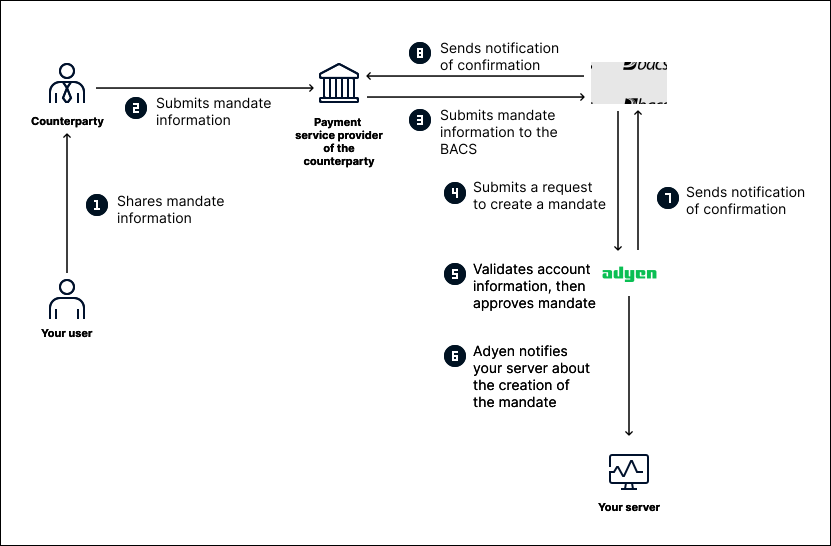
As shown in the diagram, the process for mandate creation is as follows:
- Your user shares with the counterparty the information required to create the mandate.
- The counterparty submits the mandate information to their payment service provider.
- The payment service provider submits the mandate information to BACS.
- BACS submits a request to Adyen for creating a mandate.
- Adyen validates that the business account is active and has the required capability for accepting direct debits.
If these conditions are fulfilled, Adyen approves the mandate. - Adyen notifies your server about the creation of the mandate.
- Adyen sends a notification of confirmation to BACS.
- BACS sends a notification of confirmation to the payment service provider of the counterparty.
Amending or canceling a mandate
Your user can amend a mandate at any moment. By amending the mandate, your user can change the business account that they use for direct debits. For example, consider a user that opens a second business account in your platform, exclusively to handle monthly expenses. Instead of creating a new mandate, your user can amend the ID of the business account.
Your user can also cancel a mandate at any moment. For example, when a user unsubscribes from a service, they can cancel the mandate to stop future direct debits.
The following diagram shows the process for amending or canceling a mandate.
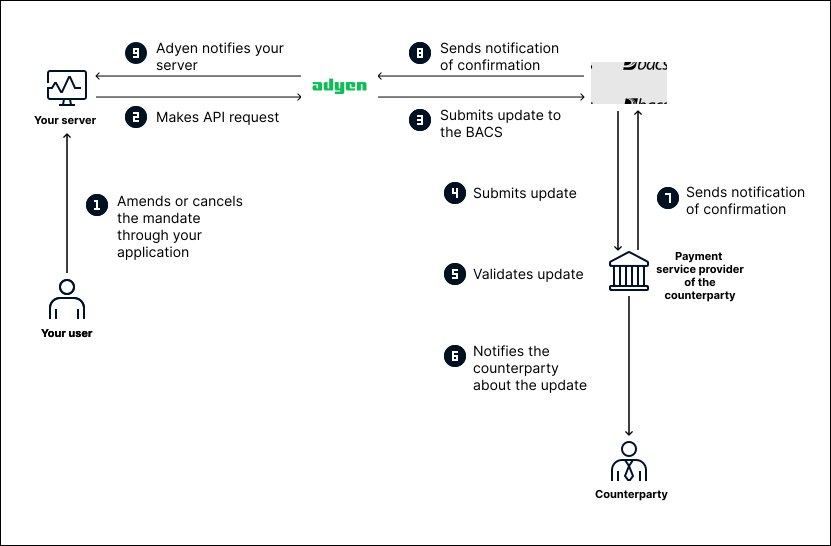
As shown in the diagram, the process for amending or canceling a mandate is as follows:
- The user amends or cancels the mandate through your application.
- Your application's server makes an API request to Adyen.
- Adyen submits the updated mandate information to BACS.
- BACS sends the updated mandate information to the payment service provider of the counterparty.
- The payment service provider validates the information and amends or cancels the mandate.
- The payment service provider notifies the counterparty about the update.
- The payment service provider sends a notification of confirmation to BACS.
- BACS sends a notification of confirmation to Adyen.
- Adyen notifies your server about the update to the mandate.