


Grants undergo changes over time and their status can be modified based on various events. For instance, grants that have been approved are automatically activated by a background processing system, which initiates the fund disbursement process.
You can monitor changes in the grant status using either way:
- Call our Capital API and check the status.code parameter in the response.
- Listen to the Capital webhooks.
The lifecycle of a grant consists of two main stages:
-
Grant initiation: During this stage, Adyen prepares the requested offer as the user applies for business financing. Status updates at this stage trigger only capital webhook types. No transfers or transactions occur during grant initiation.
-
Grant management: This stage involves managing and overseeing the funds that have been disbursed to the user. Grant management status updates trigger capital, transfer, and transaction webhook types.
The following diagram and explanation detail the various grant statuses that occur during these two stages.
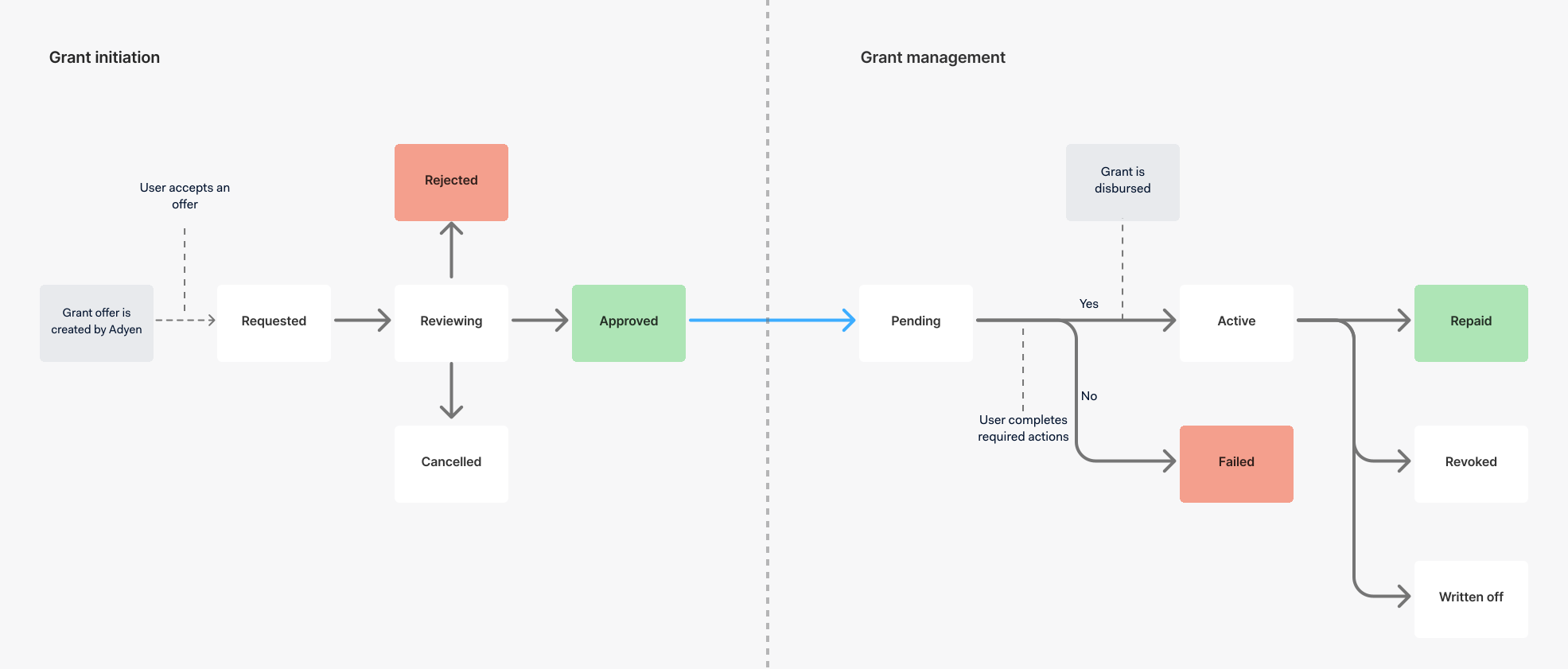
Grant initiation statuses
| Status | Description |
|---|---|
| Requested | This status indicates the initial stage of the grant initiation process, showing that a formal request for a grant has been successfully submitted. |
| Reviewing | This status indicates that the user has accepted the offer, and Adyen conducts a thorough secondary review of the grant request. This re-evaluation is crucial, as it considers any changes in the user's financial situation or eligibility that may have occurred between the offer creation and acceptance, such as acquiring additional financial obligations from other financial products. In specific situations, Adyen may require your users to provide additional information about their businesses, such as when the total user's exposure meets or exceeds the threshold, typically EUR 25,000. User action needed:
|
| Approved | This status indicates that the grant request has successfully met all necessary criteria and has received final approval from Adyen. |
| Rejected | This status indicates that the grant request did not meet the required criteria and has been declined by Adyen. |
| Cancelled | This status indicates that the user has chosen to withdraw their grant request. This action can occur at any point during the grant initiation stage, up until the grant transaction is formally booked and the grant transitions to the Pending status. |
Grant management statuses
| Status | Description |
|---|---|
| Pending | This status indicates that the user has accepted the offer, marking the completion of the grant initiation stage. The grant remains pending until:
User action needed:
|
| Failed | This status indicates that the grant disbursement was unsuccessful. This can happen for various reasons, such as when the user fails to complete the required actions (like signing the Terms of Service) before the offer expires, or due to unforeseen technical or administrative issues. This does not affect the user's future eligibility for business financing with Adyen. |
| Active | This status indicates that the grant has been successfully disbursed to the user, marking the beginning of the grant's active phase. |
| Repaid | This status indicates that the user has successfully met all repayment obligations, and the grant has been fully settled. |
| Revoked | This status indicates that the user has requested to revoke the grant. Depending on regional regulations, a grant may be legally revoked within a specified timeframe after offer acceptance. When a grant is revoked, the principle amount is paid off and the fees are waived. This does not affect the user's future eligibility for business financing with Adyen. |
| Written Off | This status indicates that the grant has been officially classified as a write-off, with the likelihood of recovering the outstanding amount very low. The user will not qualify for business financing with Adyen for a certain period based on our risk appetite. |