


The information in this page does not constitute legal advice. It only provides an overview of Adyen's compliance guidelines for financial products and Adyen for Platforms (referred to as the Compliance Guidelines). For additional, non-legal clarifications about this content, reach out to your Adyen contact.
Platforms must provide a user interface that includes the following:
- Product request: Let the user request any of the financial services that the platform has agreed with Adyen to provide.
- KYC: Provide required KYC information to Adyen as required under Adyen’s customer due diligence procedures.
- Agreements and Terms: Present all required agreements and user terms including bank disclosures and fees, as detailed in Adyen’s Customer Disclosure and Consent Procedure.
If the platform is using hosted onboarding, KYC fields, agreements, and terms of service will be hosted by Adyen. If the platform is using Adyen’s components in the UI, certain requirements may be embedded into the components provided by Adyen. To learn more about the embedded requirements, see Capital components.
-
User consent: Ensure that the user reads and accepts the required legal agreements, using language detailed in Adyen’s Customer Disclosure and Consent Procedure:
“I have read and I accept these terms and confirm that I am a legal representative authorized to accept these terms on behalf of the company. I have taken notice of the privacy statement (www.adyen.com/privacy-policy) and I consent to my (personal) data being used for the purposes described therein."
-
Terms and Conditions availability: Provide ongoing access to all the agreements that have been accepted by the user.
-
Account access: Provide the user, free of charge, with ongoing access to their Balance or Bank Account, Capital, or Issuing product to view transactions, fees and other account information, as provided by Adyen to the platform through API as detailed below.
-
Preselected options: The user interface must not include pre-selected options to indicate that the user has confirmed that they have read or understood the provided information concerning financial services.
-
Financial service provider: The user interface may not present the platform as a bank and should include a disclosure indicating Adyen as the financial services provider.
- (Ireland Only): For all products, the following wording in the interface must be used:
“We work with Adyen N.V. to offer financial services. Adyen N.V., trading as Adyen, is authorised by De Nederlandsche Bank in the Netherlands and is regulated by the Central Bank of Ireland for consumer protection rules."
Product-specific requirements
| Service | Terms |
|---|---|
| Payment processing (only in the UK) | Terms and Conditions for Adyen for Platforms |
| Capital |
|
User interface requirements
| Service | Interface requirements |
|---|---|
| Payment processing (only in the UK) |
|
| All financial products (only in the US) |
|
| Capital |
|
Presenting financing offers
When presenting a financing offer to your users, include the following information:
- Contract type: Clearly show the type of financing offer, such as business loan, to eligible users.
- Financing offer: Clearly show a financing offer, including all the fields that Adyen provides for dynamic and static offers through the Capital API.
- Repayment term: Specify that for a business loan, the repayment term has a maximum period. This means that the repayment term is fixed and the business loan must be completely repaid before it ends.
- How to request a financing offer: Enable users to request Capital on your interface. Clearly show that they must request the product before receiving any financing offer.
The following image shows an example of how to present your financing offers to your users.
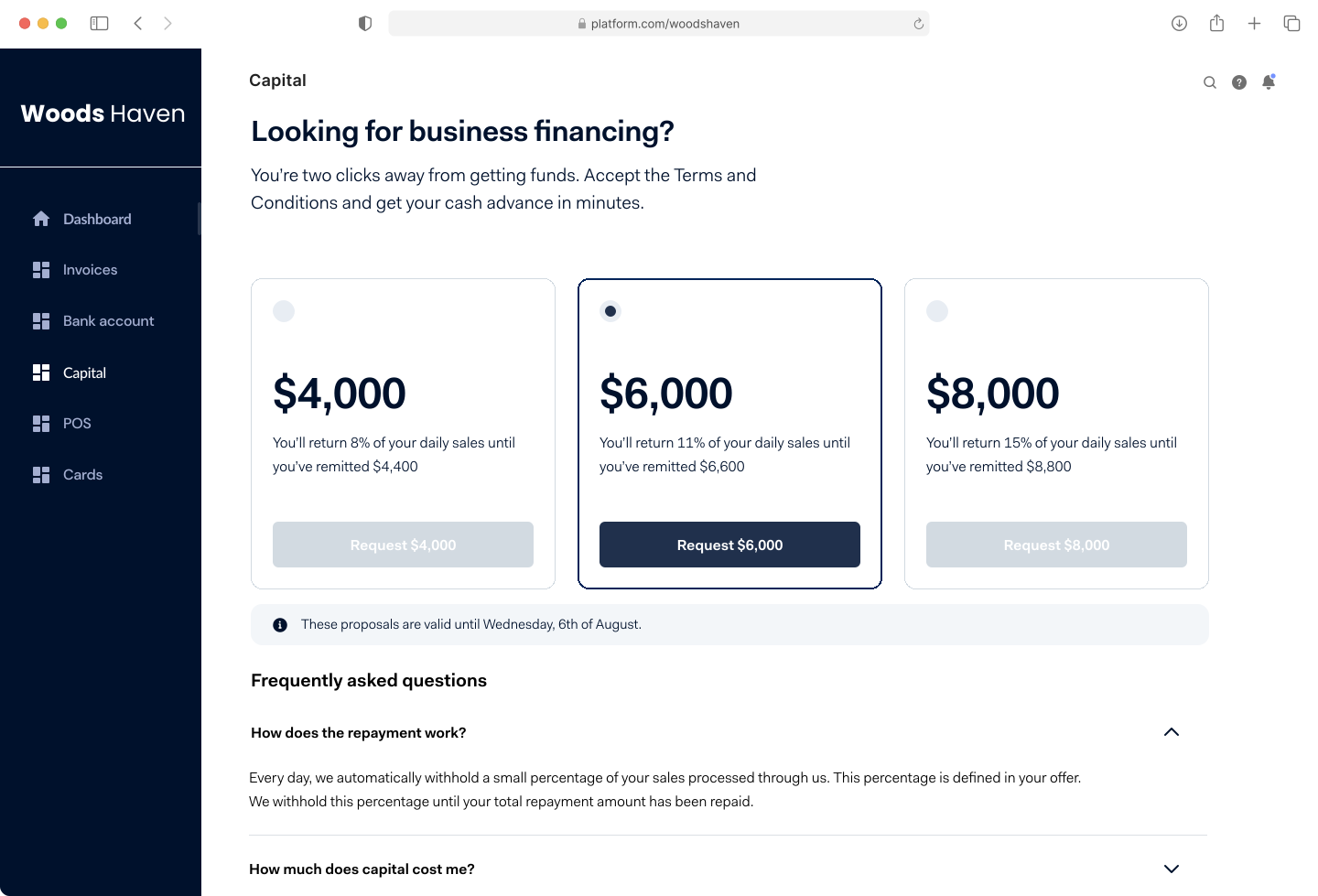
In this example, the interface:
- Explicitly shows whether the user is viewing an offer for a business loan or cash advance.
- Shows all the financing offers available to your user.
- Uses a Request button to indicate the user how to request a financing offer.
- Specifies the validity period of the offers.
Presenting KYC interface and Terms of Service
To comply with KYC requirements and user agreements, include the following information in your interface:
- KYC collection fields: Enable your users to submit KYC information for review by Adyen.
- Relevant terms: When showing your user the details of their financing offer, you must include all the terms that are relevant for this offer. For example, you should include:
- The financing amount.
- The total repayment amount.
- The repayment percentage.
- The fee for using the product. In Canada, you must show this fee as an annual interest rate.
- Adyen's alternative ways for repaying the financing, if applicable.
- Capital user terms: Ensure that the user terms for Capital are available for and accepted by your users. Users must only accept the terms one time. In case of updates to the user terms, your platform must communicate these updates to your users.
- Acceptance of Terms of Service: Enable your users to view and accept the Terms of Service and conditions related to the Capital product. If you are not able to generate the required Terms of Service for your user, reach out to your Adyen contact. You must capture all acceptance information from the user.
The following image shows an example of how to present terms and conditions to your users.
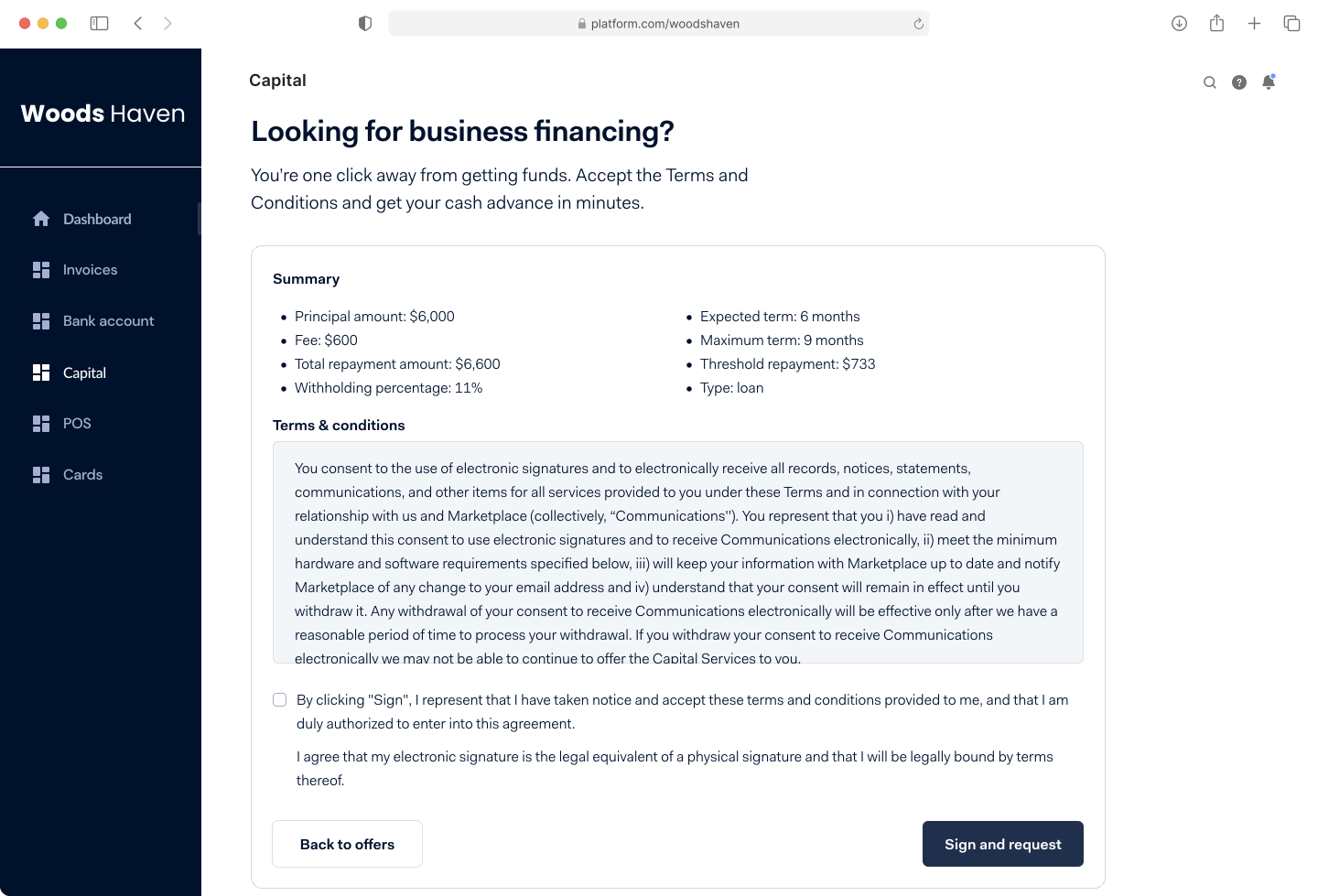
In this example, the interface:
- Shows a Summary section that includes relevant terms, such as:
- The financing amount
- The fees
- The terms of the repayment period
- The type of financing
- Shows the Terms and conditions for using the Capital product.
- Enables the user to accept the terms and conditions.
- Specifies that accepting the terms and conditions in your interface is equivalent to signing a contract.
Presenting insights into Capital funds
Your interface must provide access to the following information:
- Capital disbursement: Inform your users in real time about the Capital funds that have been paid out to them, and about repayments of the Capital funds.
- User insights: Enable your users to view, track, and monitor their Capital funds. This includes:
- Capital balance
- Repayment requirements
- Repaid funds
- Capital term
The following image shows an example of how to present Capital insights to your users.
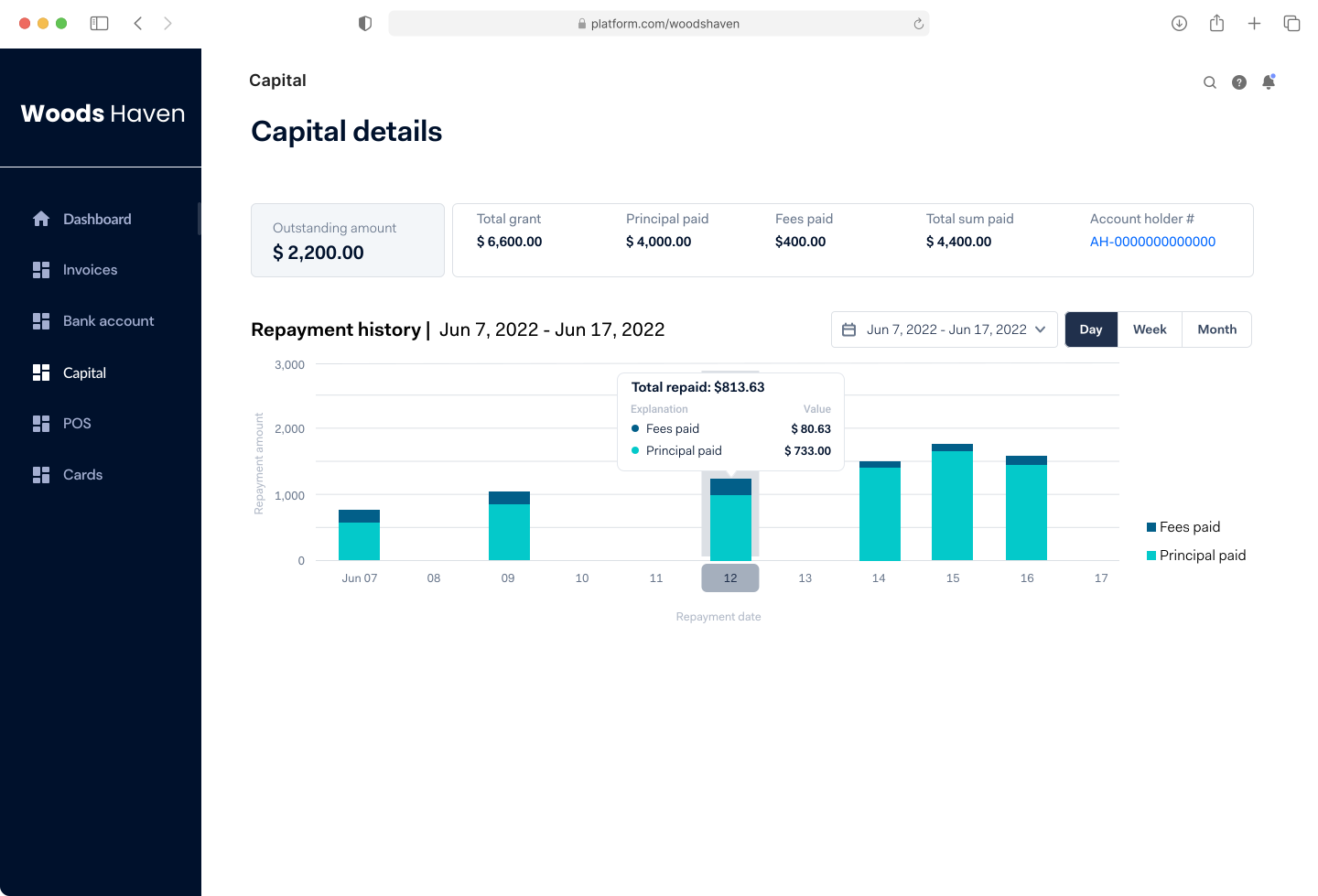
The example shows a page that enables users to monitor their Capital funds and repayments. You can get your user's grant details through the Capital API by:
- Making a GET /grants/{grantId} request with grantId as the path parameter.
- Subscribing to the Capital webhooks and Transfer webhooks.
Protecting your Capital information
Your Capital user interface must be protected against unauthorized access and security breaches. You must implement reasonable security measures according to industry practices. For example, your application must:
- Use unique and personal security credentials for login.
- Safely transmit personal security credentials.
- Validate the users' credentials when they request access.
Customer disclosure and consent procedure
This document outlines the Customer Disclosures and Consent Procedure of Adyen. It describes when and under what conditions Adyen makes disclosures and gains consent from its customers. This document is reviewed on an annual basis.
This procedure encompasses disclosures and consents which Adyen presents to its customers;
- As part of Adyen's customer due diligence (CDD) process. This refers to the due diligence which Adyen performs on all customers as a result of Know Your Customer (KYC) obligations during onboarding or periodic review.
- As a result of regulatory obligations in the US which mandate that c certain disclosures and/or consent, reflected in the relevant agreement(s), must be detailed within a procedure.
This document does not encompass other legal disclosures and consents that Adyen may require as part of the agreements.
Legal Background
Adyen enters a contractual agreement with every user directly, or indirectly (through a platform). This agreement outlines the terms of use for Adyen’s products and services.
In addition to the terms of use, there is additional information that must be disclosed and/or requires consent to/from customers, due to local and/or global regulatory obligations, outside of these agreements.
This procedure differentiates between Disclosures and Consents.
- Disclosure: refers to mandatory information that must be disclosed to the customer, meaning that they must be made explicitly aware of that information prior - or during - the customer due diligence process;
- Consent: refers to provisions that the customer must explicitly consent to or certify. Consent must be freely given, informed and specific.
Applicability
This procedure applies to all entities with whom Adyen enters into a business relationship with or on whose behalf Adyen performs a transaction, or provides embedded finance solutions (hereinafter: ‘customer’).
Consent can only be given to Adyen by natural persons type: Authorized Signatory. The identification and verification requirements of authorized signatories is described in Adyen’s Natural Person Screening Procedure.
The disclosures and consents presented to customers are based on the service line being utilized. Identification and verification requirements on service lines are described in Adyen’s Service Line Screening Procedure.
When a term is not defined in this procedure, please refer to the definitions stated in Adyen’s Global AMLCFT and Sanctions Policy and related documents.
Methodology
Adyen discloses all disclosures and obtains all consents remotely through Adyen’s Onboarding forms and/or API’s, all evidence of consents obtained must be retained.