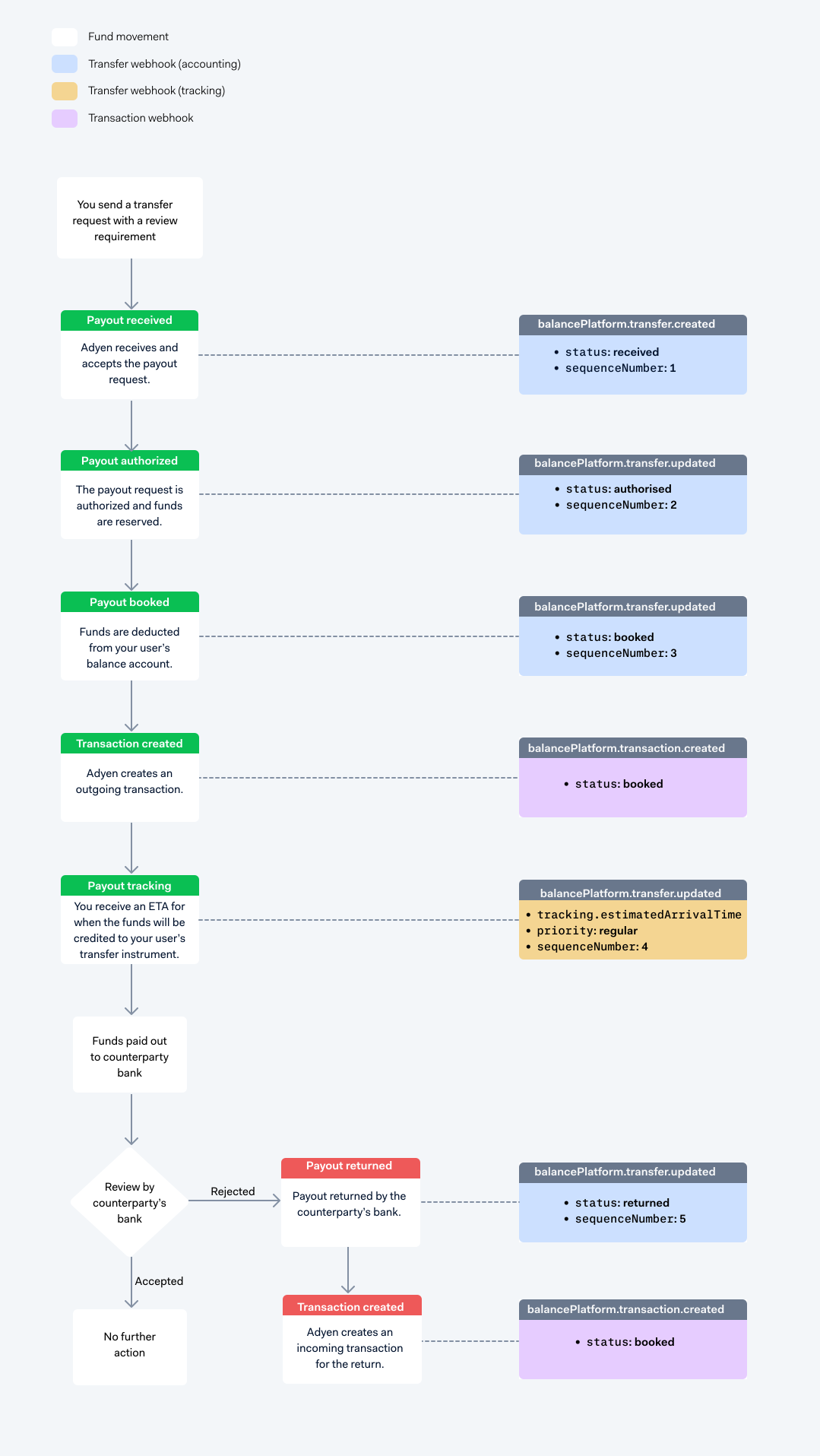
When you make transfer requests to pay out funds from your balance account, each payout goes through multiple stages before the funds are credited to the counterparty's bank account or card. A payout passes from one stage to another after specific events occur in the payout lifecycle.
To keep you updated about changes in a payout's status as it moves through the payout lifecycle, Adyen sends information about status changes in API responses and webhooks.
Accounting events
Accounting events are events that occur during the lifecycle of a payout that affect the available balance in your balance account.
Tracking events
After a payout reaches the booked status, the funds are deducted from your balance account. To keep you informed about the progress of your payouts, Adyen sends a balancePlatform.transfer.updated webhook that includes a tracking object.
Depending on the payout type, you receive different tracking information:
- Instant bank transfers: You receive a credited
statuswhen the funds arrive, or failed if the payout cannot be completed. - Payouts to cards: You receive an accepted
statuswhen the card schemes accept the payout for processing, or failed if the payout cannot be completed. - Non-instant bank transfers: You receive a
tracking.estimatedArrivalTime, which returns the estimated time when the funds will be credited to the counterparty's bank account.
Payout pending
After a payout reaches the booked status, but before the funds leave Adyen, the payout is automatically analyzed to ensure it complies with Adyen's policies. If the payout is flagged, Adyen must manually review it before sending the funds.
During the manual review process, the payout enters a pending state. You receive a balancePlatform.transfer.updated tracking webhook with status pending.
For payouts to cards, Adyen can also send a webhook with status accepted to indicate that the payout has been accepted by the card network. Card payouts are subject to additional checks by the card schemes. If a request results in an error during these checks, you can receive a balancePlatform.transfer.updated webhook with status refused to reflect the outcome.
Instant vs non-instant payouts to bank accounts
The following tabs explain the tracking events for instant and non-instant payouts to bank accounts. These events do not apply to payouts to cards.
Payout returned
After a payout is sent to the counterparty's bank account, the counterparty bank or issuer is required by regulation to screen the payout. If there are any issues with the payout, they can return the funds to Adyen.
Payouts that do not have an instant priority cannot fail, but they can be returned by the counterparty's bank. After you receive the tracking webhook with the estimated arrival time of your payout:
- The funds arrive at the counterparty's bank.
- The counterparty's bank reviews the payout.
- If the payout fails the review, the counterparty's bank returns the payout with a specific code that indicates the reason for the return. See reason codes to see a list of reasons why a payout can be returned by the counterparty's bank. A new transaction is created for the return, and you receive the following webhooks:
- A
balancePlatform.transfer.updatedwebhook withstatusreturned. Thereasonfield in the last object of theeventsarray indicates the reason for the return. - A
balancePlatform.transaction.createdwebhook which informs your server that Adyen has credited funds to your balance account.
- A