


With AdyenPremium, your platform and your users earn returns on funds held in business accounts. Adyen calculates returns daily, based on the balance on each business account. You configure the share of the returns that your users receive, and your platform earns the remainder.
Returns are settled monthly. Adyen settles your platform share of the returns in your liable account and your users' share in their respective business accounts.
In the UK, you cannot share AdyenPremium returns with your users.
This page explains how AdyenPremium works, and how AdyenPremium returns are settled in your accounts.
Requirements
Before you begin, take into account the following requirements, limitations, and preparations.
| Requirement | Description |
|---|---|
| Integration type | You must have an Adyen for Platforms integration that supports business accounts. |
| Webhooks | Subscribe to the following webhooks: |
| Limitations |
|
AdyenPremium rates
The following table shows the rates that Adyen uses to calculate the returns that you earn with AdyenPremium.
| Rate | Applicable regions | Description | How it is calculated |
|---|---|---|---|
| Benchmark rate | All | The market interest rate. This rate is updated daily to match the current market rate in your region. | Set by the central bank of your relevant region. The benchmark rates per region are: |
| Adyen's markup | All | Adyen's markup applied to the returns. | Set up by you and Adyen. |
| AdyenPremium rate | All | The return rate available to your platform. You can allocate this rate between your platform and your users. | The benchmark rate minus Adyen's markup. |
| Configured business account rate (users' share rate) | EU, US | The configured return rate that your users receive for funds on their business accounts. | Configured by your platform. |
| Actual business account rate | EU, US | The actual return rate that your users receive for funds on their business account. | It is equal to the lower of the following rates:
|
| Platform share rate | All | The return rate that your platform receives for funds on your users' business accounts. | The AdyenPremium rate minus the actual business account rate. |
Example for EU and US
The following example shows how AdyenPremium rates are calculated based on the following conditions:
- The benchmark rate is 10%.
- Adyen's markup is 4%.
- The configured business account rate is 4%.
| Rate | How it is calculated | Rate value |
|---|---|---|
| Benchmark rate | Set by the central bank of your relevant region. | 10% |
| Adyen's markup | Set up by you and Adyen. | 4% |
| AdyenPremium rate | \(\text{Benchmark rate} - \text{Adyen's markup}\) | 6% |
| Configured business account rate (users' share rate) | Configured by your platform. | 4% |
| Actual business account rate | Lower of configured business account rate and AdyenPremium rate | 4% |
| Platform share rate | \(\text{AdyenPremium rate} - \text{Actual business account rate}\) | 2% |
As a result of the calculations in this example:
- Your users' share rate is 4%.
- Your platform's share rate is 2%.
Example for UK
The following example shows how AdyenPremium rates are calculated based on the following conditions:
- The benchmark rate is 10%.
- Adyen's markup is 4%.
| Rate | How it is calculated | Rate value |
|---|---|---|
| Benchmark rate | Set by the central bank of your relevant region. | 10% |
| Adyen's markup | Set up by you and Adyen. | 4% |
| AdyenPremium rate | \(\text{Benchmark rate} - \text{Adyen's markup}\) | 6% |
| Platform share rate | It is the same as AdyenPremium rate. | 6% |
Because in the UK you cannot share AdyenPremium returns with your users, your platform share rate is equal to the AdyenPremium rate. In this example, this is 6%.
How AdyenPremium returns are calculated
AdyenPremium generates returns daily. Adyen calculates returns based on the balance in users' business accounts at the end of each sales day (closing balance). On weekends and bank holidays, AdyenPremium is calculated based on the closing balance from the most recent business day.
AdyenPremium returns, including your platform share, are calculated per business account. The following tabs show the calculation method for each region.
Adyen calculates amounts in whole cents and rounds fractional amounts up or down to the nearest cent. For example, an amount of USD 10.005 becomes USD 10.01.
How to calculate monthly settlement
At the end of the month, Adyen settles the accummulated daily returns. The return amounts are credited to the corresponding business accounts. These settlements appear in your Balance Platform Balance Report.
To simplify reconciliation, you can calculate the monthly settlement amount of your AdyenPremium returns. To calculate your monthly platform share, sum the daily platform share amounts. To calculate the monthly user share of each user, sum their respective daily user share amounts.
Your platform share is settled in your liable balance account. Your users' share is settled in their respective business accounts.
Redirecting returns of closed business accounts
When a business account earns returns during a month, but is closed before the month ends, Adyen redirects the returns to an active balance account. Adyen determines to which balance account the returns are redirected, and then settles the funds in that account.
The following diagram shows how Adyen redirects earned returns from a closed business account.
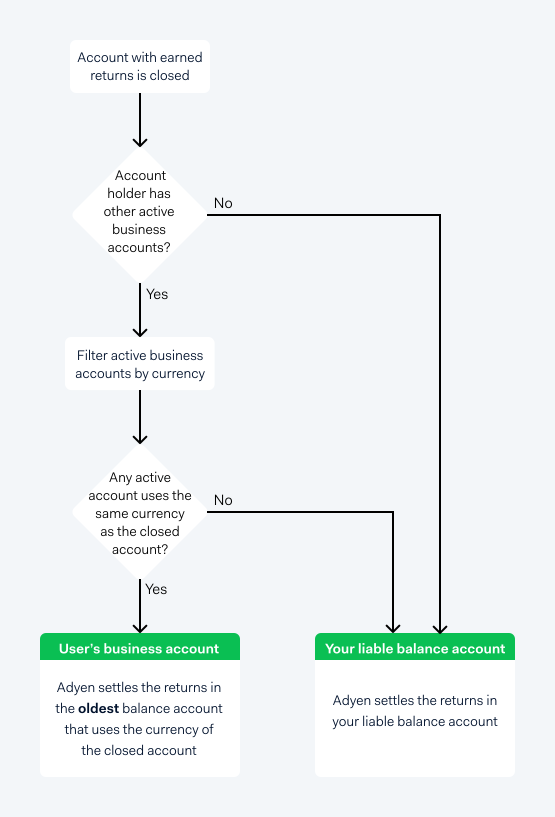
As shown in the diagram, Adyen redirects returns from closed business accounts as follows:
- Adyen checks if the account holder of the closed business account has other active balance accounts.
- Adyen filters the active business accounts to check if any have the same currency as the closed business account.
- Adyen does one of the following:
- If there is one or more active business accounts with the same currency, Adyen settles the returns in the oldest of these business accounts.
- If there is no active business account with the same currency, Adyen settles the returns in your platform's liable balance account.
Configure your AdyenPremium rates
To configure or update your AdyenPremium rates:
- Reach out to your Adyen contact. Your Adyen contact specifies what information you need to complete this request.
- Complete the request with the information specified by your Adyen contact.
After you complete the request, the configuration is enabled within 24 hours, unless you specify a later date.
Get updates about AdyenPremium settlements
Every time AdyenPremium returns are settled, Adyen sends multiple transfer webhooks to your server. Transfer webhooks include the details of any transfer that occurs in your balance platform, including AdyenPremium settlements.
You can use the data in the webhooks to reconcile your AdyenPremium settlements. The following tabs show the information that is included for webhooks related to user share and platform share settlements.