


Limited availability
Adyen's Higher grant amounts feature for Capital is currently in the pilot phase. Some processes and documentation may change as the feature evolves.
In specific situations, Adyen may require your users to provide additional information about their businesses to comply with the European Central Bank's AnaCredit data collection requirements.
This requirement is triggered for certain legal entity types under the following circumstances:
- When you offer an Adyen Capital grant that exceeds the threshold, which is typically EUR 25,000 or the equivalent in another supported currency.
- When the total of an Adyen Capital grant offer and any outstanding balance for the user meets or exceeds the threshold, typically EUR 25,000 or the equivalent in another supported currency.
The thresholds for combined business financing and restrictions on legal entity types differ by country or region. Refer to the country and region-specific regulations for more details.
This page gives an overview of the steps needed to collect Know Your Customer (KYC) data from users requesting higher grant amounts. These instructions apply if you are integrating Capital through our Capital API.
If you are using our UI components for Capital, you can also benefit from this feature. The components automatically facilitate the collection of user data through the Adyen-hosted page, so no additional actions are required on your part.
Requirements
Before you begin, take into account the following requirements, limitations, and preparations.
| Requirement | Description |
|---|---|
| Integration type | You must have an Adyen for Platforms integration with the Capital financial product enabled. |
| API credentials | You must have:
|
| Capabilities | Make sure that your user's account holder has the following capabilities:
|
| Webhooks | Subscribe to the following webhooks: |
| Limitations |
|
| Setup steps | Before you begin, make sure:
|
How it works
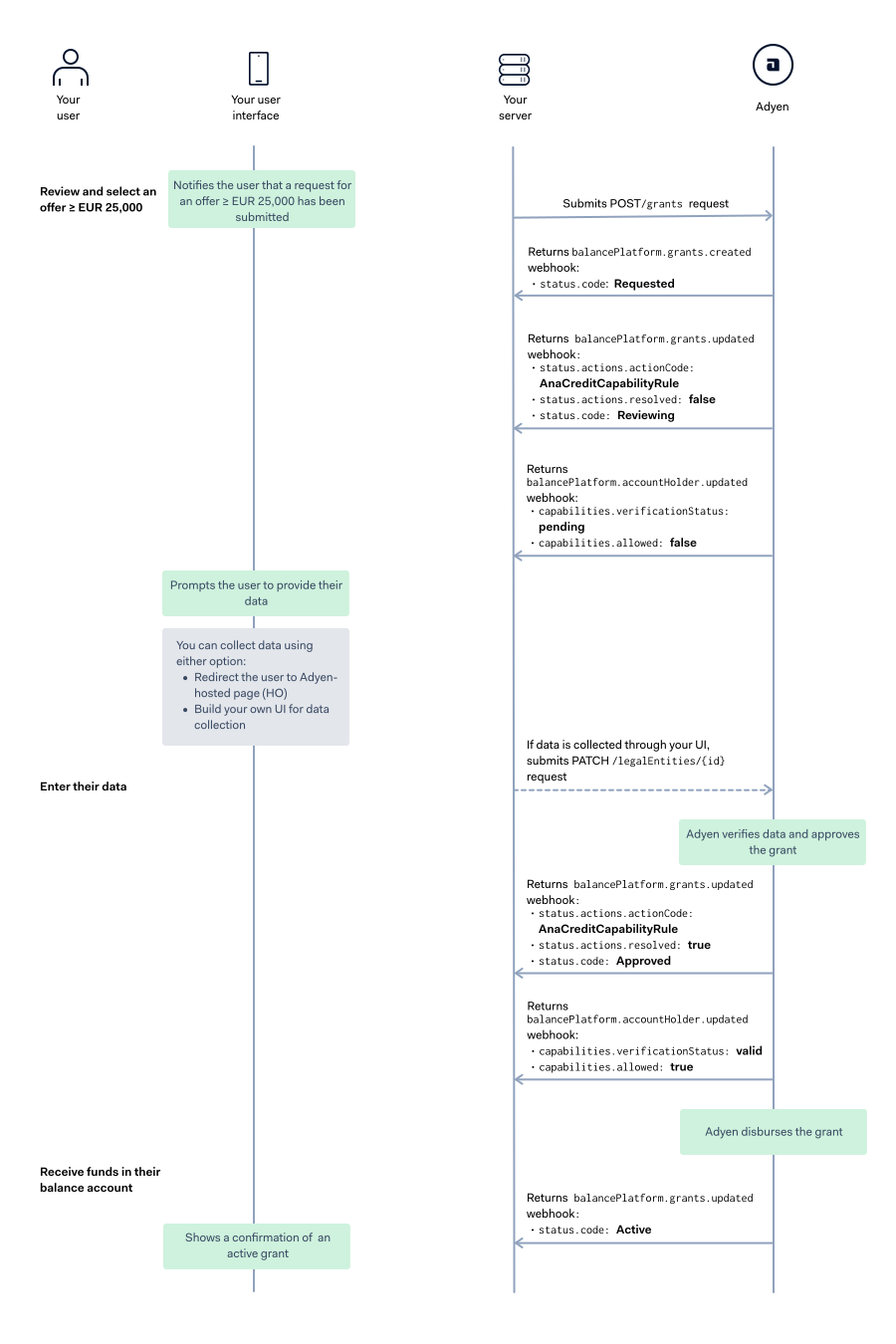
After a user select a grant offer, you send an API request to configure a grant for them. Adyen then performs checks to calculate the user's total exposure. This calculation includes the new grant request along with any outstanding balance for that user. If the total amount exceeds the threshold determined for a specific country o region, additional KYC data is required.
The procedure is as follows:
- Adyen performs checks whether the user's exposer exceeds the threshold.
- Adyen sends webhooks to your server to notify you that additional KYC data is required.
- You collect the necessary KYC data and submit it to Adyen.
- Adyen reviews the user data and notifies you about the verification results.
- After Adyen verifies the data and approves the grant, the grant amount is automatically disbursed to the user. You can then proceed to get grant details or manage disbursements.
The following diagram illustrates an example when a user select an offer of EUR 25,000 or more, and how it affects the status of the grant and the user's capabilities.
1. Select a way to collect user data
Adyen offers two options for collecting additional KYC data from users requesting higher grant amounts. Select the option that best suits your needs.
Option |
Hosted onboarding (recommended) |
API-only |
|---|---|---|
| How it works | Your users are redirected to a secure, Adyen-hosted page. You make a single API request to generate a one-time link, which you then present to the user in your user interface (UI). The hosted onboarding page handles the entire data collection process and user flow. | You build a custom user interface directly within your platform. You use Adyen's Legal Entity Management APIs to determine what information is needed from the user and then submit that data through subsequent API calls. |
| Provides you with |
|
|
| Required from you |
|
|
2. Get updates when additional data is required
Adyen sends a webhook to your server to notify you that additional KYC data is required for the user to receive a higher grant amount. Alternatively, you can make an API request to get details about a specific grant.
-
Get updates about the grant status and required actions for higher grant amount using one of the following options:
- Listen to balancePlatform.grants.updated webhooks
- Make a GET /grants/{grantId} request
-
In the webhook payload or the API response, note the following:
actions.code: Set to AnaCreditCapabilityRuleactions.resolved: Set to falsestatus.code: Set to Reviewing
This indicates that an additional KYC data requirement has been established for the grant. To receive the grant, users must provide the necessary information. The grant status will remain Reviewing until the required actions are completed.
The unresolved AnaCreditCapabilityRule code impacts the Capital capabilities,
getGrantOffersandreceiveGrants, of your user's account holder: - verificationStatus: Set to pending- allowed: Set to false.- problems: Contains verification errors that must be resolved.
3. Collect user data
Follow the steps depending on your selected way of data collection:
4. Get verification results and grant status updates
In order for the grant to be approved, the verification errors must be resolved for the account holder and the necessary actions related to the grant must be completed.
-
Get updates about the verification status and results using one of the following options:
- Listen to balancePlatform.accountHolder.updated webhooks
- Make a GET /accountHolders/{id} request
The webhook and the API response should indicate the following for each of the Capital capabilities:
- verificationStatus: Set to valid
- allowed: Set to true
-
Get updates about the grant status and required actions using one of the following options:
- Listen to balancePlatform.grants.updated webhooks
- Make a GET /grants/{grantId} request
The webhook and the API response should indicate the following:
actions.code: Set to AnaCreditCapabilityRuleactions.resolved: Set to truestatus.code: Set to Approved
Country and region-specific regulations
The following table lists the legal entity types and thresholds of combined business financing by country or region that trigger AnaCredit requirements.
| Country/Region | Organization | Sole Proprietorship | Combined business financing from... |
|---|---|---|---|
| Australia |  |
 |
EUR 25,000 |
| Canada (excl. Quebec and Saskatchewan) |
|
|
EUR 25,000 |
| Finland | |
|
EUR 25,000 |
| France | |
|
EUR 25,000 |
| Spain (beta) | |
|
EUR 3,000 |
| Sweden | |
|
EUR 25,000 |
| United Kingdom (incl. Channel Islands and Isle of Man) |
|
|
EUR 25,000 |
| United States (incl. Puerto Rico) |
|
|
EUR 25,000 |
Verification errors
The following are the common verification errors indicating missing data for higher grant amounts with Capital. Complete the corresponding remediation actions to resolve the errors.
| Error | Error code | Remediation action | Remediation action code |
|---|---|---|---|
ECONOMIC_SECTOR |
2_8203 | provideEconomicSector |
2_905 |
GLOBAL_LEGAL_ENTITY_IDENTIFIER |
2_8204 | provideGlobalLegalEntityIdentifier |
2_909 |
INSTITUTIONAL_SECTOR |
2_8225 | provideInstitutionalSector |
2_910 |
LEGAL_FORM |
2_8226 | provideLegalForm |
2_906 |
STATUS_OF_LEGAL_PROCEEDINGS |
2_8227 | provideStatusOfLegalProceeding |
2_907 |
DATE_OF_INITIATION_LEGAL_PROCEEDINGS |
2_8228 | provideDateOfInitiationLegalProceeding |
2_908 |
HEAD_OFFICE_INDICATOR |
2_8229 | provideHeadOfficeIndicator |
2_911 |
CNAE_NUMBER |
2_8230 | noPossibleRemediation |
1_100 |