


Enterprise accounts allow you to store and manage your funds and your customers' funds. Using enterprise accounts, you can receive and send third-party transfers, which allows you to fully control your cash flow using Adyen's resources.
To set up an enterprise account, reach out to your Adyen contact.
Requirements
Before setting up an enterprise account, consider the following requirements and limitations.
| Requirement | Description |
|---|---|
| Integration type | You must have a Payouts or Enterprise issuing integration. |
| API credentials | To make transfers with your enterprise account, make sure that your API credential has the roles required to use the Transfers API. |
| Webhooks | To track the status of transfers made with your enterprise account, subscribe to the following webhooks: |
| Limitations | To use some types of enterprise accounts, you must have an Electronic Money Institution (EMI) or Payment Institution (PI) license. |
| Setup steps | To set up an enterprise account, reach out to your Adyen contact. |
Overview of enterprise accounts
An enterprise account is connected to a balance account. When you create an enterprise account, you receive a set of account identification details, such as an account number or IBAN. With these account details, you can perform banking operations, such as:
- Receiving funds from third-party bank accounts.
- Sending funds to third-party bank accounts or cards.
Flow of funds
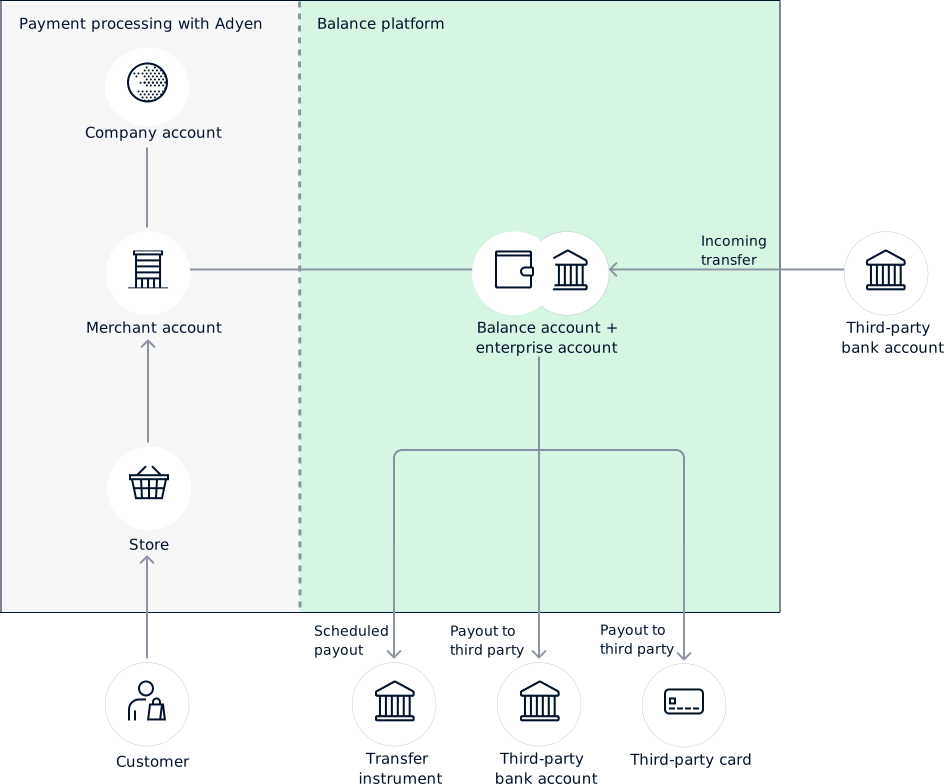
To keep your enterprise account funded, Adyen moves your sales funds from your merchant account and settles them in your enterprise account. After your funds are settled, you can start using them for transfers. This allows you to manage your cash flow and make payouts using the resources in your balance platform.
With enterprise accounts, the flow of your funds is as follows:
- Adyen processes a payment from your customer.
- The payment funds are credited to your merchant account.
- The payment funds are moved to and settled in your balance account, which is connected to your enterprise account.
- Using your enterprise account, you can receive funds and make payouts to third parties.
The following diagram shows the flow of your funds when using enterprise accounts.
Account information for third parties
The following tabs show the account information that you must share with third parties so you can receive funds from them.
Supported countries/regions
We offer enterprise accounts in the following locations:
| Europe |
|---|
European Union (with a Dutch IBAN)
United Kingdom
| North America |
|---|
United States