Limited availability
Adyen's Managed Risk solution is in pilot phase. Some of the processes and documentation may change as the solution evolves.
Managed Risk enables you to outsource the risk inherent in your user's payment processing to Adyen. We monitor and mitigate fraud and default risks across the users of your platform, and assume the responsibility for negative balances on their accounts. Managed Risk eliminates the need to build dedicated risk management tools for your platform, which reduces your operational load and costs.
Requirements
Take into account the following requirements, limitations, and preparations for this solution.
| Requirement | Description |
|---|---|
| Integration type | You must have a platform model integration on Adyen for Platforms. |
| Customer Area roles | To view Managed Risk details in your Customer Area, make sure that you have one of the following roles:
|
| Webhooks | To receive updates, subscribe to the following webhooks in your Customer Area:
|
| Limitations | Managed Risk is currently not compatible with Adyen's financial products offering. |
Risk management
Adyen has a comprehensive internal risk management framework. This framework executes automated and expert-validated actions, customized to individual user risk profiles. Based on the data provided by your user during onboarding and the data collected through observing their processing activities, Adyen may apply the following:
- Dynamic settlement delay: Dynamically decrease or increase the settlement period of your user's transactions according to their risk level.
- Rolling reserves: Withhold a percentage of your user's daily sales for an extended period.
- Block payouts: Suspend or block your user's payouts by changing their sendToTransferInstrument account holder capability settings. We notify you about the change in a balancePlatform.accountHolder.updated webhook message.
- Refund control: Decline refunds if the balance account has insufficient funds to cover the transaction.
Negative balances
Adyen is responsible for covering negative balances that may occur in your users' balance accounts. As a result, we automatically and periodically perform negative balance write-offs, which clears the outstanding debt from the user's account.
Write-offs occur automatically and periodically, after the balance of your user’s balance account has remained negative for 180 days after their last captured payment. If a negative balance recurs after a previous write-off (for example, due to a new chargeback), the new negative balance is written off the following day.
When a write-off is initiated, Adyen executes internal accounting steps that result in zeroing out the negative balance on your user's account and notifying your platform through the following channels:
- Transfer webhooks: You receive a balancePlatform.transfer.created event type when the funds transfer to your user’s balance account is initiated, and balancePlatform.transfer.updated event type for all subsequent status changes. All webhooks related to negative balance write-offs contain a
descriptionfield with the following text: ManagedRisk negative balance write-off. - Reports: You can observe the write-off activity in your platform's Accounting Report and Statement Report.
Receive updates
All changes in your user's risk management settings automatically trigger webhook messages to your server. To receive these messages, subscribe to the Configuration webhooks.
After you successfully onboard your user, we send a webhook message with event type balancePlatform.managedRisk.settlementDelay.updated to notify you that we configured Managed Risk for the account holder.
This webhook message contains the following information in the data object:
| Parameter | Description |
|---|---|
accountHolderId |
The unique identifier of the account holder whose risk management changes. |
balancePlatform |
The unique identifier of the balance platform in which the change occurs. |
creationDate |
The date and time when the change was triggered, in ISO 8601 extended format. |
configurations.paymentMethod |
The payment method to which the settlement delay applies. |
configurations.settlementDelay |
The settlement delay applied to your user's transactions. It indicates the number of days after which your user's funds become available in their balance account. |
id |
The unique identifier of the webhook event. |
reason |
The reason for the change in your user's risk management, set to paymentProcessingEnabled. |
The following examples show the webhook message you receive when Managed Risk is configured for your user.
View events
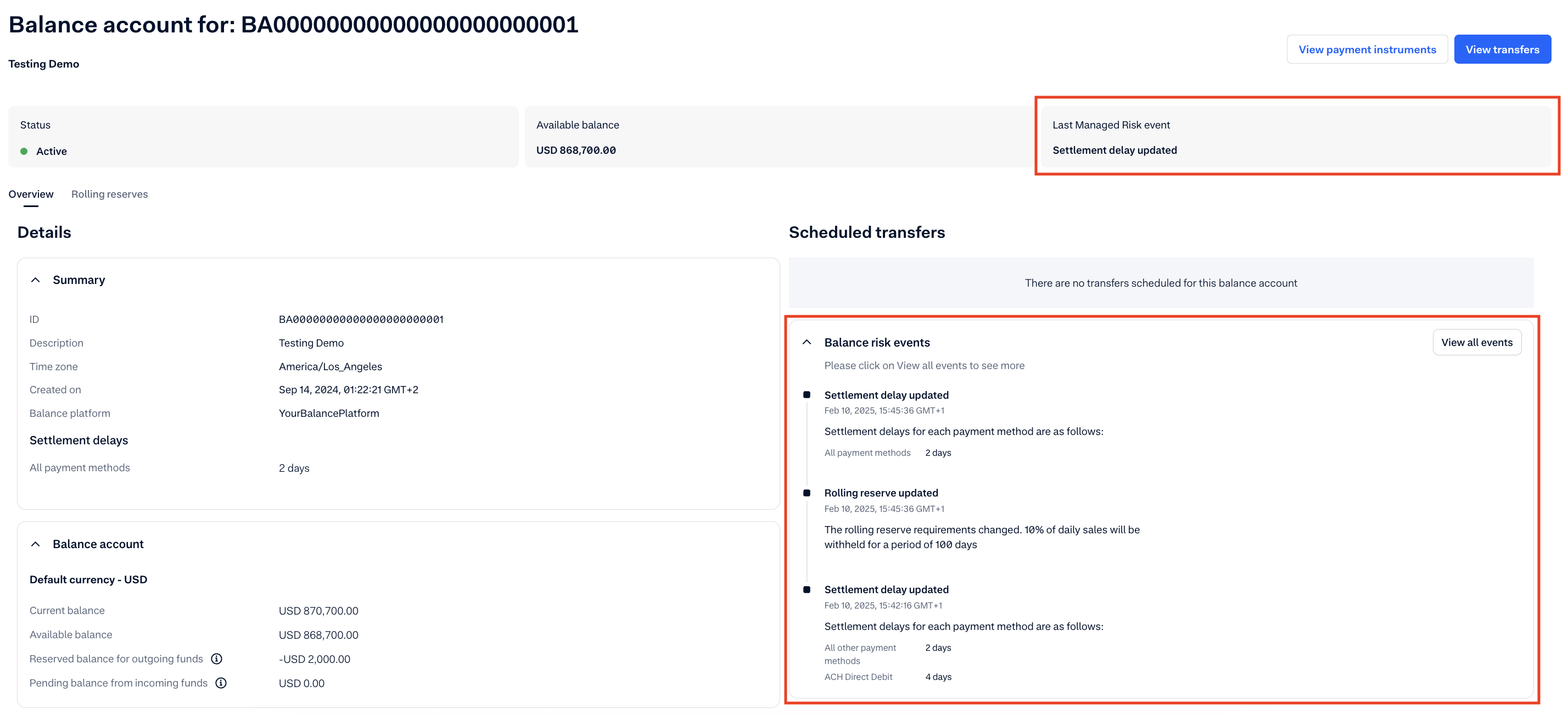
You can track the changes and view all events related to risk management on the Balance account page in your Customer Area.
- Go to Accounts & balances > Balance accounts.
- Select the ID of the balance account you want to view from the list.
- On the Balance account details page, you can view:
- The latest risk-related event on the balance account in the Last Managed Risk event tile.
- The latest events under the Balance risk events section. By default, we display the last 3 events.
- To view all risk management-related events in reverse chronological order, select View all events.
Here is an example of the Balance account > Overview tab with the latest Managed Risk events.