Limited availability
Adyen's Managed Risk solution is in pilot phase. Some of the processes and documentation may change as the solution evolves.
If your user is considered higher risk due to their industry or behavior, we withhold a percentage of their daily sales volume from the sales day's settlement batch for a certain period of time. Adyen holds the reserved funds until the end of the rolling reserve cycle, then releases them to your user's balance account. When the funds become available, you can pay them out to your user manually, or according to a preconfigured payout schedule.
Requirements
If you have the roles and permissions for Managed Risk, there are no additional requirements, limitations, or preparations.
How it works
In the following example, Adyen applied a 10% reserve to your user's daily sales, with a 30-day rolling cycle and a 2-day settlement delay.
This means that 90% of your user's daily sales become available on your user's balance account after the settlement delay (on day 3), while the remaining 10% is held in reserve for 30 days. According to the 2-day settlement delay and the 30-day rolling reserve cycle, the funds that become available on day 33 consist of 90% of the sales volume of day 31, plus the amount that was reserved on day 3.
Available funds(D31) = (Sales volume(D31) x 0.90) + (Sales volume(D1) x 0.10)
Example breakdown for a rolling reserve
Here is the breakdown of the reserved, released, and available funds for the rolling reserve cycle described above:
| Sales day | Sales volume | Funds reserved | Funds released | Available funds | Funds in reserve |
|---|---|---|---|---|---|
| 1 | $1,000.00 | $100.00 | $0.00 | $0.00 | $100.00 |
| 2 | $2,000.00 | $200.00 | $0.00 | $0.00 | $300.00 |
| 3 | $3,000.00 | $300.00 | $0.00 | $900.00 | $600.00 |
| 4 | $1,000.00 | $100.00 | $0.00 | $1,800.00 | $700.00 |
| ... | ... | ... | ... | ... | ... |
| 31 | $3,000.00 | $300.00 | $100.00 | $900.00 | $5,600.00 |
| 32 | $1,000.00 | $100.00 | $200.00 | $1,800.00 | $5,500.00 |
| 33 | $2,000.00 | $200.00 | $300.00 | $2,700.00 | $5,400.00 |
| 34 | $1,000.00 | $100.00 | $100.00 | $900.0 | $5,400.00 |
Receive configuration updates
All changes in your user's risk management settings automatically trigger webhooks to your server. To receive these webhooks, subscribe to the Configuration webhooks.
Rolling reserve applied
We send a balancePlatform.managedRisk.rollingReserve.applied webhook when we apply a rolling reserve to your user's balance account.
This webhook contains the following information in the data object:
| Parameter | Description |
|---|---|
accountHolderId |
The unique identifier of the account holder whose daily sales we applied the rolling reserve. |
balancePlatform |
The unique identifier of the balance platform in which the change occurred. |
creationDate |
The date and time when the rolling reserve was applied, in ISO 8601 extended format. |
id |
The unique identifier of the webhook event. |
rollingReservePercentage |
The percentage of your user's daily sales volume that is withheld from the settlement batch as a rolling reserve. |
withHoldingPeriodInDays |
The number of days after which we release the withheld percentage of your user's daily sales volume. |
The following example shows the webhook you receive when a rolling reserve is applied to your user's daily sales volume.
Rolling reserve updated
Adyen sends a balancePlatform.managedRisk.rollingReserve.updated webhook to notify you of changes to the applied rolling reserve. Updated reserve terms only affect future payments and do not affect previous reserves.
This webhook contains the following information in the data object:
| Parameter | Description |
|---|---|
accountHolderId |
The unique identifier of the account holder whose risk settings changed. |
balancePlatform |
The unique identifier of the balance platform in which the change occurred. |
creationDate |
The date and time when the rolling reserve amount and/or withholding period changed, in ISO 8601 extended format. |
id |
The unique identifier of the webhook event. |
rollingReservePercentage |
The updated percentage of your user's daily sales volume that is withheld from the settlement batch as a rolling reserve. |
withHoldingPeriodInDays |
The updated number of days after which we release the withheld percentage of your user's daily sales volume. |
The following example shows the webhook you receive when a rolling reserve that has been applied to your user's daily sales volume, is updated.
Rolling reserve lifted
Adyen sends a balancePlatform.managedRisk.rollingReserve.lifted webhook when we remove the rolling reserve configuration from your user's balance account.
This webhook contains the following information in the data object:
| Parameter | Description |
|---|---|
accountHolderId |
The unique identifier of the account holder whose risk management changes. |
balancePlatform |
The unique identifier of the balance platform in which the change occurs. |
id |
The unique identifier of the webhook event. |
The following example shows the webhook you receive when a rolling reserve is lifted from your user's daily sales volume.
Receive fund movement updates
All fund movements in your balance platform automatically trigger webhooks to your server. We send a balancePlatform.transfer.updated webhook when we deduct funds from your user's transaction and allocate it to the reserve, and a balancePlatform.managedRisk.balance.block.released webhook when we release these funds.
While we send individual transfer webhooks for every transaction, we only send one balancePlatform.managedRisk.balance.block.released per settlement batch.
Reserved funds
Adyen sends a balancePlatform.transfer.updated webhook when we reserve the funds from your user's transaction amount and allocate it to the rolling reserve.
This webhook contains an additional managedRisk object with the following information:
| Parameter | Description |
|---|---|
blockedAmount |
The amount deducted from the original transaction amount and allocated to the reserve. |
expectedReleaseDate |
The date when the withheld amount is scheduled to be released to the balance account, in ISO 8601 format. |
batchReference |
The unique identifier of the batch of transfers this individual transfer is part of. |
The reserved amounts are also included in the Managed Risk Blocked Amount column of the Balance Platform Accounting and Payout reports. You can enable this column by configuring the reports in your Customer Area.
The following example shows the webhook you receive when we add USD 100 to a rolling reserve with a 30-day cycle.
Released funds
Adyen sends a balancePlatform.managedRisk.balance.block.released webhook when we release the funds from the reserve and allocate it to the current sales day's settlement batch.
This webhook contains the following information:
| Parameter | Description |
|---|---|
amount |
The sum of the funds released from the reserve and allocated to the settlement batch of the valueDate. |
valueDate |
The date when the previously withheld amount is released to the balance account, in ISO 8601 format. |
batchReference |
The unique identifier of the batch of fund releases. |
The following example shows the webhook you receive when we release the funds reserved in the previous example.
View events and changes
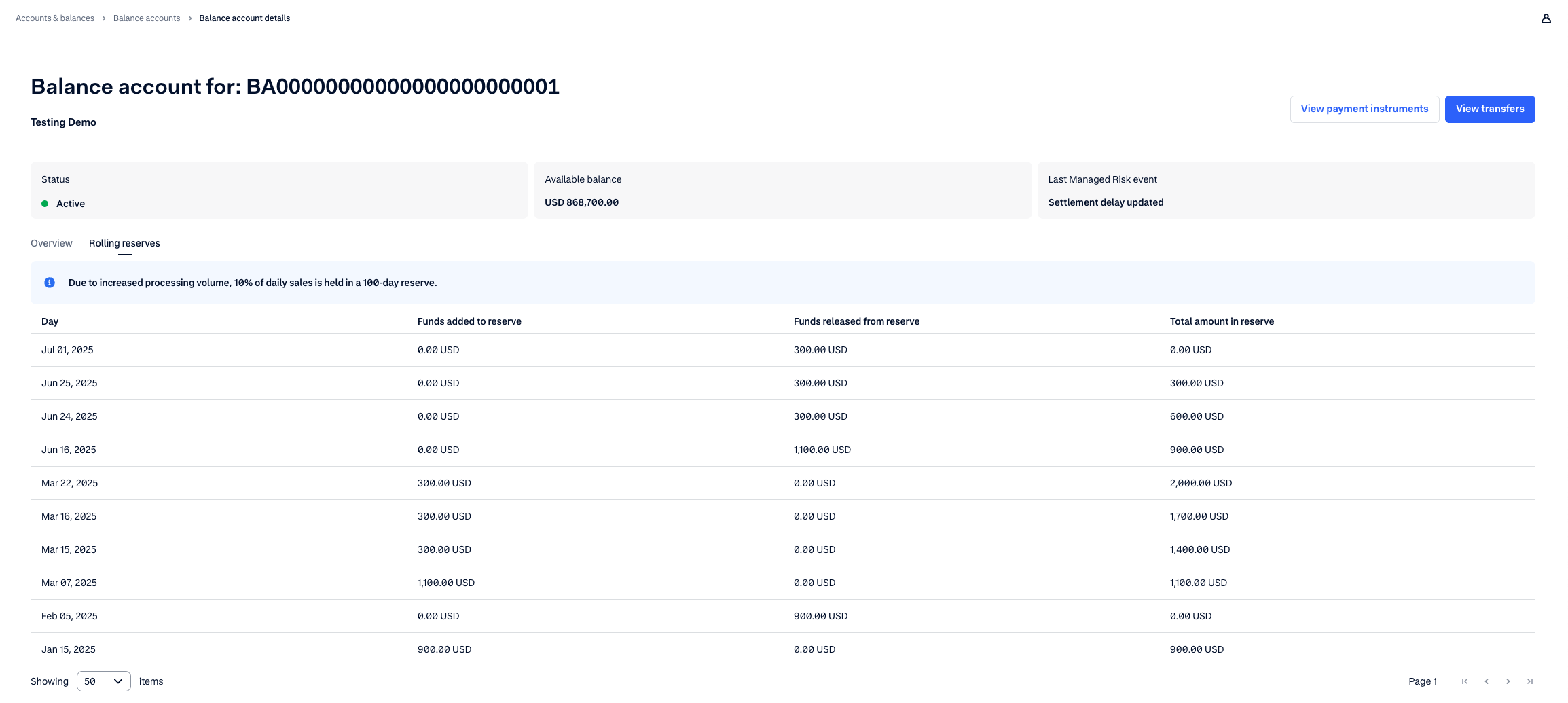
View the rolling reserve configuration and fund movement details in your Customer Area:
- Go to Balance account.
- Select the Rolling reserves tab.
This tab is only visible if a rolling reserve is applied to the balance account. - You can view the current rolling reserve configuration in the header.
- In the table, you can see an overview of when funds are added to and released from the reserve, and the total amount that is held in reserve on your user's balance account.