


In your merchant account, you hold the following balances:
- Pending balance
- Refund reserve
- Next payout amount
- Deposit
- Negative refund allowance
The deposit and the negative refund allowance are fixed amounts determined by Adyen, but you can adjust all other balances in your merchant account in the following ways:
- Top up your account
- Transfer funds between accounts
- Process payments
- Pay out funds to your bank account
Fund allotment
When you increase the available balance in your merchant account, the funds first go to your pending balance. After they are settled, these funds are allotted to the other balances held in that account. How these funds are allotted depends on whether you top up the account, or increase balances in another way (using a funds transfer, or by processing payments).
Requirements
Before you begin, take into account the following requirements, limitations, and preparations.
| Requirement | Description |
|---|---|
| Integration type | An online or point-of-sale integration with Adyen. |
| API credential roles | To transfer funds using the API, make sure you have the credentials for Balance Control API with the following role:
|
| Customer Area roles | To manage your reserve, top up your account, or transfer funds using the Customer Area, make sure that you have one of the following roles:
|
| Setup steps | Before you begin:
|
Top up your account
The fastest way of transferring funds to your account is to generate a top-up payment. When we receive the top-up payment, we add the funds to your reserve, your deposit, or your pending balance, based on how you chose to allot the funds.
For payments made in EUR or USD, the funds are added to your account within two business days. For other currencies, this can take up to four business days.
For some currencies, for example ZAR, you need to use specific details for your bank transfer.
To generate a top-up payment, you need one of the following user roles:
- Merchant financial
- Manage key financial tasks
To top up your merchant account using your Customer Area:
- Select the correct merchant account.
- Go to Balances > Balances overview.
- Select Top up.
- Select the Reason for your top-up payment.
- Enter the amount that you want to add to the account.
- Select Top up with your bank account or Other top up methods.
- In the new window that opens, complete the payment.
Transfer funds between accounts
You can transfer funds between two merchant accounts under the same company account and legal entity. For this to work, these two merchant accounts must have at least one common processing currency. This currency is used to transfer the funds.
By transferring balances, you can adjust the balance of your reserve, your deposit, or pending amount. You can do this by using the Customer Area or the Balance Control API.
Keep track of balance changes
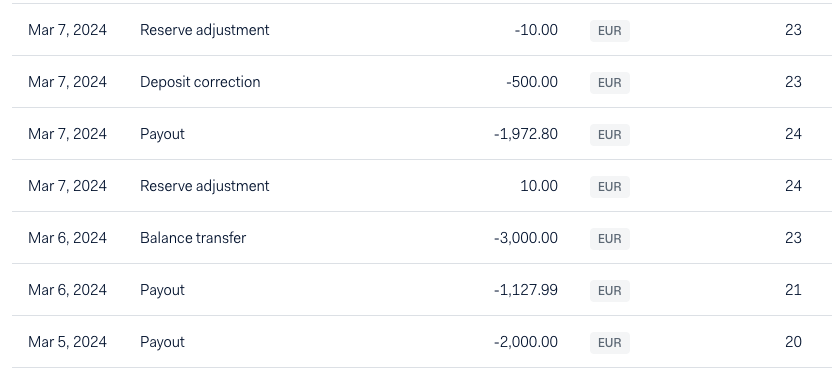
To keep track of adjustments you make to the balances in your Adyen accounts, you can use the activity log in the Customer Area.
The activity log gives you a chronological view of all balance adjustments that took place in your merchant account. To view the activity log in your Customer Area:
- Select the correct merchant account.
- Go to Balances > Balances overview.
- Select the Activity log tab.
You can also use the Company Payout and Settlement details reports to get details of balance transfers.