


This page shows an overview of your end-to-end integration of Intelligent Money Movement. This overview is based on the offerings that you selected:
The following table shows your selected offerings and the main features that we recommend you to use with each offering.
| Offering | Feature |
|---|---|
| Online payments | |
| In-person payments | |
|
Risk and revenue optimization |
|
|
Fund management |
|
| Payouts | |
| Enterprise issuing | |
| Webhooks | |
| Reports | |
The following sections provide more details about each offering and their features.
Online payments
An online payments integration with Adyen enables you to accept payments from shoppers through your website, mobile app, or other digital channels. You can offer a seamless checkout experience while supporting a wide range of payment methods and currencies:
- Accept payments from customers worldwide using their preferred payment methods.
- Process transactions securely with built-in fraud protection.
- Offer a seamless checkout experience across web and mobile.
- Support multiple currencies and local payment methods.
- Use Adyen-generated reports for your bookkeeping and reconciliation processes to ensure accurate accounting of funds.
Recommended integration for online payments
Your business requirements determine how you integrate online payments. We offer flexible integration options to suit different needs.
| Online payments functionality | Integration details |
|---|---|
| Accept payments | |
| Select payment features | |
| Modify payments | |
Accept payments
Determine the server-side flow and the user interface (UI) option for your online payments integration. If you are not an Adyen technology or service partner, you can alternatively integrate with a plugin that has Adyen payments functionality out of the box.
See more information:
The following subsections show the features that your integration needs for accepting payments.
Server-side choice
To build your online payments integration, first choose between the Sessions flow and the Advanced flow. This choice depends on the use cases that you need to support, and on the integration effort that you can handle.
Sessions flow: a single API request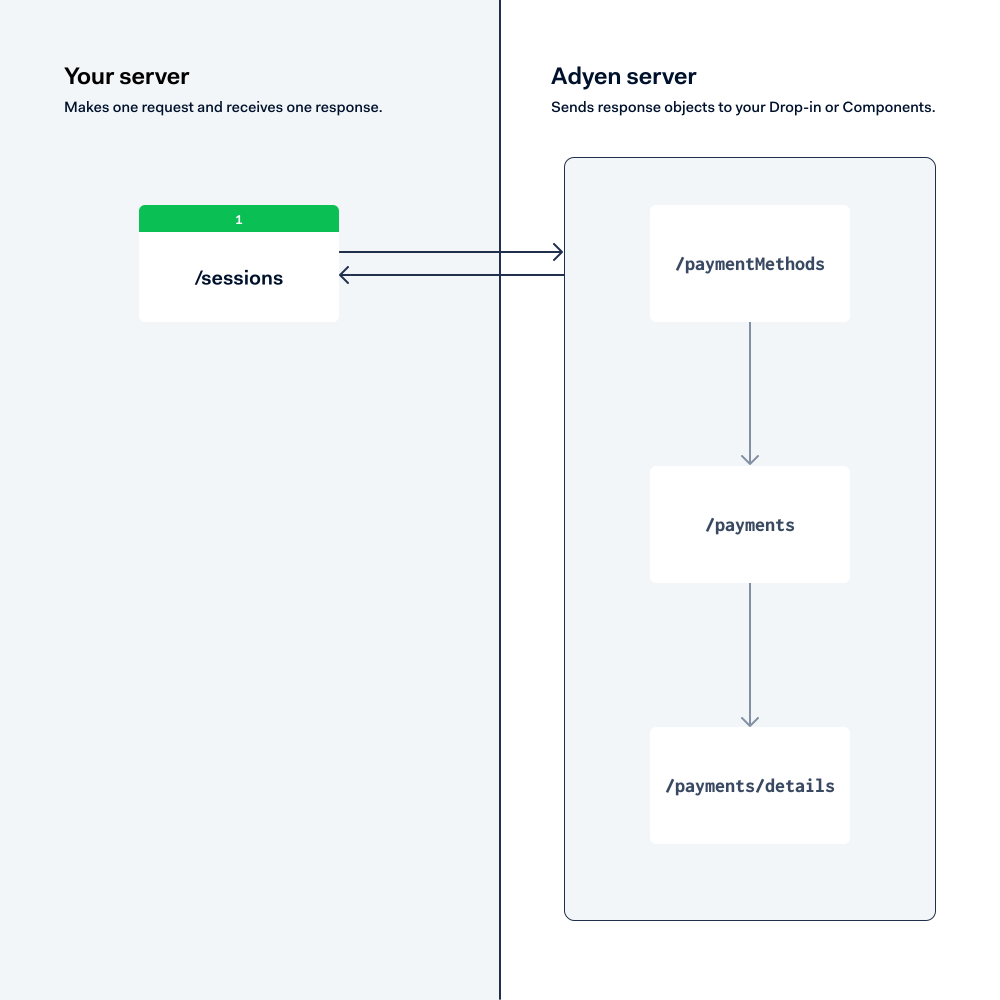
Advanced flow: three API requests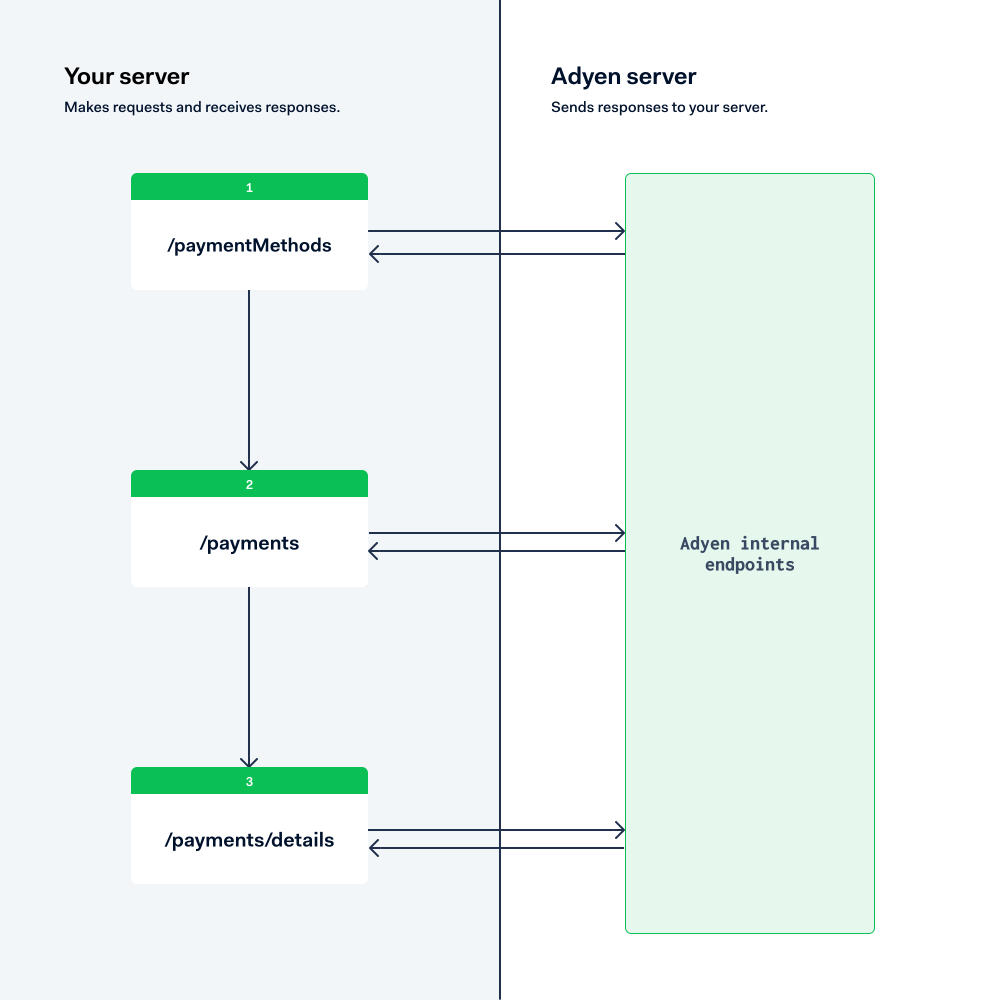
See more information:
Client-side choice
Then choose the integration type to match your client website or app.
- Drop-in is our fully pre-built UI for accepting payments. It is available for multiple platforms, such as Web, iOS, and Android.
- Components are customizable UI components for accepting payments. This option too is available for multiple platforms.
- API only means you use the Advanced flow on the server side, and build your own UI for accepting payments.
Whatever solution you choose, ensure it can process 3DS2 payments in regions where it is mandatory.
See more information:
- In the Sessions flow or Advanced flow integration guide, switch between Drop-in and Components for your platform to see the differences between these UI options.
- 3D Secure 2 authentication
Add payment methods
After you build your payment server and client-side UI, add the payment methods that you want to offer to your shoppers.
For example, you should offer the payment methods that are most popular in your target markets:
- Credit and debit cards
- Digital wallets (Apple Pay and Google Pay)
- Buy-now-pay-later options
- Local payment methods (for example: iDEAL, Pix, UPI)
- Bank transfers
See more information:
- Payment methods that we support.
Select payment features
The following subsections show features that you can select to make online payments easier and more secure.
3D Secure 2 authentication
3D Secure 2 is an authentication protocol that helps verify the identity of shoppers during online card payments. It reduces fraud and shifts liability for chargebacks from you to the card issuer for authenticated transactions.
This type of authentication is mandatory in regions like the European Economic Area (EEA) under Strong Customer Authentication (SCA) requirements. Even in regions where it is not mandatory, 3D Secure 2 authentication can help reduce fraud and improve authorization rates.
See more information:
Tokenization
Tokenization allows you to securely store shoppers' payment details to make recurring payments more efficiently. Instead of storing sensitive card data, you store a token that references the payment details held securely by Adyen.
Use tokenization to:
- Enable one-click payments for returning shoppers.
- Set up recurring payments that you initiate, like subscriptions and automatic top-up.
- Reduce PCI compliance scope by not handling raw card data.
See more information:
Express checkout
Express checkout enables shoppers to complete purchases with fewer steps, using saved payment methods from digital wallets like Apple Pay and Google Pay. Shoppers can skip manual entry of payment and shipping details.
See more information:
Modify payments
The following subsections show how you can modify payments after these have been authorized.
Capture
After a payment is authorized, you must capture it to transfer the funds from the shopper to your account. You can capture payments manually or configure automatic capture.
Use manual capture when you need to:
- Verify stock availability before charging the shopper.
- Delay charging until goods are shipped.
- Capture partial amounts.
See more information:
Cancel
Cancel an authorized payment before it is captured to release the reserved funds back to the shopper. This is useful when an order cannot be fulfilled or the shopper changes their mind.
See more information:
Refund
Refund a captured payment to return funds to the shopper. You can issue full or partial refunds depending on your business needs.
See more information:
Reversal
Use a reversal when you do not know the current state of a payment. Adyen determines whether to cancel or refund the payment based on its status. This is useful for error recovery scenarios.
See more information:
In-person payments
With Adyen's in-person payments solution you can build a feature-rich point-of-sale integration that:
- Is supported around the world in many languages.
- Enables you to accept global and local payment methods.
- Lets you choose from a wide range of fully-certified and PCI-compliant Adyen payment terminals.
- Matches your business needs, and your choice of network architecture.
The following subsections explain the main features of Adyen's in-person payments offering.
Terminal API integration
Our Terminal API is based on an industry standard communication protocol called nexo Retailer Protocol, and supports all operations that a modern POS system offers.
A Terminal API integration uses PCI-certified payment terminals that are supplied by Adyen. These terminals are capable of interpreting Terminal API messages.
To begin, have a look at the integration checklist.
Standalone terminals
If you do not need a fully-featured POS system, you can use standalone terminals instead. This is our quickest way to start accepting in-person payments. It does not require any development or integration work. Instead of using a POS system, you initiate transactions directly from a standalone terminal that is supplied by Adyen.
In addition, standalone terminals can be used as a fallback for a POS system with integrated terminals: if there is a problem with the internet access, you can continue making transactions by using a standalone terminal instead of an integrated terminal.
For instructions, see Standalone terminals.
Mobile solutions
In addition to (or instead of) using traditional payment terminal hardware, you can accept point-of-sale payments on a mobile device like a smartphone or a tablet, or using a combination of a mobile device and a card reader.
To implement these Tap to Pay and card reader mobile solutions, you first need to integrate your POS system with our Terminal API. Then you add our Mobile SDK to your POS app, and install the app on your mobile device. The payments are routed through the SDK, but use the Terminal API specification.
Another option for Tap to Pay is to connect your POS app to an Adyen Payments app that already includes the Mobile SDK.
For specific requirements and instructions, see the Mobile solutions documentation.
Plugins
You may already use a retail, hospitality, or other platform by a company that partners with Adyen. In this case, you can use a plugin to integrate our payments solution and process in-person payments with Adyen.
By using a plugin, you accept in-person payments on Adyen payment terminals that communicate directly with the partner platform.
We offer plugins for global platforms like Oracle Opera, Oracle Simphony, Oracle Xstore, and Cegid Retail Y2. You can check the full list in our partner directory.
Risk and revenue optimization
Adyen offers a built-in risk management solution to help your business minimize fraud and increase conversion. For better outcomes, our solution combines machine learning and static rules.
Uplift
Adyen Uplift helps you strike a balance between conversion, risk and cost. You get recommendations that are tailored for your business, can experiment with different settings, and find out where you can make changes to increase revenue and decrease cost. Adyen Uplift helps you get more out of payments and reduces the time you have to spend on operational tasks.
Recommendations and insights are powered by machine learning and automation. Use them to evaluate the full payment funnel performance, automate decisions, take action to optimize payment conversion, simplify risk management, or lower the cost of payments.
We have divided the Adyen Uplift focal areas in a number of modules:
- Tokenize: Securely store one or more payment details per shopper, with the shopper's consent. These tokens replace the shopper’s payment details and can be used in subsequent payments.
- Protect: This is our built-in risk management solution helping businesses to make the right decisions and fight fraud, reduce costs, and increase conversion using a combination of static rules and machine learning.
- Authenticate: Apply the right authentication mechanism for each shopper, balancing security, regulation, and convenience while you maximize conversion and limit risk.
- Optimize: Make the best use of available payment methods, and benefit from automated routing, issuer messaging, and recovery.
- Personalize: This module consists of different tools and a dashboard to help you explore and analyze how you can optimize the checkout experience for shoppers.
See more information:
Fund management
Manage your business funds using Adyen's balance platform. With your balance platform, you can get access to an enterprise account with banking capabilities.
You can only use enterprise accounts if you are also using Payouts or Enterprise issuing.
Enterprise accounts
Enterprise accounts allow you to store and manage your funds and your customers' funds. When you create an enterprise account, you receive a set of account identification details, such as an account number or IBAN. With these account details, you can perform banking operations, such as:
- Receiving funds from third-party bank accounts.
- Sending funds to third-party bank accounts or cards.
See more information:
Payouts
Adyen offers a payouts service using Adyen's balance platform. With this offering, you can combine payouts with processing online or in-person payments. Your payouts do not need to be directly related to an acquired payment, the counterparty can be any third-party beneficiary. For example, you can use our payouts service to pay your supplier or business partner.
The following subsections show the main features you can use with Adyen Payouts.
Pay out to your verified bank account
The funds of your business are held in your balance account until you pay them out to your verified bank account. You can pay out your funds in two ways:
- On a schedule: you set up a schedule that automatically triggers the payout based on timing and amount.
- On demand: you pay out when needed, outside of the automatic scheduled payouts.
See more information:
Pay out to third-party bank accounts
You can use your balance platform to pay out funds to third-party bank accounts. You can use this feature to send funds to any counterparty external to your business, such as providers or freelancers.
Adyen provides multiple features to help you complete payouts successfully. Before you make a payout, you can use Adyen's APIs to:
- (EU and UK only) Verify the counterparty's name. This allows you to ensure that your payouts are sent to the intended counterparty.
- Calculate transfer routes. Some counterparties can be subjected to additional requirements or limitations. To prevent transfer failures due to such limitations, we recommend that you calculate the available transfer routes before sending funds to a new counterparty.
Adyen supports paying out to counterparties in multiple locations, currencies, and priorities.
See more information:
Pay out to third-party cards
You can use your balance platform to pay out funds to third-party Mastercard or Visa cards. Funds typically become available to the cardholder within 30 minutes, although processing times can vary depending on the card issuer.
Adyen supports two types of card payouts:
- One-off payouts: make a single payout to a card.
- Recurring payouts: save the details of a card and make recurrent payouts to that card.
To help you manage the details of counterparty cards, we allow you to tokenize the card details. This allows you to simplify recurring payouts and store card details when you are not fully PCI compliant.
See more information:
Enterprise issuing
With Adyen's balance platform, you can use Enterprise issuing. This offering allows you to issue cards for business purposes, such as to:
- Allow members of your team to pay for business-related expenses.
- Allow you to pay your business' suppliers.
- Offer card issuing as a service to other businesses.
These Adyen-issued cards are tied to, and funded by, the balance accounts in your balance platform.
The following subsections show the main features of Enterprise issuing.
Create and manage cards
You can create virtual or physical cards using Adyen's APIs. These cards are associated with Visa or Mastercard pre-approved use case, which is called a scheme program. By default, Adyen handles the scheme program for you.
For your physical cards, you create a personalized design that reflects your brand. This design is included on the card itself and the mailer it is sent in. Each card design must be approved by Visa or Mastercard. To make sure that your design fulfills the schemes' requirements, your Adyen contact helps you to complete and specify the designs.
Depending on your use case and the type of cards you issue, you may need to fulfill PCI compliance requirements. Your Adyen contact informs you of any PCI requirement that applies to your use case.
After you create your cards, you can use Adyen's APIs to manage the status of the cards. For example, you can suspend, reactivate, or permanently close a card.
See more information:
Add funds to cards
Payments that you make with your Adyen-issued cards are funded by balance accounts in your balance platform. To make sure that you always have funds for card payments, you can transfer funds to your balance accounts from a verified bank account that you own.
See more information:
Approve or decline payments
Adyen performs internal checks and validations to ensure that payments made with Adyen-issued cards are legitimate. Additionally, Adyen allows you to configure custom verifications to automatically approve or decline payments. You can use one or both of the following methods:
- Use transaction rules to approve or decline payments based on conditions. For example, you can specify a maximum amount that a cardholder can spend on a transaction.
- Use relayed authorization to approve or decline payments by responding to a webhook sent by Adyen. You can use your own business logic to determine if a payment is approved or declined. Then, you send that response to Adyen.
When you combine both methods, transaction rules are applied first. This setup serves as a filtering mechanism for payment attempts before sending you the relayed authorization webhook.
See more information:
Use network tokens
You can create network tokens that your cardholders can use in place of sensitive card details. Cardholders can use these network tokens to securely make payments or add their cards to digital wallets.
When a cardholder pays with an Adyen-issued card, the merchant receives the network token instead of the card details. The merchant then sends the network token to the card scheme and Adyen. Adyen then decodes the network token and validates the corresponding card details on behalf of the merchant.
Using network tokens has the following benefits:
- Reduced friction: network tokens are maintained by card schemes, which reduces the number of declined payments.
- Higher authorization rates: payments made with network tokens have higher authorization rates than payments with raw card details.
- Increased security: each transaction is protected by a one-time use cryptogram.
See more information:
Webhooks
Adyen uses webhooks to notify you that an event has occurred within your Adyen integration. Webhooks are useful for tracking long-running processes, where a change in a resource or its status may not occur for multiple seconds, minutes, hours, or days.
You can use webhooks for:
- Handling asynchronous flows. For example, with payment methods like iDEAL, it can take time to get a confirmation that the payment was completed.
- State management. For example, when a resource in your integration is changed, you receive a webhook that contains a snapshot of the new state of the resource.
- Reacting to external events. Some important updates come from external systems and are not a direct result of an API request you made. For example, consider dispute management or relayed authorization.
Adyen offers different webhook event types to choose from. You can decide which webhook event types to subscribe to. Expand the following subsections to read the different types of webhook events.
Events related to processing payments
The following table provides you with a list of webhook types that you need for your integration.
| Webhook Type | Description |
|---|---|
| Standard webhooks | Informs you about the status of processed payments, disputes, or payouts. |
Events related to managing payment terminals
| Webhook Type | Description |
|---|---|
| Terminal assignment complete | Informs you when a scheduled assignment of a payment terminal has been completed. |
| Terminal boarding succeeded | Informs you when the boarding of a terminal succeeded. |
| Terminal settings updated | Informs you when the terminal settings are updated. |
| Terminal order update | Informs you about updates to your sales, return, or replacement order for payment terminals. |
Events related to configuring resources in your balance platform
These webhook events inform you about the creation and updates of resources in your balance platform, such as account holders, balance accounts, scheduled payouts, and cards.
| Webhook Type | Description |
|---|---|
| Account holder webhooks | Inform you when you successfully create or update an account holder. |
| Balance account webhooks | Inform you when you successfully create or update a balance account. |
| Sweep webhooks | Inform you when you successfully create, update, or delete a custom payout schedule. A custom payout schedule is called a sweep. |
| Payment instrument webhooks | Inform you when you successfully create or update an Adyen-issued card. You also receive a webhook when an Adyen-issued card is almost expiring. |
Events related to funds transfers
| Webhook Type | Description |
|---|---|
| Transfer webhooks | Inform you about the lifecycle of fund movements on your balance platform, from initiation to completion. These events are especially important for tracking the state of payouts. |
| Transaction webhooks | Inform you when a transfer is booked. For example, it informs you when an outgoing external transfer is completed. |
Events related to Adyen-issued cards
| Webhook Type | Description |
|---|---|
| Authentication webhooks | Inform you when the process of cardholder authentication is finalized, whether it is completed successfully, fails, or expires. |
| Card order webhooks | Inform you about the lifecycle of orders of physical cards. |
| Dispute webhooks | Inform you about the lifecycle of disputes for payments made with Adyen-issued cards. When you raise a dispute, Adyen sends webhooks to inform you about its creation and outcome. |
| Network token webhooks | Inform you about the status of network tokens created for Adyen-issued cards. |
Events related to reports
| Webhook Type | Description |
|---|---|
| Report webhooks | Use this webhook to automate your reporting and reconciliation processes for reports of your balance platform. |
Reports
To ensure accurate accounting of funds within your Adyen accounts, you can use Adyen-generated reports for your bookkeeping and reconciliation processes. You can generate these reports on demand or automatically on a schedule.
Adyen generates reports for your Adyen account and for your balance platform. You can use these reports to do common reconciliation processes. For complete financial reconciliation over a period of a month, you need to use a combination of Adyen account reports and balance platform reports. For other common reconciliation tasks you can use the data from just one report.
Expand the following subsections to read about the types of reports that you can generate.
Reports related to payment processing
| Report | What to use this report for |
|---|---|
| Received payment details report | Get detailed insights about individual payment interactions. This report includes some customer insights, payment information and statuses. |
| Payment accounting report Required for full financial reconciliation. |
Get details of payment lifecycle events, including the fees associated with each event. Understand the breakdown of payment processing costs and get retrospective cost insight. |
| Settlement details report Required for full financial reconciliation. |
This report includes the payment funds and per-transaction costs that are available on the accounting reports, as well as the total balance adjustments originating from the Monthly invoice. This report also includes any one-off inbound wire transfer deposits to your balance platform. |
| Monthly invoice Required for full financial reconciliation. |
Get a summary of all assessed fees and adjustments applied during the preceding month. Use as part of a full monthly reconciliation of balance platform operating costs. Get insights into the overall balance platform margin. |
Reports related to payment terminals
| Report | What to use this report for |
|---|---|
| POS Terminal fleet Scheduled report | Get information about your terminals, such as:
|
Reports related to funds in your balance platform
| Report | What to use this report for |
|---|---|
| Balance Platform Accounting Report Optional for full financial reconciliation. |
Track all balance changes related to transfer lifecycle events and their success rates through their status (received, authorised, booked). Confirm the balance changes that you are informed of through webhooks for individual transactions in the same period. Track events that influenced balance changes. |
| Balance Platform Statement Report Required for full financial reconciliation. |
Get the opening and closing balances on a daily basis for all accounts that had a balance change on that day. See the events that influenced the balance change. Track transactions included in scheduled payouts and on-demand payouts. |