


Adyen supports network tokens for Adyen-issued cards. With network tokens, you can create network tokens that your cardholders can use in place of sensitive card details. Your cardholders can use network tokens to securely make payments or add their cards to digital wallets.
Requirements
Before you begin, make sure that you fulfill the following requirements:
| Requirement | Description |
|---|---|
| Integration type | You must have an integration that supports Issuing. |
| Setup steps | Reach out to your Adyen contact to make sure that you have set up a card manufacturing profile. |
Network tokens
Network tokens are unique identifiers that replace and represent sensitive card details, such as:
- The 16-digit primary account number (PAN)
- The card verification code (CVC)
- The expiry date
When your cardholder pays with an Adyen-issued card, the merchant receives the network token instead of the card details. The merchant then sends the network token to the card scheme and Adyen. Adyen then decodes the network token and validates the corresponding card details on behalf of the merchant.
Using network tokens has the following benefits:
- Reduced friction: network tokens are maintained by card schemes, which reduces the number of declined payments.
- Higher authorization rates: payments made with network tokens have higher authorization rates than payments with raw card details.
- Increased security: each transaction is protected by a one-time use cryptogram.
Adyen supports two types of network tokens:
- Network tokens for digital wallets: This allows your cardholder to add their card to a digital wallet. Instead of storing your cardholder's raw data, the digital wallet receives a network token from Adyen.
- Card-on-file network tokens: This allows your cardholder to make single or recurring payments to a specific merchant. Instead of processing payments using your cardholder's raw data, the merchant uses a network token provided by Adyen.
Lifecycle of a network token
Adyen creates a network token upon the request of a digital wallet or merchant. After it is created, the network token passes through multiple functional statuses during its lifecycle.
The lifecycle of a network token is as follows:
- A digital wallet or merchant makes a request for a network token.
- Adyen creates the network token. At this stage, the network token cannot be used and the status is inactive.
- Adyen performs a risk analysis on the data included in the request.
- Based on the outcome of the risk analysis, Adyen approves or declines the network token:
- If the network token is approved, Adyen updates the status of the token to active.
- If the network token is declined, Adyen updates the status of the token to closed.
- (Optional) If the network token is active, you or your cardholder can later update the status of the token to suspended or closed.
The following diagram shows how statuses change throughout the lifecycle of a network token.
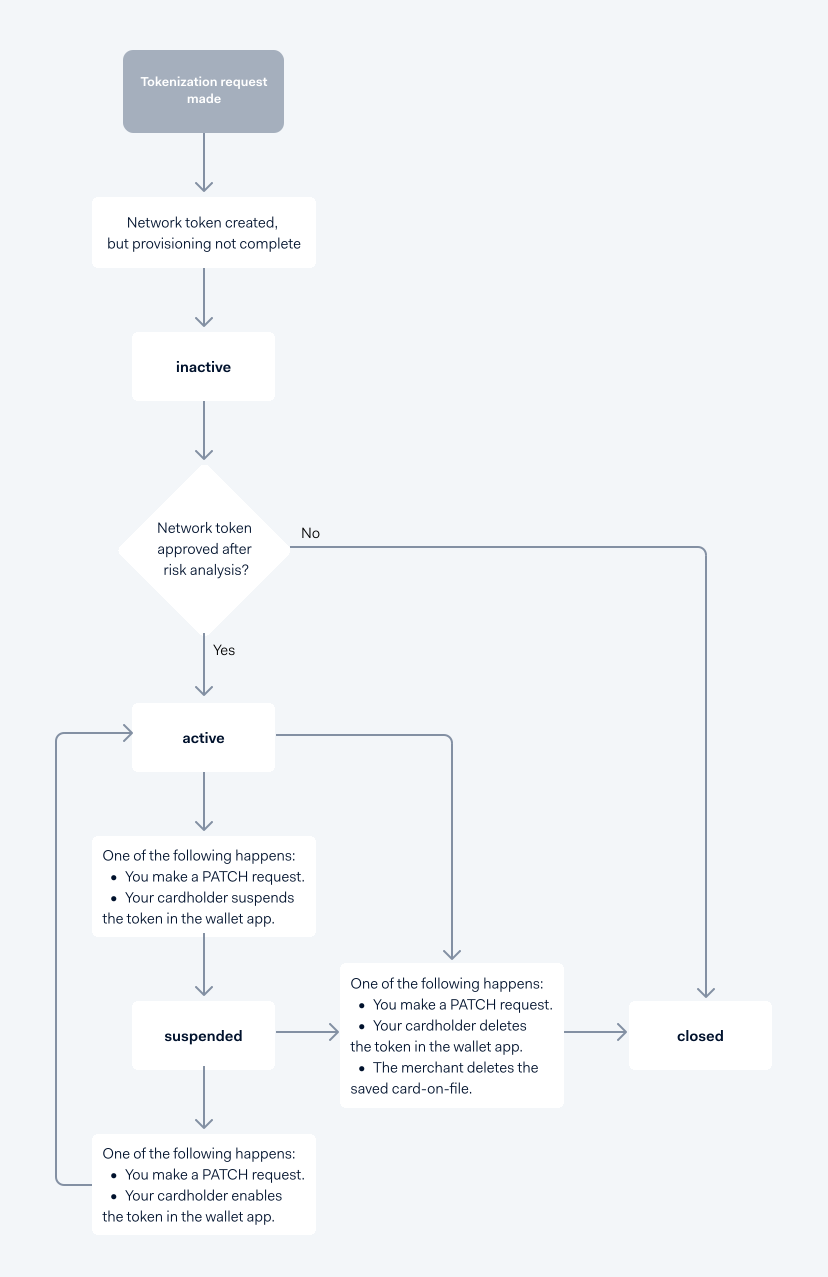
The following table describes the possible statuses of a network token.
| Status | Description |
|---|---|
| inactive | The network token has been created, but it cannot be used yet because the provisioning process has not been completed. This is the initial status of a network token before it becomes active or permanently closed. |
| active | The network token can be used to make payments. The network token becomes active after:
|
| suspended | The network token is temporarily disabled and cannot be used for payments. A network token becomes suspended when:
|
| closed | The token is permanently deactivated and can no longer be used. This status cannot be updated. A network token becomes closed when:
|