


Card-on-file network tokens, also called merchant network tokens, occurs when your cardholder saves the card details with a merchant. For example, consider the case when a cardholder enters the card details on a website to complete a purchase or subscribe to a service with recurring payments.
Unless the merchant is PCI compliant, the merchant does not store the raw card details. Instead, the merchant makes a network token request that is forwarded to Adyen.
Requirements
Before you begin, make sure that you fulfill the following requirements:
| Requirement | Description |
|---|---|
| Integration type | You must have an integration that supports Issuing. |
| Webhooks | In your Customer Area, subscribe to the following webhook:
|
| Setup steps | Reach out to your Adyen contact to make sure that you have set up a card manufacturing profile. |
Overview
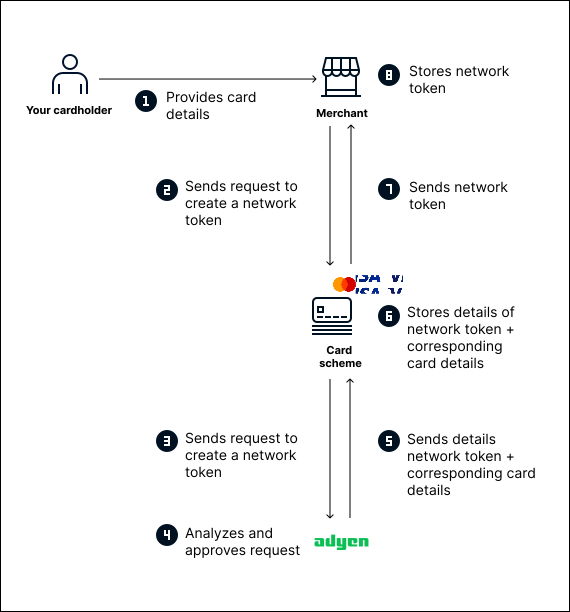
The process to create and activate card-on-file network tokens is as follows:
- Your cardholder provides the card details to the merchant.
- The merchant sends a network token request to the card scheme.
- The card scheme sends the network token request to Adyen.
- Adyen analyzes and approves the request if all the information in the request is correct.
- Adyen sends the network token and the corresponding card details to the card scheme.
- The card scheme stores the network token and the corresponding card details.
- The card scheme sends the network token to the merchant.
- The merchant stores the network token.
The following diagram shows the process to create and activate card-on-file network tokens.
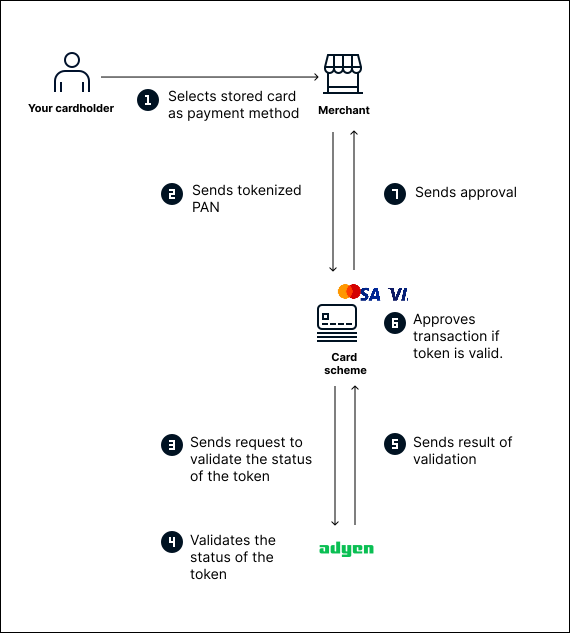
When your cardholder tries to make a purchase using the stored card details, the process is as follows:
- Your cardholder selects the stored card as a payment method.
- The merchant sends the network token to the card scheme.
- The card scheme sends a request to Adyen to validate the status of the network token.
- Adyen validates the status of the network token.
- Adyen sends the result of the validation to the card scheme.
- If the network token is valid, the card scheme approves the transaction.
- The card scheme sends the approval to the merchant.
The following diagram shows the payment flow using a card-on-file network token.
Provisioning for card-on-file network tokens
Provisioning is the process of creating a network token. Provisioning is initiated when a merchant tries to save your cardholder's data for card-on-file payments.
The initial part of the provisioning flow is as follows:
- Your user provides the card details to the merchant.
- The merchant sends a request to the card scheme to create a network token for the card.
- The card scheme forwards the network token request to Adyen.
After receiving the request, Adyen creates a network token with status inactive. Adyen then verify the merchant's information with the card scheme. Based on the outcome of the verification, Adyen decides whether to activate the network token.
After receiving the request, Adyen creates an inactive network token. To decide whether to activate the network token, Adyen verify the merchant's information with the card scheme.
Verification process for provisioning
Card schemes maintain allowlists of approved merchants that are authorized to use card-on-file network tokens. When Adyen receives a network token request, Adyen verifies that the merchant is on the allowlist of the corresponding card scheme.
The verification results in one of the following outcomes:
- If the merchant is on the allowlist, Adyen automatically approves the network token.
- If the merchant is not on the allowlist, Adyen automatically closes the network token and ends the provisioning process.
The outcome of the verification process determines the flow of the provisioning process. The following tabs describe the possible flows.