


Adyen sends webhooks to inform your server about payment-related events. On this page, you'll find details about webhook types along with examples. These webhooks inform you when a merchant initiates a payment, and when funds have been added to or deducted from balance accounts. In case you are not yet familiar with payments, we recommend starting with payment stages.
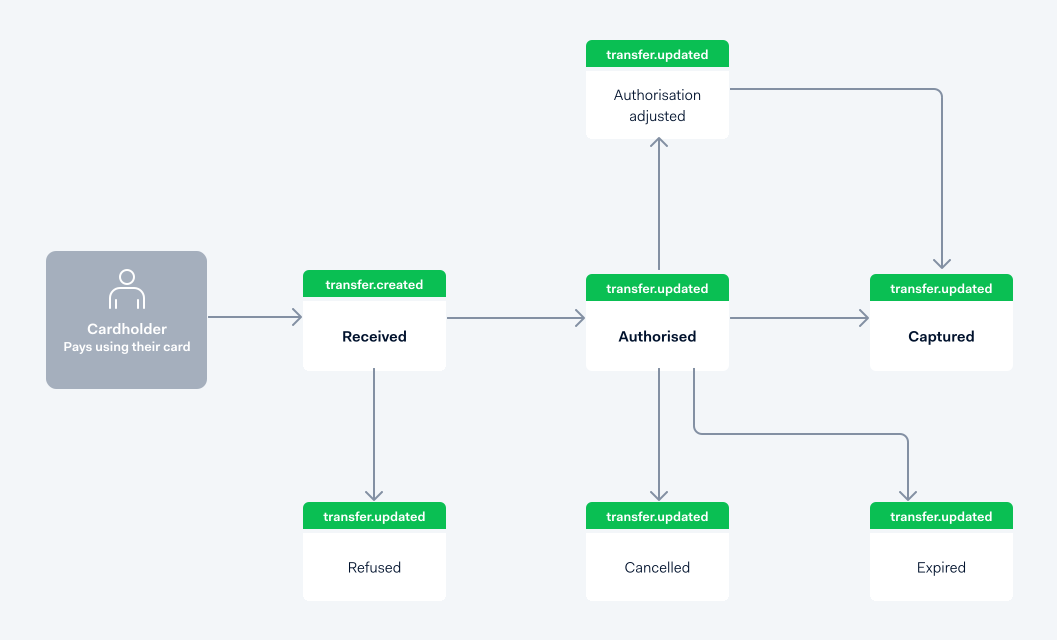
You can identify the webhooks triggered by payment-related events by the following values:
| Parameter | Description | Value |
|---|---|---|
| category | Specifies the category of the transfer. | issuedCard |
| direction | The direction of the transfer based on the balance account. | All events: outgoing Refund: incoming |
| type | Specifies the type of the transfer. | payment |
Payment received
When a user pays with an Adyen-issued card, this triggers a request for a payment. The balancePlatform.transfer.created webhook with status received provides information about the received payment request, such as the amount and which merchant initiated the payment.
Payment authorised
When a user pays with an Adyen-issued card, this triggers a request for payment authorisation. The balancePlatform.transfer.updated webhook with status authorised provides information about the authorisation, such as the reserved amount.
Payment authorisation adjusted
If the initial authorised amount needs to be updated, a merchant may submit an adjusted authorised amount. The balancePlatform.transfer.updated webhook with status authAdjustmentAuthorised, authAdjustmentRefused or authAdjustmentError provides information about the updated authorisation, such as the new reserved amount.
Payment refused
In some cases, when a transaction rule violation occurs, the payment can be refused. This event triggers a balancePlatform.transfer.updated webhook with status refused.
Payment advice authorized or refused
When Adyen updates the status of a payment based on the scheme's advice, you receive an additional balancePlatform.transfer.updated webhook with a new event for the updated booking. You can identify webhooks related to scheme advice by the following fields:
| Field | Description |
|---|---|
data.reason |
Returns schemeAdvice |
data.status |
Returns authorised or refused |
data.events |
Returns a new event for the updated booking based on the scheme's advice. This event has the status adviceAuthorised or adviceRefused, and determines whether the general status of the payment (returned in data.status) is authorised or refused. |
The scheme's decision determines the final status of the payment and whether the funds are reserved or released. When you receive a webhook related to scheme advice, use its status as the final outcome of that payment.
Below is an example webhook you receive when a payment is authorized by the payment scheme:
Below is an example webhook you receive when a payment is refused by the payment scheme:
Payment canceled
Before a payment has been captured, the merchant can cancel the authorisation. This event triggers a balancePlatform.transfer.updated webhook with status cancelled.
Payment captured
When a payment is captured, the funds are deducted from the balance account. This event triggers:
- A balancePlatform.transfer.updated webhook with
statuscaptured. - A balancePlatform.transaction.created webhook with information about the transaction.
The following tabs show example webhooks for different payment capture types you can receive.
Payment expired
When the remaining authorised amount has not been fully captured after a specified date, authorisation expires. This event triggers a balancePlatform.transfer.updated webhook with status expired.
Payment refunded
The following diagram shows the refund flow and the webhooks that you would receive in each step.
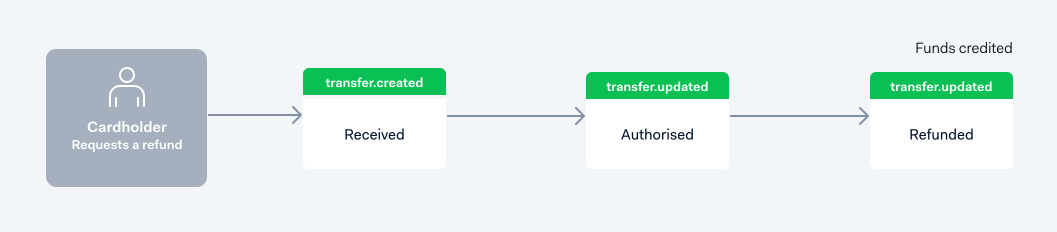
When a merchant refunds the payment, we send:
- A balancePlatform.transfer.updated webhook with
statusrefunded. - A balancePlatform.transaction.created webhook with information about the transaction.
Note that the refund is not linked to the original payment.
The following examples show a balancePlatform.transfer.updated and a balancePlatform.transaction.created.