


Digital wallets are applications, such as Apple Pay and Google Pay, that allow cardholders to securely store card data and payment information. When your cardholder adds their Adyen-issued card to a digital wallet, they can make payments using the digital wallet, without presenting their physical card or entering their card details online.
Instead of storing your cardholder's sensitive card details, digital wallets make a network token request to Adyen. Upon this request, Adyen creates a network token that represents your cardholder's data and sends it to the digital wallet.
When your cardholder makes a payment, the digital wallet provides the network token data, instead of your cardholder's data. This process makes payments more secure and convenient for your cardholder.
Requirements
Before you begin, make sure that you fulfill the following requirements:
| Requirement | Description |
|---|---|
| Integration type | You must have an integration that supports Issuing. |
| API credentials | You need an API credential for the Configuration API that has the following role:
|
| Webhooks | In your Customer Area, subscribe to Network token webhooks. Network token events are part of the Configuration API. For details on the webhook messages you receive during provisioning, see Webhooks for network tokens. |
| Setup steps | Reach out to your Adyen contact to:
|
Overview
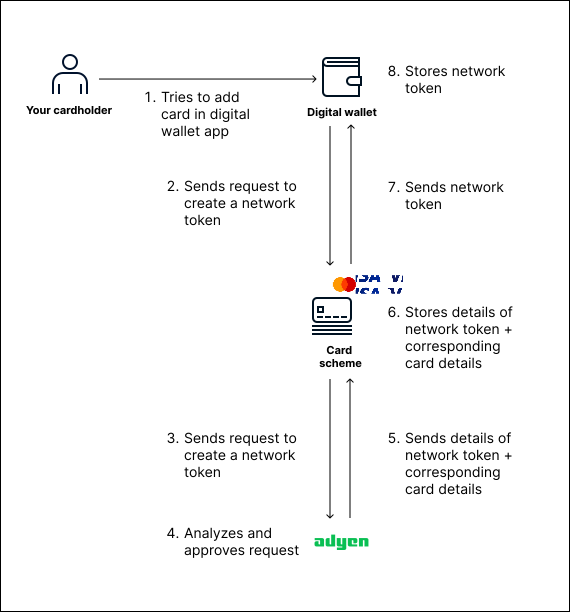
To use a digital wallet, your cardholder must add the card to the digital wallet. When your cardholder attempts this, it triggers the following process:
- Your cardholder tries to add their card to their digital wallet.
- The digital wallet sends a network token request to the card scheme.
- The card scheme sends the network token request to Adyen.
- Adyen analyzes and approves the request if all the information in the request is correct.
- Adyen sends the network token and the corresponding card details to the card scheme.
- The card scheme stores the network token and the corresponding card details.
- The card scheme sends the network token to the digital wallet.
- The digital wallet stores the network token.
The following diagram shows the process for creating and activating a network token for a digital wallet.
After the previous process is complete, your cardholder can use the digital wallet to make online or in-person payments.
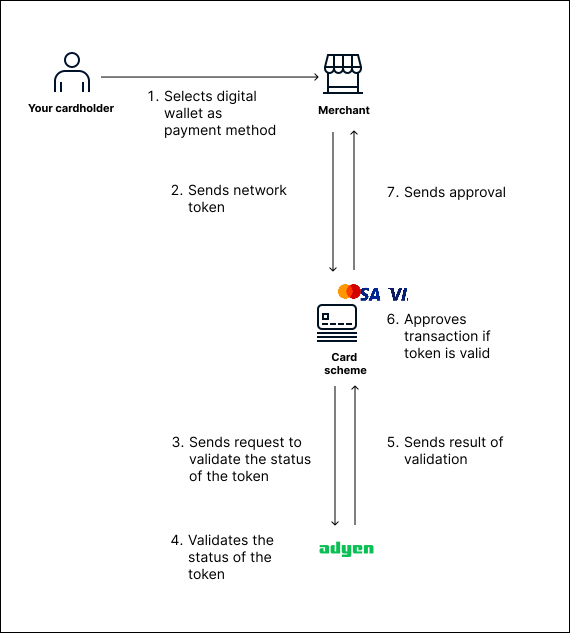
When your cardholder makes a payment, your cardholder's payment data is processed as follows:
- Your cardholder selects the digital wallet as a payment method.
- The merchant sends the network token from the digital wallet to the card scheme.
- The card scheme sends a request to Adyen to validate the status of the network token.
- Adyen validates the status of the network token.
- Adyen sends the result of the validation to the card scheme.
- If the network token is valid, the card scheme approves the transaction.
- The card scheme sends the approval to the merchant.
The following diagram shows the payment flow using a digital wallet.
Provisioning for a digital wallet
Provisioning is the process of creating a network token. Provisioning is initiated when your cardholder tries to add their card to a digital wallet.
The initial part of the provisioning flow is as follows:
- Your cardholder adds the card to a digital wallet.
- The digital wallet sends a request to the card scheme to create a network token for the card.
- The card scheme forwards the network token request to Adyen.
After receiving the request, Adyen creates a network token with status inactive. Adyen then performs a risk analysis using the information provided in the network token request. Based on the outcome of the risk analysis, Adyen decides whether to activate the network token.
Decision process for provisioning
The decision process has one of the following outcomes:
- Adyen activates the network token automatically, without further verifications.
- Adyen requires two-factor authentication to verify your cardholder's identity.
- Adyen requires that your cardholder contacts you by phone call to verify their identity.
- Adyen closes the network token automatically and ends the process.
The outcome of the decision process affects the flow provisioning process. The following tabs explain the flow of the provisioning process depending on the outcome of the decision process.