


This page explains how to process payments with an Enterprise Issuing integration. If you are using Embedded Issuing, see respective pages for marketplaces or platforms.
In addition to issuing cards, you can use Adyen's payment processing platform to acquire payments for your business. You can process both online and in-person payments from your customers. If you want, you can use the revenue from these acquired payments to fund your Adyen-issued cards.
Fund settlement
- Payments are processed through your stores and arrive in your merchant account in a pending state.
- After the configured settlement delay (T+2 by default), these funds become available in your merchant account.
- Adyen deducts the fees incurred on these payments from your merchant account.
- All the remaining available funds are then aggregated into a net settlement batch. By default, these batches are created on an hourly basis. You can also opt to have them created on a daily basis instead. To do this, reach out to your Adyen contact.
- The funds from each settlement batch are booked to the balance platform and get settled in the balance account configured for that merchant account.
- You can use the amounts in your balance accounts to fund your Adyen-issued cards or pay out the funds to your transfer instrument (verified external bank account).
Flow of funds
In the following example, you have a hotel called HotelChainLLC with 2 hotel branches in Europe:
- HotelBranch_AMS (Amsterdam) which accepts payments in EUR.
- HotelBranch_STO (Stockholm) which accepts payments in SEK.
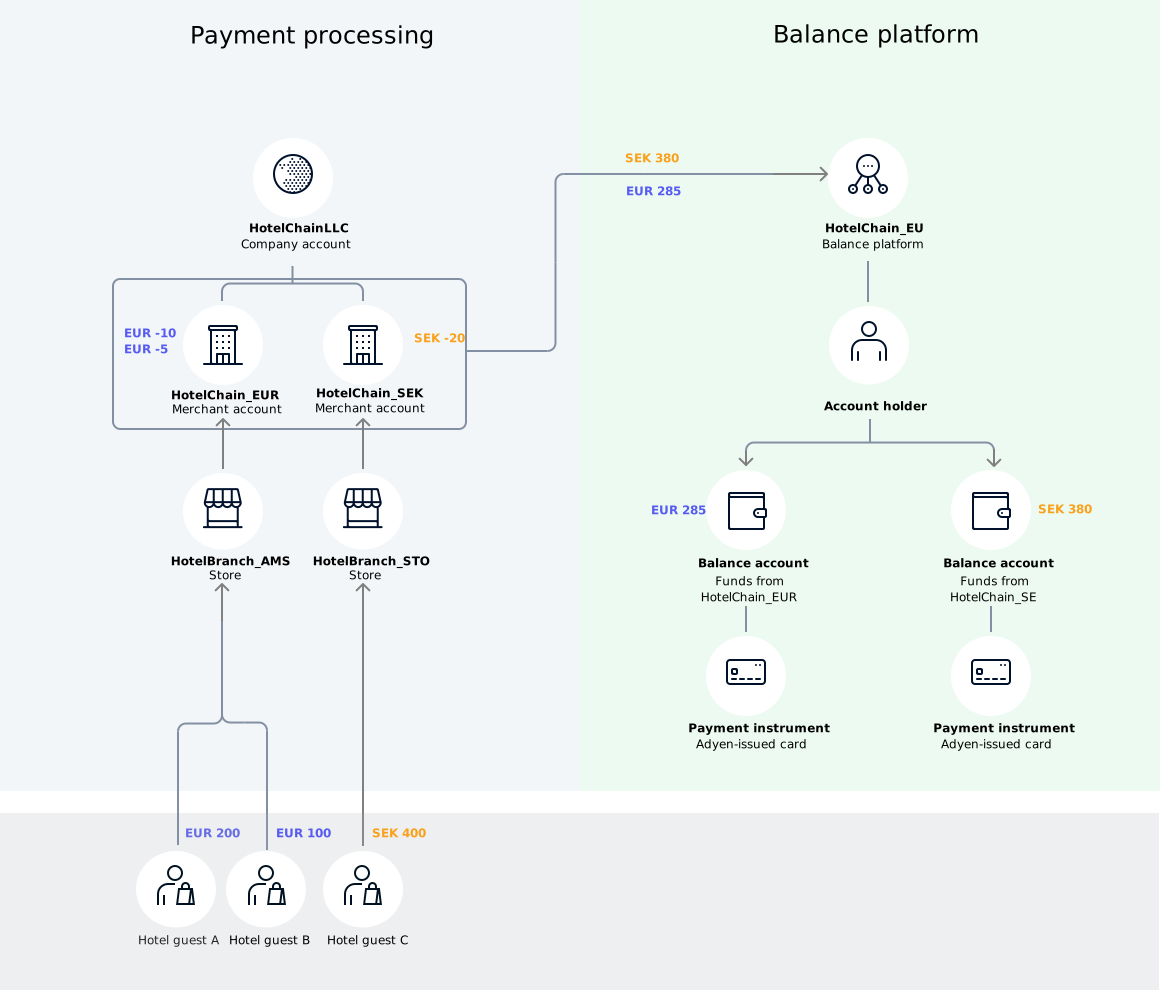
The following diagram shows the flow of funds from your customer to your balance accounts:
-
Your hotel guests (customers) pay:
- Hotel guest A pays EUR 200.00 at the Amsterdam branch.
- Hotel guest B pays EUR 100.00 at the Amsterdam branch.
- Hotel guest C pays SEK 400.00 at the Stockholm branch
-
After the settlement delay of T+2 days, these funds become available in their respective merchant accounts:
- EUR 300.00 becomes available in HotelChain_EUR.
- EUR 400.00 becomes available in HotelChain_SEK.
-
From your merchant accounts, Adyen deducts the fees for these payments.
- From HotelChain_EUR, Adyen deducts:
- EUR 10.00 in fees for the payment from Hotel guest A
- EUR 5.00 in fees for the payment from Hotel guest B
- From HotelChain_SEK, Adyen deducts:
- SEK 20.00 in fees for the payment from Hotel guest C
- From HotelChain_EUR, Adyen deducts:
-
The remaining funds are aggregated into settlement batches for each merchant account, and booked to the balance platform:
- The settlement batch for HotelChain_EUR contains EUR 285.00, which is the net amount (after fees) from the payments of Hotel guest A and Hotel guest B.
- The settlement batch for HotelChain_SEK contains SEK 380.00, which is the net amount (after fees) from the payment of Hotel guest C.
-
The funds from each settlement batch are settled into the balance account configured on the merchant account:
- EUR 285.00 is settled in the balance account configured for HotelChain_EUR.
- SEK 380.00 is settled in the balance account configured for HotelChain_SEK.
Webhooks
Adyen aggregates the funds from your acquired payments into settlement batches, before transferring them to your balance accounts.
To stay updated about the funds moving into your balance accounts, you can subscribe to Transfer webhooks. Each settlement batch is treated as a single transfer. This means that for each batch that gets settled to your balance account, you receive the following webhooks:
- balancePlatform.transfer.created: informs your server that an incoming transfer is initiated to your balance account.
- balancePlatform.transfer.updated: informs your server of transfer status changes.
Reports
You can use the Balance Platform Accounting Report to reconcile the payments you acquired with Adyen. Each entry in this report corresponds to a single settlement batch. You cannot use this report to reconcile your funds at a transactional level.
To reconcile your funds on a transactional level, see Transaction-level reconciliation.