


See our SDKs
 View the repositories for our SDKs on Github:
You can allow your cardholders to access the PIN of their Adyen-issued card within your app. Secured sessions use end-to-end encryption between your client and Adyen, without exposing sensitive card data to your server.
This page explains how to use secured sessions and Adyen's SDKs for iOS and Android to securely reveal PINs in your user interface.
Requirements
Before you begin, take into account the requirements, preparations, and limitations specified in the following tabs.
Secured sessions with Adyen
With secured sessions, your server creates a session with specific permissions and scope. Your client uses this session to communicate directly with Adyen through the SDK.
Adyen's SDKs for iOS and Android allow you to retrieve the PIN from Adyen. Additionally, they automatically handle all cryptographic operations, such as exchanging keys, encrypting, and decrypting the PIN.
Secured sessions with Adyen's SDKs offers the following benefits:
- Your server never handles sensitive PIN data.
- Sessions are scoped to a specific card and operation.
- Sessions are single-use, which prevents replay attacks.
- End-to-end encryption between the SDK and Adyen protects data in transit.
How it works
The following diagram illustrates the PIN reveal flow using sessions.
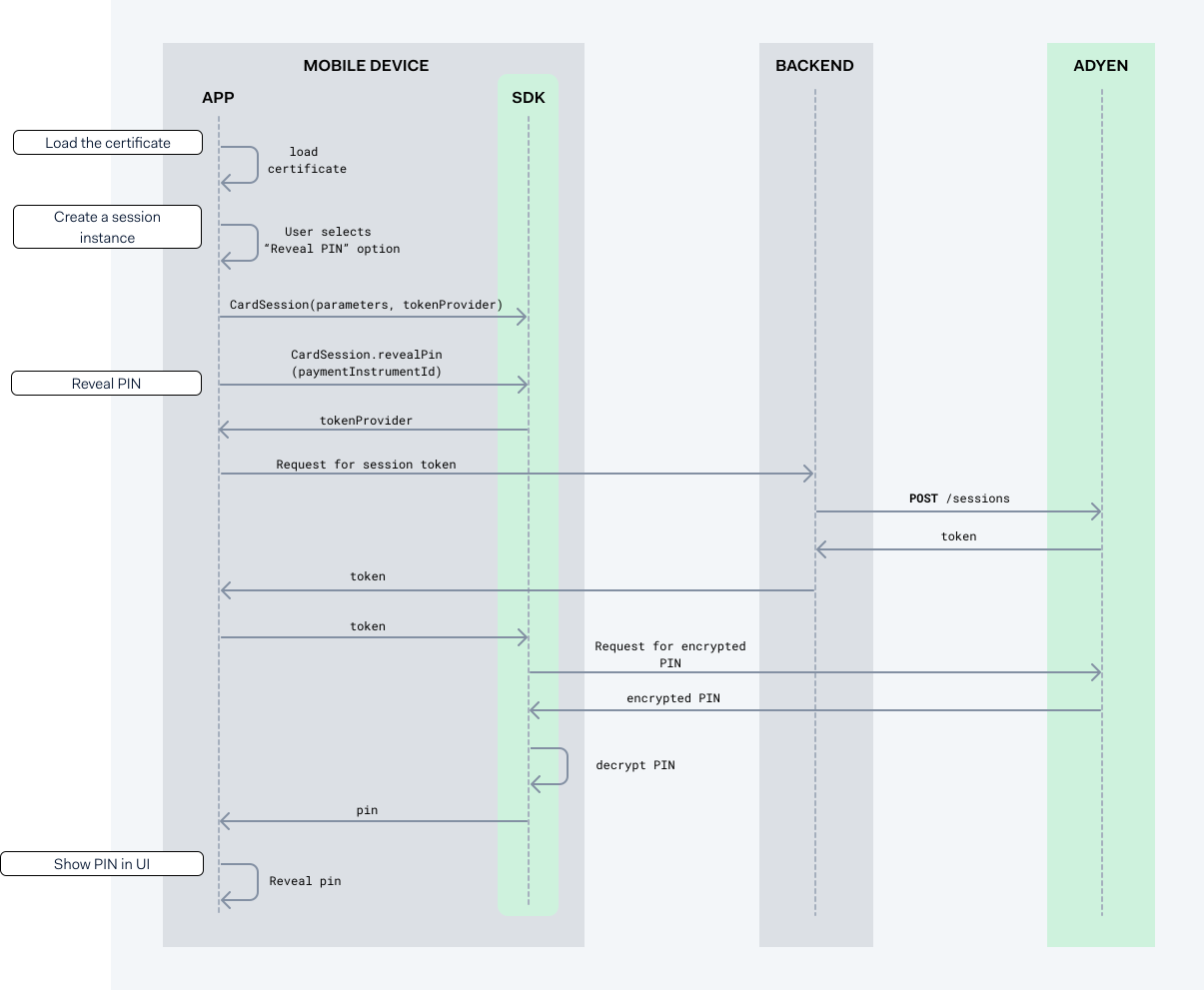
As shown in the diagram, the steps for revealing the PIN are:
- Load the application certificate when your application starts.
- Create a session instance.
- Reveal the PIN.
- Show the PIN in your user interface.
1. Load the application certificate
Adyen provides you with an application certificate that you need to initialize Adyen's SDKs. The SDKs use this certificate to establish a secure session with Adyen.
When your application starts:
-
Load the application certificate into your application.
The following tabs show examples of how to load the certificate depending on which SDK you are using.
2. Create a session instance
When a cardholder using your application selects the option to reveal the PIN, you must initialize the SDK. During initialization, you configure all objects and logic that handle your secure session with Adyen.
The following tabs show examples of how to initialize Adyen's SDKs for iOS and Android.
3. Reveal the PIN
After you initialize the SDK, you can create a secured session. Start the flow for a secured session by calling the CardSession.revealPin SDK method. This method instructs the backend to make a request to our Session authentication API. Then, the SDK method retrieves the session data from the backend and returns it to your application.
To create a secured session:
-
From your client application, call the session instance that you created. Pass the payment instrument ID of the card as the
paymentInstrumentIdparameter.
This method instructs the backend to make a request for a session. The following tabs show examples for iOS and Android. -
From your backend, make a POST /sessions request with the following parameters:
Parameter Required Description product 
Set to platform. policy.resources.type Set to paymentInstrument. policy.resources.paymentInstrumentId The unique identifier of the payment instrument that the session applies to. policy.roles An array of roles that define the allowed operations. Include the PaymentInstrument: Pin Reveal role. -
Verify that the response contains a session token.
-
Pass the token from your backend to the SDK. Use the token provider that you defined when you initialized the SDK.
If the request is successful, the SDK uses the token to establish a secure session with Adyen. The SDK uses the secure session to get the encrypted PIN from Adyen. Then, the SDK decrypts the PIN automatically. You do not need to make additional calls.
4. Show the PIN in your user interface
After the SDK receives the session token from the backend, the CardSession.revealPin method returns a string that includes the decrypted PIN.
To reveal the decrypted PIN in your user interface:
- Pass the decrypted PIN to your app.
- Reveal the PIN to your cardholder in your user interface.
After you reveal the PIN, delete it from your app's memory.
Troubleshooting
The following table describes errors the Adyen's SDKs can return and how to solve them.
| Error | Description | Solution |
|---|---|---|
| Session expired | The session token has expired. | Create a new session from your server. |
| Unauthorized | The session does not have the required role for the requested operation. |
|
| Forbidden | The payment instrument ID does not match the ID provided in the POST /sessions request. |
Verify that the payment instrument ID matches the ID provided in the POST /sessions request. |