


Each dispute goes through a dispute flow. Before you accept or defend a dispute, it is important to have a general understanding of how the flow works, and how you can follow a dispute through the flow.
Requirements
Before you begin, take into account the following requirements.
| Requirement | Description |
|---|---|
| Integration type | Make sure that you have built an online payments integration. |
| Customer Area roles | To follow disputes through the dispute flow, make sure that you have one of the following roles:
|
| Webhooks | To follow disputes using webhooks, subscribe to the Standard webhook and enable dispute events. |
| Setup steps | You can manage disputes using the Disputes API or the Customer Area. |
Dispute flow overview
The dispute flow can differ between card schemes and payment methods, but the general flow is the same for most.
A chargeback takes place when a cardholder disputes a payment and asks their issuing bank to reverse it. To charge back the payment, the bank submits a formal dispute on behalf of the cardholder. Adyen processes the chargeback and debits the payment amount and the chargeback processing fee from your account. The dispute flow starts.
You can accept or defend the chargeback using the Customer Area or the Disputes API. If you defend the chargeback, you have to provide documents to support your defense.
The issuing bank reviews the information you supply and accepts or declines your defense. If the issuer accepts your defense, or if the cardholder cancels the chargeback, the funds will return to your account.
You can follow the dispute flow by monitoring the dispute in your Customer Area, and by listening to webhook messages. To monitor overall dispute performance, such as win and loss rates, you can use the Risk & dispute analytics dashboard.
The following diagram illustrates the flow of a dispute:
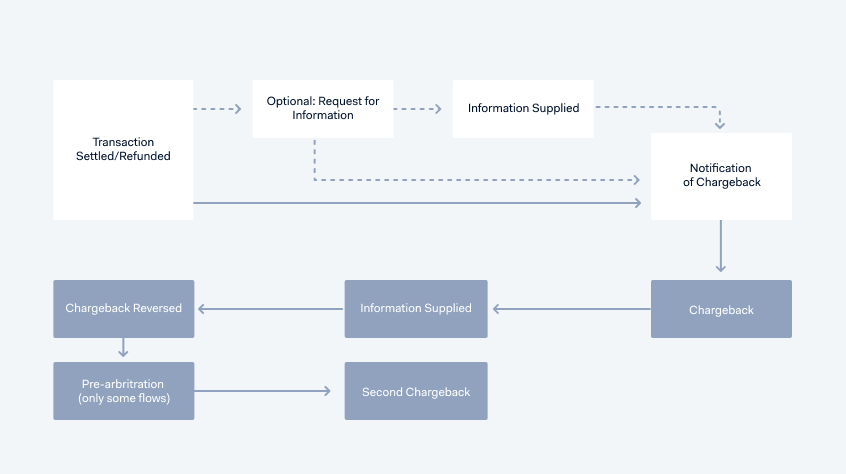
Dispute stages
In general, a dispute can go through the following stages in the flow:
Stage |
Description |
|---|---|
| Notification of Fraud (NOF) (optional) |
To notify you of fraud activity, Adyen sends equivalent of a Visa TC40 and Mastercard SAFE (System to Avoid Fraud Effectively) report. This is not a dispute, and no money is withdrawn from your account. This transaction can become a chargeback if there is no 3D Secure liability shift. Suggested actions:
|
| Request for Information (RFI) (optional) |
The issuer requests more information about the transaction. At this stage, no money is withdrawn from your account. However, if you do not respond to the RFI in a timely manner, a chargeback may take place, and money may be withdrawn from your account. Suggested actions:
|
| Notification of Chargeback (NoC) | A chargeback has been initiated by the issuer, and can be defended. The NoC can come after the RFI, or immediately after the payment status is set to Settled or Refunded. Depending on the payment method, the chargeback debit happens a few days after you receive the NoC, or after you defend the dispute. The NoC marks the start of the defense period. Adyen automatically defends chargebacks that do not require action on your part. For example, a dispute can be auto-defended if the issuer opens a dispute on a transaction that was already refunded, or if it is a fraudulent chargeback for which there was a liability shift. If the chargeback is not auto-defended, the dispute goes to the Chargeback stage. Suggested actions:
|
| Chargeback | The disputed amount is withdrawn from your account. Suggested actions:
|
| Information Supplied | Adyen receives the supporting documents and forwards them to the scheme. It is no longer possible to change these documents. |
| Chargeback Reversed | The disputed amount is transferred back to your account. In this stage, the issuer reviews the defense. If they accept the defense, or the issuer response timeframe expires, this is the final stage. |
| Pre-arbitration (only some flows) |
If the issuer declines your defense, they open pre-arbitration, which Adyen will review. If you are eligible and the dispute flow supports it, you can accept or decline the pre-arbitration case yourself. This requires additional configuration and approval from Adyen. Reach out to our Support Team or your Adyen contact for more details. If you accept the pre-arbitration, the dispute is lost. You receive a second chargeback. If you decline the pre-arbitration, the case can be sent to scheme arbitration. We recommend that you only decline if you are confident that the chargeback is not valid, and that the defense materials provided during the first chargeback defense were sufficient. |
| Scheme Arbitration (optional) |
The scheme rules on the chargeback liability based on the information provided throughout chargeback defense timelines. This stage can only occur if you have enabled accepting or declining pre-arbitration yourself. If the scheme rules in favor of the issuer, you can incur a fee of up to USD 600. This fee is added to the second chargeback. |
| Second Chargeback | A second chargeback occurs when the issuer declines your defense, when you or Adyen accept a pre-arbitration case, or when you decline a pre-arbitration case and scheme arbitration rules in favor of the issuer. You cannot upload defense documents. This is the final stage. |
Follow a dispute through the flow
You can follow a dispute in your Customer Area or listen to webhook messages to understand where the dispute is in the flow, find the dispute status, and decide on your next steps.
Customer Area
Event |
Where to follow |
How to follow |
Details and next steps |
Example statuses |
|---|---|---|---|---|
| A dispute is opened on your account. | Email and/or Customer Area notification | Go to Notification center > Settings | Open the dispute details via the alert that you receive. | Not applicable |
| A transaction is charged back. | Payment lifecycle journal type | Go to Payments > Payment list > PSP reference | Review the payment lifecycle of the transaction, including any dispute lifecycle events. |
|
| A dispute is opened on a transaction and Adyen has created a dispute PSP reference. | Payment events type | Go to Payments > Payment list > PSP reference | Select the dispute event to open the dispute details and review the dispute. |
|
| Detailed dispute information is available. | Dispute details | Go to Risk & disputes > Disputes > Dispute PSP reference | Review the dispute details to decide if you can or want to take action on the dispute. Details include, where applicable, the dispute status, a dispute reason and reason code, the creation date, the number of days left to defend, and if the dispute was auto-defended. |
|
| The dispute moves through the dispute flow. | Dispute history | Go to Risk & disputes > Disputes > Dispute PSP reference | Review the dispute history to understand the current status in the dispute lifecycle, and when the status changed. |
|
| You want to get insights on dispute performance. | Disputes tab in the Risk & dispute analytics dashboard | Go to Analytics > Risk & dispute analytics > Disputes | Use the dashboard to assess dispute performance such as win and loss rates. You can filter on a time period, on fraudulent and non-fraudulent disputes, on dispute status, and more. |
|
| A pre-arbitration case is opened on a previously defended dispute on your account. | Email and/or Customer Area notification | Go to Notification center > Settings | Open the dispute details via the alert that you receive. | Not applicable |
Dispute webhooks
Listen to webhook messages to follow a dispute through the flow.
Event |
Webhook event code |
Details and next steps |
Example statuses |
|---|---|---|---|
| A fraudulent transaction has occurred. | NOTIFICATION_OF_FRAUD | The alert is passed on by issuers to schemes and then to Adyen. We send you a webhook message so that you can take preventative action. | Not applicable |
| Information requested for this payment. | REQUEST_FOR_INFORMATION | Review the dispute, and supply information. |
|
| A dispute is opened on your account. | NOTIFICATION_OF_CHARGEBACK | A chargeback is incoming on a payment. This webhook message marks the start of the defense period. Review the dispute details and decide if you want to defend or accept the chargeback. |
|
| Information has been supplied. | INFORMATION_SUPPLIED | You have successfully uploaded dispute defense documents, or Adyen has auto-defended the dispute. You can now wait if the issuer accepts your defense, or not. |
|
| A transaction is charged back. | CHARGEBACK | A payment was charged back. Review the dispute details and decide if you want to defend or accept the chargeback. |
|
| Dispute defense was not accepted. | SECOND_CHARGEBACK | The issuing bank declines the material that you supplied to defend the original chargeback. |
|
| Dispute defense was accepted. | CHARGEBACK_REVERSED | A chargeback has been defended towards the issuing bank, and the disputed amount was transferred back to your account. The dispute status will be Pending while the issuing bank reviews the material. This stage is not final and a second chargeback can be presented by the issuing bank, resulting in losing the chargeback case.Only for the Visa allocation flow, the final status can be Won if the issuing bank accepts the defense in pre-arbitration. |
|
| Pre-arbitration case was opened. | PREARBITRATION_OPEN | The issuer issuer declines your defense and initiates a pre-arbitration case. This event code is only used for disputes that can include pre-arbitration. |
|
| Pre-arbitration case was accepted. | PREARBITRATION_WON | The pre-arbitration case that was initiated has been accepted by the cardholder's bank. This event code is only used for disputes that can include pre-arbitration, such as the Visa allocation flow or the UnionPay flow. |
|
| Pre-arbitration case was not accepted. | PREARBITRATION_LOST | The pre-arbitration case that was initiated has been declined by the cardholder's bank. This event code is only used for disputes that can include pre-arbitration, such as the Visa allocation flow or the UnionPay flow. |
|
| You accept the pre-arbitration case. | PREARBITRATION_ACCEPTED | You have accepted the pre-arbitration case. The dispute is lost, and you receive a second chargeback. |
|
| You decline the pre-arbitration case. | PREARBITRATION_DECLINED | You have declined the pre-arbitration case. The case can be escalated to scheme arbitration by the issuer. |
|
| The issuer does not escalate the pre-arbitration case that you declined. | PREARBITRATION_ISSUER_WITHDRAWN | After you decline the pre-arbitration, the issuer might decide not to escalate the case to scheme arbitration, or may not escalate in time. In exceptional cases, if the dispute timeframe still allows for that, the issuer can send a new pre-arbitration request after withdrawing the first one, taking the dispute back to the pre-arbitration open stage. |
|
| The issuer escalates the pre-arbitration case that you declined. | SCHEME_ARBITRATION | The issuer does not agree with your decision to decline the pre-arbitration case. The scheme evaluates the documentation provided during the dispute flow, and rules if the chargeback liability falls on you or the issuer. |
|
| The scheme has ruled in your favor. | SCHEME_ARBITRATION_WON | The payment scheme has ruled that the issuer is liable for the dispute. The dispute is closed. |
|
| The scheme has ruled in favor of the issuer. | SCHEME_ARBITRATION_LOST | The payment scheme has ruled that you are liable for the dispute. You receive a second chargeback that will include the scheme arbitration fees on top of the dispute amount. |
|
| The defense period ended. | DISPUTE_DEFENSE _PERIOD_ENDED |
You have not defended the dispute within the timeframe, or the defense period ended because you accepted liability for the chargeback and will not defend the dispute. |
|
| The issuer response period ended. | ISSUER_RESPONSE _TIMEFRAME_EXPIRED |
The issuer either accepted your defense of the dispute, or did not respond in time. |
|
| The issuer has sent extra information about the dispute. | ISSUER_COMMENTS | Includes any free-text issuer comments that include relevant information about the dispute flow, such as why the issuer decided to initiate or continue the dispute. You can receive issuer comments for chargebacks and pre-arbitration cases. | Not applicable |