


Before making a scheduled or on-demand payout to a user, Adyen calculates the maximum amount that you can pay out to them. This calculation is based on the balances on their balance account.
Calculating the payout amount allows you to protect your platform from any potential obligations that may arise due to users holding a negative balance.
This page explains how Adyen calculates the payout amount.
Requirements
Before you begin, take into account the following requirements:
| Requirement | Description |
|---|---|
|
Integration type |
You need an Adyen for Platforms integration. |
|
Setup steps |
To configure your platform to pay out the current balance:
|
How Adyen calculates the maximum payout amount
Adyen allows you to pay out an amount equal to or less than the maximum payout amount. The method in which Adyen calculates the maximum payout amount depends on the payout configuration that is enabled in your platform. You can enable one of the following configurations:
- Pay out the available balance : The maximum payout amount is the available balance. The available balance is the sum of all funds already settled minus any negative balance that will be settled in the future. This is the default configuration.
- Pay out the current balance : The maximum payout amount is the current balance. The current balance is the sum of all funds already settled in your user's balance account. To enable this configuration, reach out to your Adyen contact.
Your platform can use only one of these configurations at a time. The same configuration applies to all balance accounts in your platform.
The following sections explain the details of both configurations.
Pay out the available balance (default)
By default, Adyen sets the maximum payout amount to equal the available balance in a user's balance account. Adyen calculates the available balance as follows:
- Adyen calculates the current balance: Adyen sums all funds that have already been settled in your user's balance account.
- Adyen calculates future balance changes: Adyen sums all funds that will be settled in the future in your user's balance account. These funds are reflected in the reserved and pending balances.
- Adyen calculates the available balance:
- If the sum of future balance changes is negative, Adyen subtracts the future balance changes from the current balance to calculate the available balance.
- If the sum of future balance changes is positive or zero, Adyen determines that the available balance is equal to the current balance.
Expand the following subsections to see examples of how Adyen calculates the available balance of a balance account.
Example 1: Balance account has zero future balance changes
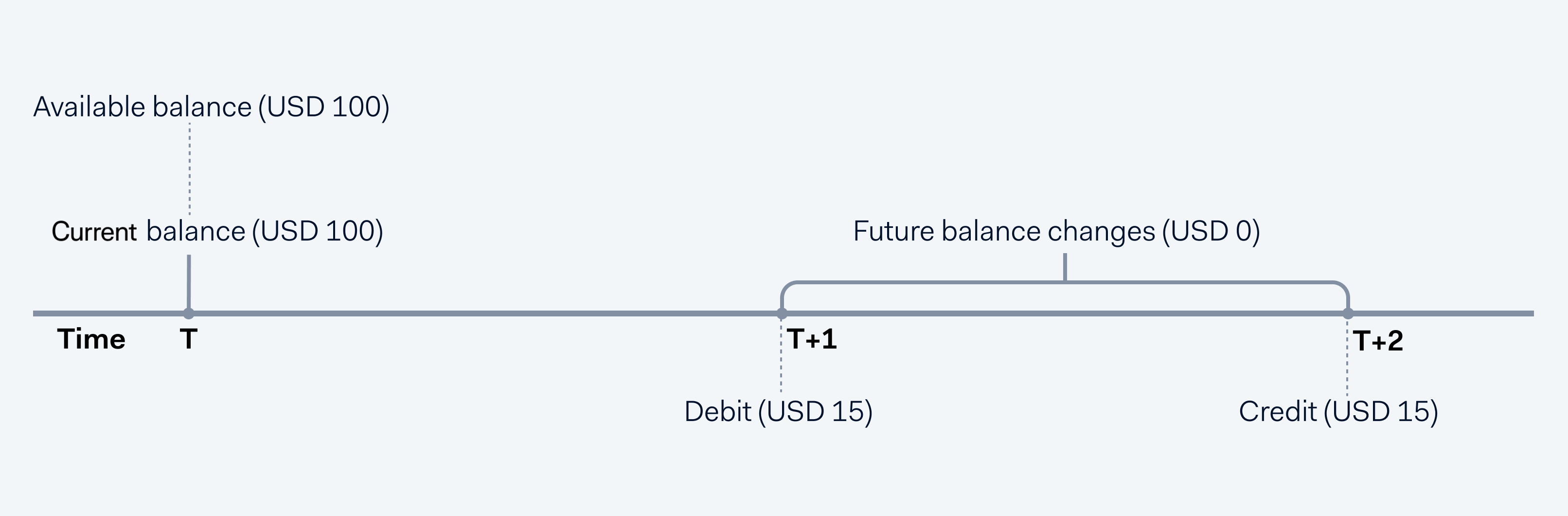
- At the current time T, the current balance of the balance account is USD 100.
- The total of the debits and credits scheduled for T+1 (USD -15) and T+2 (USD +15) is USD 0.
- Because the future balance changes result in a zero amount, Adyen ignores this amount when calculating the available balance.
- The available balance for the payout at T is the current balance of USD 100.
Example 2: Balance account has positive future balance changes
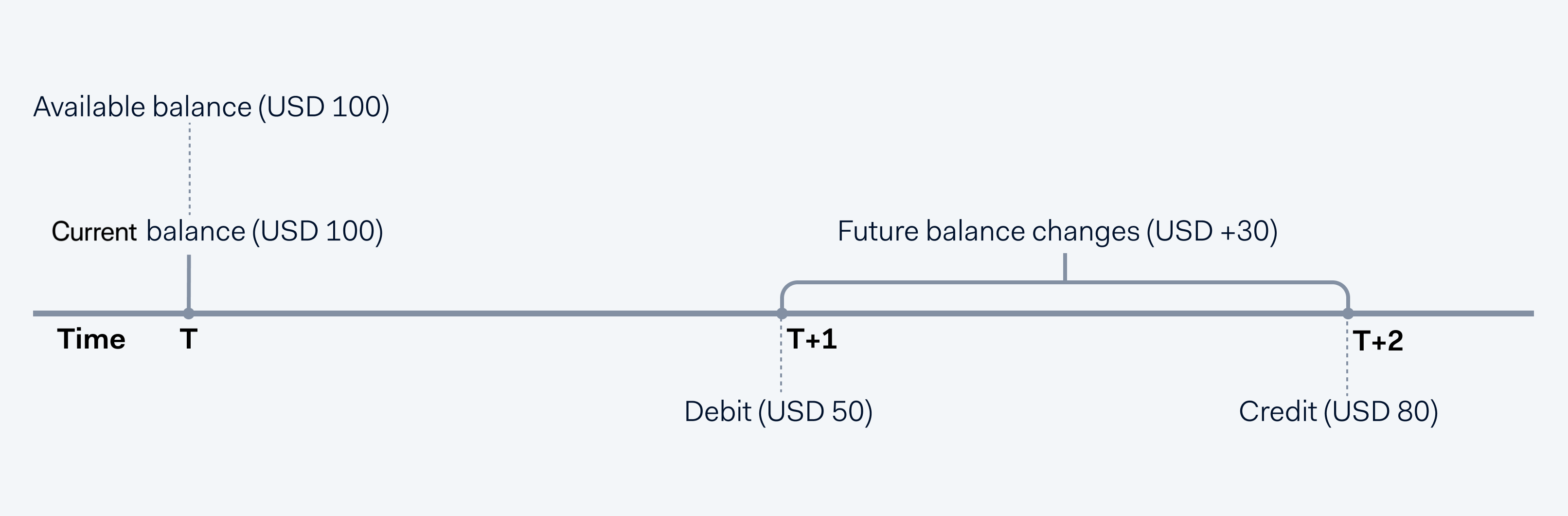
- At the current time T, the current balance of the balance account is 100 USD.
- The total of the debits and credits scheduled for T+1 (USD -50) and T+2 (USD +80) is USD 30.
- Because the future balance changes result in a positive amount, Adyen ignores this amount when calculating the available balance.
- The available balance for the payout at T is the current balance of USD 100.
Example 3: Balance account has negative future balance changes
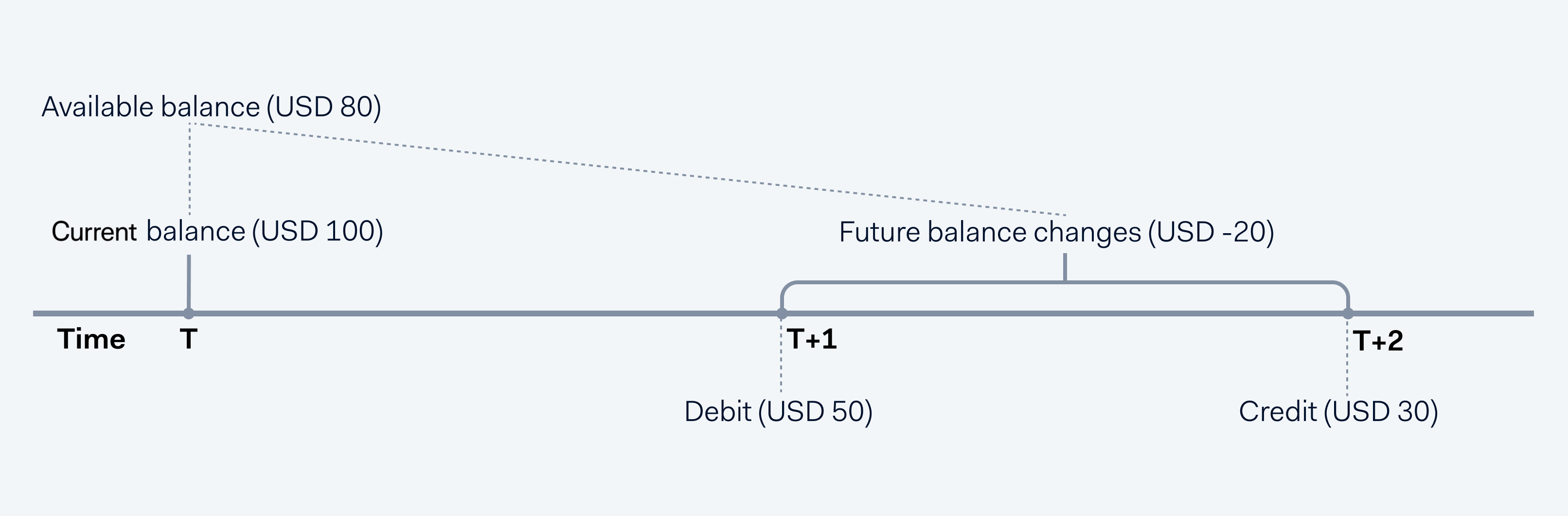
- At the current time T, the current balance of the balance account is USD 100.
- The total of the debits and credits scheduled for T+1 (USD -50) and T+2 (USD +30) is USD -20.
- Because the future balance changes result in a negative amount, Adyen considers this amount for calculating the available balance.
- The available balance for the balance sweep at T is the current balance minus future balance changes, or USD 80.
Pay out the current balance
To enable this configuration:
- Reach out to your Adyen contact.
- Make sure that your reserve account has enough available balance.
When the maximum payout amount is equal to the available balance, your platform is protected from potential obligations that may arise due to negative balances. However, this can make reconciliation more difficult, because the payout amount may not be equal to the amount of settled funds.
To simplify reconciliation, Adyen can set the maximum payout amount to equal the current balance. This configuration allows you to pay out all funds already settled in a balance account. If the balance account has future negative balance changes, Adyen blocks part of the funds in your reserve account as collateral for the payout.
The following diagram shows an overview of the process for paying out the current balance:
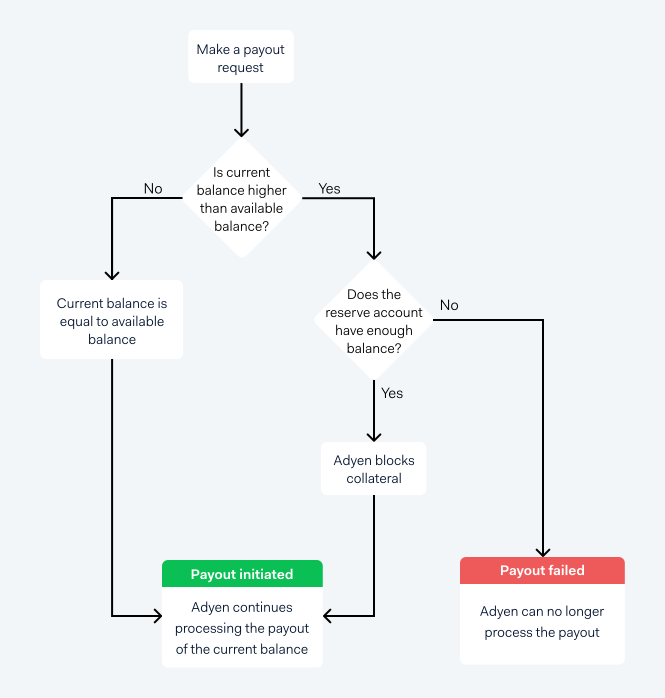
As shown in the previous diagram, the process for paying out the current balance is as follows:
- You make a request to pay out the current balance.
- Adyen compares the current balance and the available balance:
- If the current balance is equal to the available balance, Adyen pays out the current balance.
- If the current balance is higher than the available balance, Adyen verifies the balance in your reserve account.
- Adyen verifies the balance in your reserve account:
- If your reserve account has enough funds to cover the difference between the current balance and available balance, Adyen blocks an amount in your reserve account equal to this difference. This amount is held as collateral for the future negative balance changes.
- If your reserve account does not have enough funds, the payout fails.
- If all previous steps are successful, Adyen processes the payout of the current balance.
Example: Paying out current balance of account with future negative balance changes
You want to pay out the current balance of a user. The balances in your user's balance account and your reserve account are as follows:
| Balance | Balance account | Reserve account |
|---|---|---|
| Current | USD 1000 | USD 100000 |
| Reserved | USD -300 | USD 0 |
| Pending | USD 100 | USD 0 |
| Available | USD 800 | USD 100000 |
After you make the payout request, the following process occurs:
- Adyen compares the current balance to the available balance.
The current balance is higher than the available balance by USD 200, so Adyen must verify the balance in your reserve account before processing the payout. - Adyen verifies the balance in your reserve account.
The available balance in the reserve account is USD 100000, which is more than USD 200. - Adyen blocks USD 200 in your reserve account as collateral for the payout.
- Adyen processes the payout of your user's current balance, which is USD 1000.
After the current balance is successfully paid out, the balances in your user's balance account and your reserve account are as follows:
| Balance | Balance account | Reserve account |
|---|---|---|
| Current | USD 0 | USD 100000 |
| Reserved | USD -300 | USD -200 |
| Pending | USD 100 | USD 0 |
| Available | USD -200 | USD 99800 |
Compensating negative available balances
Adyen holds the collateral until your user's balance account receives enough funds to compensate the negative available balance. The amount of the collateral is unblocked gradually, in proportion to the amount of the negative balance that has been covered.
Example: Negative balance is compensated by incoming funds
After paying out your user's current balance and settling all reserved and pending funds, your user's balance account has a negative balance of USD -200. To cover for this negative balance, Adyen blocked USD 200 in your reserve account as collateral.
In this case, the balances in your user's balance account and your reserve account are as follows:
| Balance | Balance account | Reserve account |
|---|---|---|
| Current | USD 0 | USD 100000 |
| Reserved | USD 0 | USD -200 |
| Pending | USD 0 | USD 0 |
| Available | USD -200 | USD 99800 |
Days after the payout, your user receives USD 100 from sales funds. These incoming funds compensate part of the negative balance in your user's balance account, so now your user's balance is USD -100. Because your user's negative balance was partially compensated, the amount of your collateral is now reduced from USD 200 to USD 100.
After settling the incoming sales funds, the balances in your user's balance account and your reserve account are as follows:
| Balance | Balance account | Reserve account |
|---|---|---|
| Current | USD 0 | USD 100000 |
| Reserved | USD 0 | USD -100 |
| Pending | USD 0 | USD 0 |
| Available | USD -100 | USD 99900 |
Consider that in the following days, your user receives USD 150 from additional sales funds. These funds completely compensate your user's negative balance. After this, the remaining amount of your collateral is unblocked.
After settling the incoming sales funds, the balances in your user's balance account and your reserve account are now as follows:
| Balance | Balance account | Reserve account |
|---|---|---|
| Current | USD 0 | USD 100000 |
| Reserved | USD 0 | USD 0 |
| Pending | USD 0 | USD 0 |
| Available | USD 50 | USD 100000 |
If your user's balance remains negative for 30 days, Adyen transfers the remaining amount of the collateral from your reserve account to your user's balance account. For this transfer, Adyen sends a webhook to your server. The webhook provides all the details of the initiated transfer.
Example: Negative balance remains for more than 30 days
After paying out your user's current balance and settling all reserved and pending funds, your user's balance account has a negative balance of USD -200. To cover for this negative balance, Adyen blocked USD 200 in your reserve account as collateral.
In this case, the balances in your user's balance account and your reserve account are as follows:
| Balance | Balance account | Reserve account |
|---|---|---|
| Current | USD 0 | USD 100000 |
| Reserved | USD 0 | USD -200 |
| Pending | USD 0 | USD 0 |
| Available | USD -200 | USD 99800 |
Consider that, after 30 days, the balance in your user's balance account remains negative. To compensate this negative balance, Adyen transfers the blocked collateral amount (USD 200) to your user's balance account.
After this transfer, the balances in your user's balance account and your reserve account are as follows:
| Balance | Balance account | Reserve account |
|---|---|---|
| Current | USD 0 | USD 99800 |
| Reserved | USD 0 | USD 0 |
| Pending | USD 0 | USD 0 |
| Available | USD 0 | USD 99800 |
Check the balances in your user's balance account
Before you make a payout, we recommend that you check the balances in your user's balance account. You can use one of the following options:
- Make a GET /balanceAccounts/{id} request to get the details of the balance account.
- View the details of the balance account in your Customer Area.
- Track balance updates using balance webhooks.