This logic defined on this page is in pilot phase and is not available for all platforms.
When you split transactions, you can provide the split instructions in several ways. For example, you can send instructions in a specific request, or link split configuration profiles to your users' stores. For refunds and chargebacks, you can also define a default logic for your balance platform.
If you set up instructions in more than one way, then a transaction can have more than one set of instructions that applies to it. To determine which instruction takes precedence, Adyen uses a specific logic. This logic depends on the transaction's type. The following sections explain how Adyen applies split instructions for authorizations, captures, refunds, and chargebacks.
Authorizations
You can provide split instructions for an authorization in two ways: in the splits array of your authorization request, or through a split configuration profile linked to the store.
At authorization, Adyen applies split instructions in the following order:
- Split instructions in the payment request.
- Split instructions in the split configuration profile, if the payment request does not include split instructions.
Captures
You can provide split instructions for a capture in two ways: in the splits array of your capture or authorization request, or through a split configuration profile linked to the store.
At capture, Adyen applies split instructions in the following order:
- Split instructions in the capture request.
- Split instructions in the original authorisation request, if the capture request does not include split instructions.
- Split instructions in the split configuration profile, if neither request includes split instructions.
Refunds
You can provide split instructions for a refund in three ways:
- In the
splitsarray of your refund request. - Through a split configuration profile linked to the store.
- As a default refund logic configured for your balance platform. Reach out to our Support Team to enable this.
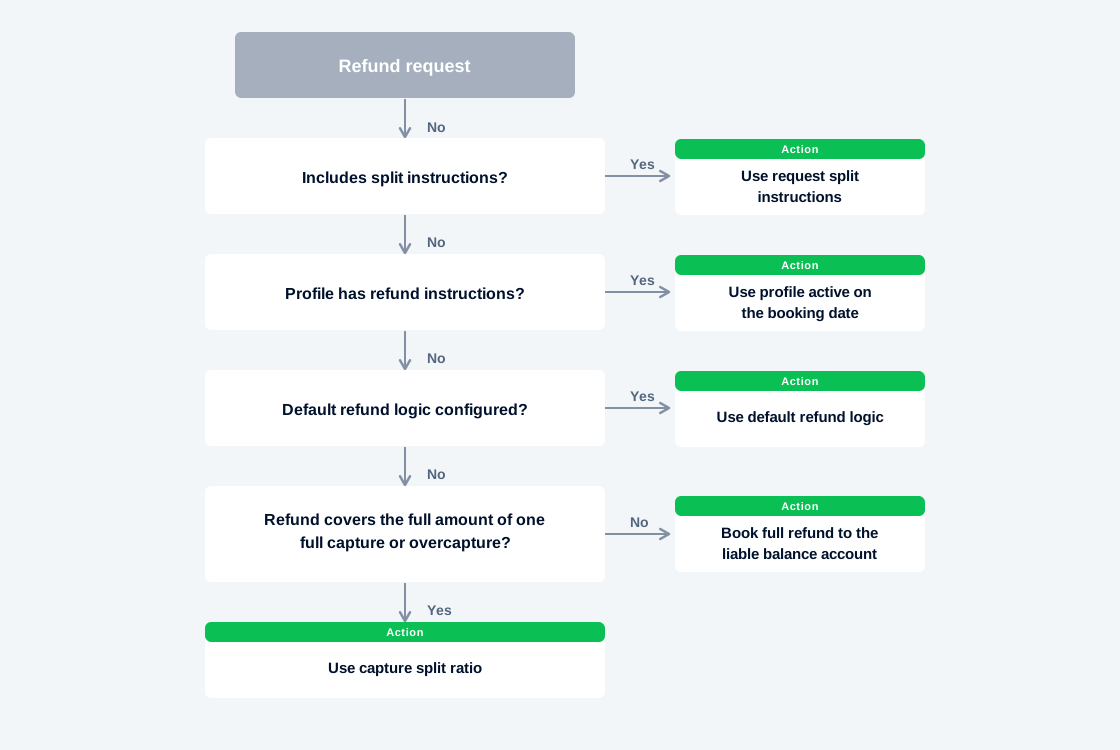
Adyen applies split instructions for a refund in the following order:
- You make a request to initiate a refund.
- Adyen checks if your refund request includes split instructions.
- If yes, we split the refund amount according to the instructions in the request. The refund is processed, and the flow ends.
- If no, continue to step 3.
- Adyen checks if the refund request meets the conditions of a split configuration rule that has defined split refund instructions.
- If yes, we split the refund amount according to the instructions in the profile that was active on the refund's booking date. The refund is processed, and the flow ends.
- If no, continue to step 4.
- Adyen checks if a default refund logic is configured for your balance platform.
- If yes, we split the refund amount according to the default refund logic. The refund is processed, and the flow ends.
- If no, continue to step 5.
- If yes, we split the refund amount according to the default refund logic. The refund is processed, and the flow ends.
- If the refund covers the full amount of one full capture, including an overcapture, and the capture includes split data, we use the capture's split ratio. In all other cases, such as for refunds of partial captures, we book the full refund amount to your platform's liable balance account.
The following diagram visualizes the logic explained above:
Chargebacks
You can provide split instructions for a chargeback in three ways:
- As chargeback logic in a
platformChargebackLogicobject in your payment or capture request - Through a split configuration profile linked to the store.
- As a default chargeback logic configured for your balance platform. Reach out to our Support Team to enable this.
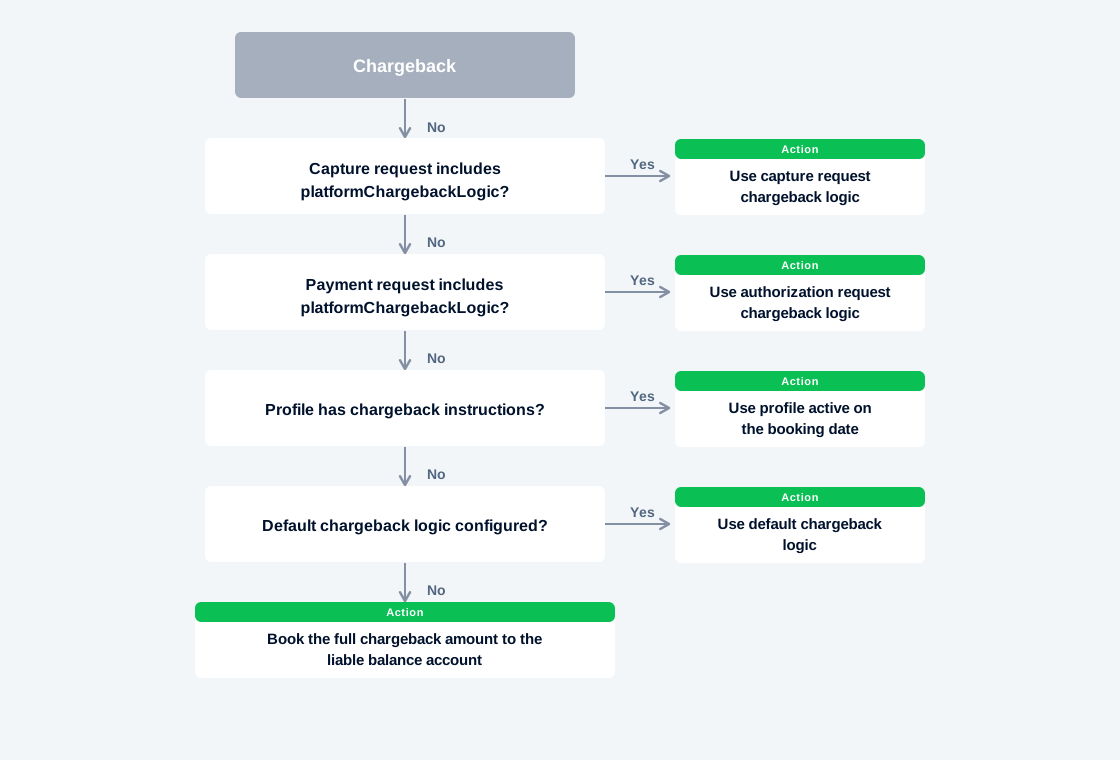
Adyen applies split instructions for a chargeback in the following order:
- Your customer initiates a chargeback.
- Adyen checks if your capture request includes chargeback logic.
- If yes, we split the chargeback amount according to the chargeback logic in the capture request. The chargeback is processed, and the flow ends.
- If no, continue to step 3.
- If yes, we split the chargeback amount according to the chargeback logic in the capture request. The chargeback is processed, and the flow ends.
- Adyen checks if your original payment request includes chargeback logic.
- If yes, we split the chargeback amount according to the chargeback logic in the payment request. The chargeback is processed, and the flow ends.
- If no, continue to step 4.
- Adyen checks if the chargeback meets the conditions of a split configuration rule that has defined split chargeback instructions.
- If yes, we split the chargeback amount according to the instructions in the profile that was active on the chargeback's booking date. The chargeback is processed, and the flow ends.
- If no, continue to step 5.
- Adyen checks if a default chargeback logic is configured for your balance platform.
- If yes, we split the chargeback amount according to the default chargeback logic. The chargeback is processed, and the flow ends.
- If no, continue to step 6.
- Adyen books the full chargeback amount to your platform's liable balance account.
The following diagram visualizes the logic explained above: