


Our Standalone solution
If you do not need a fully featured API integration, we also offer standalone terminals.
Before you start building a point-of-sale integration with our Terminal API, you need to choose an integration architecture. This determines how your POS system —also referred to as cash register— connects to the Adyen payment terminals and the Adyen payments platform.
- With local communications the POS system communicates directly with the payment terminal over the local network.
- With cloud communications the POS system communicates with the payment terminal over the internet.
Requirements
Before you begin, take into account the following information.
| Requirement | Description |
|---|---|
| Integration type | The information on this page is relevant for building a point-of-sale integration with the Adyen Terminal API and Adyen payment terminals. |
Local communications
With a local Terminal API integration, your POS system communicates directly with the terminal over your local network. To make a payment, you make an API request directly to the IP address of the terminal, for the shopper to complete the transaction. You receive the result of the payment synchronously.
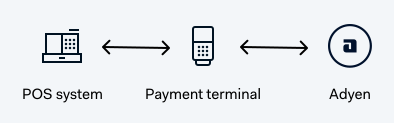
When you make an API request from a POS app directly to a terminal's IP address, the terminal listens for POST requests to /nexo on port 8443. For example, if your terminal has the IP address 198.51.100.1 you would make API requests to: https://198.51.100.1:8443/nexo.
If your integration uses Android devices and the POS app is installed on the terminal itself, you can send POST requests to either localhost or 127.0.0.1 from that app.
Alternatively, if you assign a hostname to your terminal, you can make requests to the resolvable hostname of the terminal.
You should either use DHCP reservation for the terminal IP addresses, or manually configure static IP addresses. This helps to prevent connection issues when the terminal or your network reboots.
To protect local communications, you need to add Adyen's certificate to your POS app, and encrypt your messages.
Cloud communications
With a Terminal API integration using cloud communications, your POS system communicates with the terminal over the internet. To make a payment, you send your Terminal API requests to an endpoint on the Adyen payments platform. This request is forwarded to the terminal, for the shopper to complete the transaction. You can choose whether you want to receive the result of the payments synchronously or asynchronously.
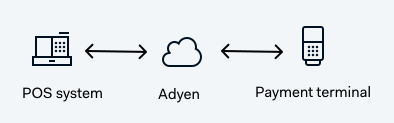
The endpoint you need to use to send Terminal API requests to the Adyen payments platform depends on two things:
- Whether your integration will receive transaction results synchronously or asynchronously.
- Whether you are making test transactions or live transactions.
Test endpoints
Use these endpoints for all test transactions, including the merchantAccount and
deviceId
path parameters to identify the payment device that you want to send the request to. The deviceId must be the same as the POIID in the MessageHeader of the Terminal API request.
| Test endpoints - all locations | |
|---|---|
| Synchronous result: | https://device-api-test.adyen.com/v1/merchants/{merchantAccount}/devices/{deviceId}/sync |
| Asynchronous result: | https://device-api-test.adyen.com/v1/merchants/{merchantAccount}/devices/{deviceId}/async |
We have introduced new cloud communications endpoints. If you currently use the old terminal-api endpoints, we strongly recommend migrating to the new device-api endpoints.
Choosing between cloud and local
When choosing an integration architecture, you should consider aspects like ease of integration, security, and usability. For example, cloud communications is easier to implement but does not support all use cases. Local communications on the other hand can be more robust but requires an additional effort to ensure the local network communication between the POS system and the payment terminal is safe.
To decide between cloud or local communications:
- To find out what integration architecture we recommend in general for your type of situation, select Start below and answer a few questions.
- Check if the technical know-how for managing the network at the physical location is at the required level.
Technical know-how
The success of your cloud or local communications integration is influenced by various technical and practical aspects.
-
Infrastructure and management of the in-store network:
The team or service provider managing the network at the physical location needs to have the expertise to configure the network for the use of payment terminals. They also need to configure the IP addresses of the terminals:- A local integration should use DHCP reservation, or manually configured static IP addresses.
- A cloud integration should use dynamic IP addresses without DHCP reservation.
- If possible, the DHCP lease time should be set to 24 hours or more so that the IP addresses do not change too often.
For information about technical aspects, see Network configuration.
-
Problems with the in-store network:
Adyen cannot provide support for network issues that occur at the physical location. You need to ensure you have a team or service provider with the expertise to solve any network issues.