


UPI Autopay enables Indian shoppers to set up recurring payments through their UPI app (for example, Google Pay, PhonePe, and Paytm).
Requirements
| Requirement | Description |
|---|---|
| Integration type | Make sure that you have an existing integration for one of the following: - Web components integration for advanced flow - Web components integration for sessions flow - Web drop-in integration for advanced flow - Web drop-in integration for sessions flow Make sure you integrate to the latest web version to display the mandate information on UPI Autopay v6.22.0. |
| Setup | Backend integration for recurring flows: Ensure your backend implements all UPI Autopay recurring flows - including pre-debit notifications, recurring payments and cancelling billing plans. |
This page only covers Web SDK configuration for the signup flow. Refer to the API-only documentation for full backend requirements, and for details on how to use the /payments request.
Shopper experience
With Adyen’s UPI Autopay solution, you can give your shoppers different payment options for signing up on the recurring plan, namely UPI Collect, UPI QR, and UPI Intent:
-
Collect flow: UPI apps only show the mandate amount. The shopper authorizes the mandate with their PIN.
- The shopper gets a push notification on their phone.
- The Autopay mandate details are shown in the UPI app for review.
- The shopper enters their UPI PIN to authorize the mandate.
- The mandate is created and the first payment is completed.
-
QR and Intent flows: UPI apps show both the mandate amount and the first transaction amount.
- The shopper scans the QR code, or in the Intent flow launches the UPI app.
- The Autopay mandate details are shown in the UPI app for review.
- The shopper enters their UPI PIN to authorize the mandate.
- The mandate is created and the first payment is completed.
From Adyen Web SDK v6.22.0 the UPI Autopay component shows mandate information directly in the checkout. The result is:
- Shoppers see clear mandate details before authorizing.
- Information is consistent across Collect, Intent, and QR flows.
- Less confusion and improved conversion.
Payment examples
-
The shopper makes an upfront payment and a higher mandate is created.
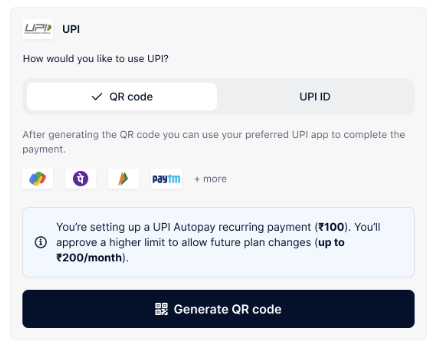
-
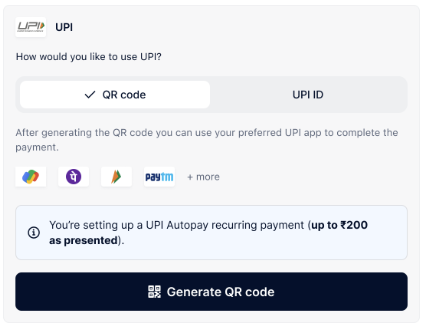
The shopper does not make an upfront payment, only a mandate is created.
You can use this to sign up shoppers for free trials, or to save the payment details for future use. In this case, a small minimum amount is authorized and refunded automatically. Pass a minimum value of 2 INR in theadditionalAmountfield in your payment request. Note that you need to show information about the authorization and refund outside of the component based on your requirements for tokenizing the payment details. For example: "To enable a free trial, 2 INR will be charged and refunded".
Mandate information box
When a mandate is present, the new UPI component renders an information box with details. The standard base text of "You’re setting up a UPI Autopay recurring payment..." is followed by dynamic text that depends on:
amount: The transaction amount (can be known or unknown).mandate.amount: The mandate limit (always known).frequency: The payment monthly, weekly, or ad hoc.amountRule: Either exact or max.
Examples of messages:
Customize the mandate information box
You can override the default translations for the mandate information box:
Integration steps
Test and go live
Reach out to your Adyen contact to set up your test environment for UPI Autopay. You can use the following magic amounts to test various transaction outcomes.
| Scenario | Description | Magic amount |
|---|---|---|
| Signup – Success | Shopper signup successful | 7005 |
| Signup – Failure | Shopper signup unsuccessful | 7006 |
| Pre debit notification - Success | Pre debit notification successful | 7005 |
| Pre debit notification - Failure | Pre debit notification unsuccessful | 1401 |
| Recurring Charge – Success | Successful recurring charge | 7005 |
| Recurring Charge – Failure | Failed recurring charge | 7008 |
| Mandate Revoke – Success | Successful mandate revoke | 7008 |
| Mandate Revoke – Failure | Failed mandate revoke | 7010 |
| Refund – Success | Successful refund | 2010 |
| Refund – Failure | Failed refund | 2011 |
Before you can accept live UPI Autopay payments, reach out to your Adyen contact to begin the onboarding process.